
Introduction
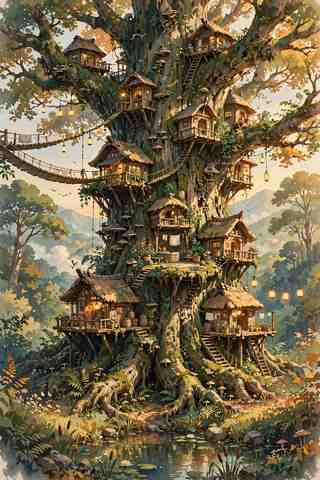
Every Ghibli fan has imagined living inside the great camphor tree — and this trend finally lets you. The Ghibli style ancient tree village prompt turns your photo into a portrait in a storybook settlement grown around a colossal tree: rope bridges between branches, lanterns swaying, fireflies rising as roots become stairways. It is going viral because it is the childhood treehouse fantasy, perfected.
The great tree is sacred ground in Ghibli’s worlds. Totoro dozes in the hollow of the Kusakabes’ camphor tree — a guardian older than the village itself — and the forest spirit’s woods in Princess Mononoke feel ancient enough to remember the first rain. This prompt channels that reverence: the tree is not decoration but the village’s elder, and you are its honored guest, small beneath branches that have seen centuries.
Envision the portrait: you stand on a root-stairway at the tree’s base, looking up as the trunk rises beyond the frame, bark furrowed like canyon walls. Above, wooden homes perch in the branches connected by rope bridges, paper lanterns glowing along every walkway. Fireflies drift through the green-gold gloom, moss softens every surface, and dappled light falls in slow columns. Soft cel shading and hand-painted detail make the bark, leaves, and lantern-light feel touchable.
Tree village portraits go viral on pure coziness: they combine the adventure of a fantasy world with the safety of home, which is the exact emotional recipe of Totoro itself. The prompt’s warm lantern light against deep forest green is a color pairing viewers find irresistible — save-worthy on sight.
The Prompt
Copy the prompt below exactly as written and paste it into your AI image tool with your photo. It is tuned for the tree village look — colossal tree, rope bridges, glowing lanterns — so keep every phrase.
Transform my photo into a Studio Ghibli anime illustration while preserving my exact face, features, hairstyle and expression. Place me in a village built around a colossal ancient tree, with wooden homes and rope bridges nestled among giant branches, hanging lanterns glowing warmly, fireflies drifting, and massive roots forming natural stairways. Use soft cel shading, hand-painted background detail, and a warm storybook mood, in portrait 9:16 orientation.
Why This Prompt Works
This prompt succeeds through vertical storytelling: roots as stairways below, homes and bridges in the mid-canopy, the trunk vanishing above the frame. That explicit vertical structure tells the AI the tree is colossal — too big to fit in one frame — which is precisely how Ghibli conveys the awe of its great trees. Without that language, generators shrink the tree to a large but ordinary size and the magic evaporates.
The lanterns are the warmth engine. Hanging lanterns glowing along rope bridges create dozens of small warm light sources against the deep forest green — the complementary contrast that makes night-forest Ghibli scenes so beloved. Fireflies add a second, living layer of light, and the prompt’s hand-painted instruction keeps both feeling organic rather than digital.
Your likeness is explicitly preserved — exact face, features, hairstyle, expression — so you remain the story’s human heart beneath the branches. Portrait 9:16 is the natural frame for a tree portrait: roots below, canopy above, and you on the stairway between earth and sky.
- Vertical structure language (roots, canopy, vanishing trunk) sells the tree’s colossal scale
- Glowing lanterns against deep green create irresistible warm-cool contrast
- Rope bridges and root stairways add storybook village authenticity
- Preserves your exact face, hairstyle, and expression
- Fireflies add a living second layer of light Ghibli fans adore
- Portrait 9:16 frames the full root-to-canopy journey
How to Use This Prompt
Turning your photo into this Ghibli scene takes less than two minutes. Follow these steps:
- Choose a clear photo of yourself — front-facing, good lighting, and your whole face visible. Photos taken in soft natural light blend most easily into the forest’s dappled green-gold glow.
- Open an AI image generator that accepts photo uploads. ChatGPT, Google Gemini, and Microsoft Copilot all work for free — just start a new chat and upload your photo.
- Paste the complete prompt from the
box above into the chat, exactly as written, and send it together with your photo.
- Wait for the generation to finish, then review the result carefully: check your likeness, the colossal tree and lantern-lit bridges, and the overall Ghibli look.
- Download the portrait in the highest resolution available, then share it as a post, a Story, or your new wallpaper.
Pro Tips for Best Results
A few small choices separate a good Ghibli portrait from a breathtaking one:
- Use a sharp, front-facing photo with even lighting — the clearer your input, the stronger the face likeness in the final portrait.
- If the first result drifts slightly off your likeness, regenerate with the same prompt; the second attempt usually locks your face in.
- Keep glasses, jewelry, or distinctive hairstyles visible in your input photo if you want them preserved in the Ghibli portrait.
- If the tree looks merely large instead of colossal, follow up with “make the tree vastly bigger, trunk disappearing out of frame”.
- Looking upward in your input photo amplifies the sense of awe at the tree’s scale.
- Add “a small forest spirit watching from a branch” in a follow-up — a Kodama homage Mononoke fans will love.
Frequently Asked Questions
Will this prompt keep my face looking like me?
Yes — face preservation is written directly into the prompt. It instructs the AI to keep your exact face, features, hairstyle, and expression while transforming everything else into a hand-painted forest storybook. For the best likeness, upload a sharp, front-facing photo with even lighting and skip heavy beauty filters. If the first result drifts a little, generate once more with the same prompt; likeness usually locks in on the second pass.
Which free AI tools can I use this Ghibli prompt with?
The prompt works in any image-capable AI tool that accepts a photo plus text instructions: ChatGPT, Google Gemini, and Microsoft Copilot all handle it for free. Dedicated art generators like Leonardo AI, Adobe Firefly, and Playground AI also produce beautiful results. Paste the prompt exactly as written — its Ghibli-specific wording (soft cel shading, hand-painted backgrounds) is phrased to work consistently across different models.
Why does the prompt specify portrait 9:16 orientation?
The 9:16 vertical format is chosen deliberately for this scene: a great tree is a vertical subject — roots below, homes mid-branch, trunk vanishing above. It is also the native size for phone wallpapers, Instagram Stories, TikTok, and Reels covers — exactly where Ghibli portraits go viral. If you need a square profile picture, generate the full portrait first and crop the center afterward so you keep the complete composition.
Can I change the setting or add my own details to the scene?
Absolutely. Keep the face-preservation line and the Ghibli style phrases untouched, then adjust the scenery to taste: try “ancient tree village at night” for a lantern-and-firefly glow, or add “a hollow doorway in the trunk” or “swings hanging from low branches”. Small, specific additions work best — AI image models handle concrete details far better than vague requests, so name exactly what you want to see.
The oldest trees remember everything, and now one remembers you. Root stairways, lantern light, fireflies in the green-gold gloom — your ancient tree village portrait is the treehouse dream, painted the way only Ghibli can.
Related Viral Prompts
Ghibli Style Sisters Cherry Blossom AI Photo Prompt
Ghibli Style Misty Bamboo Forest AI Photo Prompt
Ghibli Style Flower Tunnel AI Photo Prompt
#GhibliAI #AIPhotoPrompt #StudioGhibliStyle #GhibliForest #AnimePortrait




Leave a Reply