
Introduction
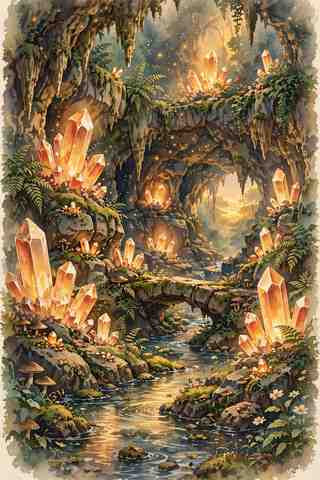
Descend past the daylight and the world starts to glow from within — that is the promise of the underground crystal cave trend, and it is mesmerizing feeds everywhere. The Ghibli style crystal cave prompt turns your photo into a portrait inside a luminous cavern: towering amethyst crystals, a mirror-still underground lake, drifting motes of light. These images go viral because they look like the inside of a geode you can step into.
Ghibli has always hidden its most magical places underground or out of sight. The glowing crystal chamber at the heart of Laputa hums with ancient power, and the night forest in Princess Mononoke shimmers with spirit light that feels older than language. This prompt draws on that lineage: the cave is not dark, it is lit by the earth itself, and you stand in that violet-blue radiance like a discovered secret.
Picture the render: you stand on a crystal shore while enormous quartz formations rise around you, refracting violet and sapphire light across every facet. The underground lake doubles the glow perfectly — crystal above, crystal below — and tiny luminous spores drift through the air like slow snow. Soft cel shading keeps your figure readable and warm against the cool radiance, all in hand-painted detail that makes each crystal feel cut by hand.
Crystal cave portraits stop scrolls because the lighting is genuinely unusual: cool violet-blue radiance on skin is rare in portrait feeds, and rarity reads as premium. The prompt’s explicit light sources (crystals, lake reflection, spores) give the AI a coherent lighting scheme, which is why these renders glow convincingly instead of looking like a blue filter.
The Prompt
Copy the prompt below exactly as written and paste it into your AI image tool with your photo. It is tuned for the crystal cave look — violet-blue glow, mirror lake, drifting spores — so preserve every detail.
Transform my photo into a Studio Ghibli anime illustration while preserving my exact face, features, hairstyle and expression. Set the scene inside a glowing underground crystal cave, with towering amethyst and quartz crystals casting violet-blue light, a still underground lake mirroring the glow, and tiny luminous spores drifting through the air. Use soft cel shading, hand-painted background detail, and a magical mysterious mood, in portrait 9:16 orientation.
Why This Prompt Works
Underground scenes fail when the AI has no light logic, producing muddy darkness. This prompt solves that by naming three light sources — glowing crystals, the mirroring lake, drifting luminous spores — which gives the model a complete, coherent lighting scheme. Violet-blue radiance with warm skin highlights is exactly the kind of motivated lighting Ghibli background artists excel at.
The mirror lake is the compositional masterstroke. By doubling the crystal glow in still water, the prompt creates natural symmetry and doubles the visual richness for free — the same reflection trick that makes Ghibli’s water scenes so hypnotic. “Still” is doing important work here: it tells the AI the reflection should be clean and readable, not rippled into noise.
Identity is explicitly protected — your exact face, features, hairstyle, and expression — so the otherworldly light flatters you instead of obscuring you. Portrait 9:16 lets the crystals tower above while the lake pools below, framing you in a full vertical column of glow.
- Three named light sources give the AI coherent violet-blue lighting logic
- Mirror-still lake doubles the crystal glow with natural symmetry
- Drifting luminous spores add signature Ghibli floating-light magic
- Preserves your exact face, hairstyle, and expression
- Cool radiance on skin is rare in feeds — it reads as premium and stops scrolls
- Portrait 9:16 frames towering crystals above and glowing water below
How to Use This Prompt
Turning your photo into this Ghibli scene takes less than two minutes. Follow these steps:
- Choose a clear photo of yourself — front-facing, good lighting, and your whole face visible. Evenly lit photos adapt most cleanly to the cave’s cool violet-blue radiance.
- Open an AI image generator that accepts photo uploads. ChatGPT, Google Gemini, and Microsoft Copilot all work for free — just start a new chat and upload your photo.
- Paste the complete prompt from the
box above into the chat, exactly as written, and send it together with your photo.
- Wait for the generation to finish, then review the result carefully: check your likeness, the glowing crystals and mirror lake, and the overall Ghibli look.
- Download the portrait in the highest resolution available, then share it as a post, a Story, or your new wallpaper.
Pro Tips for Best Results
A few small choices separate a good Ghibli portrait from a breathtaking one:
- Start with a photo that has a simple, uncluttered background so the AI focuses on preserving your face.
- After generating, use a short follow-up message (“more …”) to fine-tune details instead of starting over.
- Generate first, then crop: the full 9:16 portrait gives you the most flexibility for wallpapers, Stories, and profile pictures.
- If the cave renders too dark, follow up with “brighter crystal glow illuminating my face” to lift the key light.
- Darker clothing in your input photo lets the violet-blue light play across you more dramatically.
- Add “a small crystal throne or natural crystal arch behind me” in a follow-up for a fantasy focal point.
Frequently Asked Questions
Will this prompt keep my face looking like me?
Yes — face preservation is written directly into the prompt. It instructs the AI to keep your exact face, features, hairstyle, and expression while transforming everything else into a hand-painted subterranean wonder. For the best likeness, upload a sharp, front-facing photo with even lighting and skip heavy beauty filters. If the first result drifts a little, generate once more with the same prompt; likeness usually locks in on the second pass.
Which free AI tools can I use this Ghibli prompt with?
The prompt works in any image-capable AI tool that accepts a photo plus text instructions: ChatGPT, Google Gemini, and Microsoft Copilot all handle it for free. Dedicated art generators like Leonardo AI, Adobe Firefly, and Playground AI also produce beautiful results. Paste the prompt exactly as written — its Ghibli-specific wording (soft cel shading, hand-painted backgrounds) is phrased to work consistently across different models.
Why does the prompt specify portrait 9:16 orientation?
The 9:16 vertical format is chosen deliberately for this scene: the cave’s drama is vertical — crystals towering above, their reflections pooling below. It is also the native size for phone wallpapers, Instagram Stories, TikTok, and Reels covers — exactly where Ghibli portraits go viral. If you need a square profile picture, generate the full portrait first and crop the center afterward so you keep the complete composition.
Can I change the setting or add my own details to the scene?
Absolutely. Keep the face-preservation line and the Ghibli style phrases untouched, then adjust the scenery to taste: try “emerald and teal crystals” for a different gem palette, or add “ancient carved stone door” or “bioluminescent mushrooms”. Small, specific additions work best — AI image models handle concrete details far better than vague requests, so name exactly what you want to see.
Some treasures are buried, and some are glowing. Your crystal cave portrait is the earth showing off — violet light, mirror water, drifting spores — with you at the luminous heart of it all.
Related Viral Prompts
Ghibli Style Firefly Night Forest AI Photo Prompt
Ghibli Style Starry Night Sky AI Photo Prompt
Ghibli Style Aurora Night Sky AI Photo Prompt
#GhibliAI #AIPhotoPrompt #StudioGhibliStyle #GhibliFantasy #AnimePortrait




Leave a Reply