
Introduction
Underwater footage has a hypnotic quality that almost nothing else on a feed can match. The world goes quiet, light bends into dancing ribbons, and a swimmer glides past like something weightless and otherworldly. It is the kind of clip people watch on loop without realizing it, which is exactly why the algorithm loves it: high watch time, high saves, high shares. The problem is that real underwater cinematography requires waterproof housings, a clear pool, a strong swimmer, and perfect light. This prompt hands you all of it in eight vertical seconds, generated from text alone.
In this article you will get the complete copy-paste prompt, a deep explanation of why its underwater language produces such convincing results, a step-by-step guide to running it in Veo 3, Runway, Kling, Pika, or Sora using the intended 9:16, 8-second underwater tracking settings, creative variations for an endless content series, and answers to the questions creators ask most. Dive in: the water is perfect.
The Prompt
Here is the full prompt. Copy everything in the box and paste it into your AI video tool of choice:
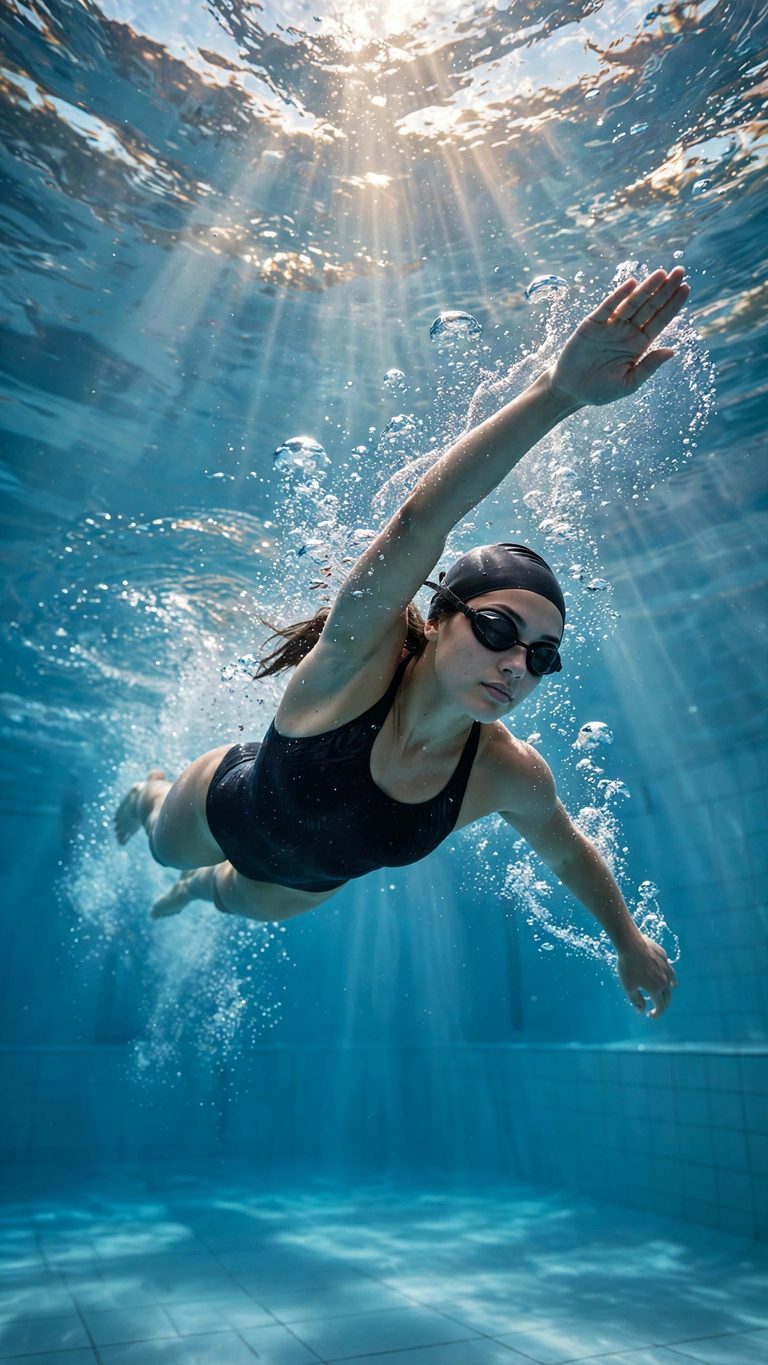
Mesmerizing underwater shot of a swimmer doing freestyle laps in a crystal-clear pool, body gliding smoothly, bubbles trailing, light rays dancing through water, camera tracking alongside below surface, powerful arm strokes in slow motion, serene blue tones, weightless graceful movement, ultra realistic, cinematic aquatic film, 8k
Why This Prompt Works
Water is one of the most forgiving subjects for AI video, and this prompt exploits that beautifully. “Mesmerizing underwater shot” sets both the environment and the intended emotional effect in three words, telling the model this is about tranquility, not action. The subject direction, “swimmer doing freestyle laps in a crystal-clear pool, body gliding smoothly,” describes continuous rhythmic motion, exactly the kind of looping-friendly movement generators render most cleanly. Freestyle stroke cycles repeat predictably, so the model can sustain them without the anatomical improvisation that causes glitches in more complex actions.
The realism comes from the water details. “Bubbles trailing” and “light rays dancing through water” are particle and lighting effects that models have learned from countless nature documentaries; caustic light patterns are essentially procedural-looking, so they render convincingly even at lower resolutions. “Camera tracking alongside below surface” is the critical camera instruction: a lateral tracking shot keeps the swimmer framed consistently, avoiding the perspective jumps that break immersion. “Powerful arm strokes in slow motion” slows the action to a graceful tempo where minor imperfections hide in the blur of motion, while “serene blue tones” and “weightless graceful movement” unify the color palette and mood. The closing “ultra realistic, cinematic aquatic film, 8k” tags push the render toward the polished documentary look rather than a home-video aesthetic.
Perhaps most importantly, the prompt’s calm emotional register makes it a palette cleanser on busy feeds, the clip people save for later and send to friends, which drives exactly the engagement signals platforms reward.
How to Use This Prompt
Water scenes reward careful setup. Here is the workflow:
Step 1: Pick your generator. Veo 3 and Sora produce the most beautiful underwater light; Kling handles swimmer anatomy well; Runway offers strong style control; Pika is fine for quick tests.
Step 2: Match the post settings. This clip is built for 9:16 vertical, 8 seconds, with an underwater tracking move. Set portrait orientation first, then 8-second duration. The tracking instruction assumes the camera glides beside the swimmer, so keep any camera-control settings on smooth or linear rather than handheld shaky.
Step 3: Paste the complete prompt. Every water detail matters. Trimming “bubbles trailing” or “light rays dancing” noticeably flattens the result.
Step 4: Generate and inspect the stroke. Watch the swimmer’s arms through one full cycle. Reject takes where arms bend impossibly or the body warps; keep the take with the cleanest, most rhythmic stroke.
Step 5: Finish with calm audio. Add ambient water sounds or soft lo-fi music. A minimal caption about peace, focus, or morning routines pairs perfectly. The serene grade needs no filters.
Pro Tips & Creative Variations
This prompt is the seed of an entire aquatic content universe. Change the stroke to “butterfly” or “backstroke” for instant variety, or move the scene to “open ocean with sun rays piercing deep blue water” for a wilder, more cinematic variant. A “synchronized swimming duo in perfect symmetry” version performs spectacularly because symmetry doubles the visual satisfaction. For a series, alternate pool training clips with ocean clips under one hashtag so followers can collect them all.
Creative edits multiply the value. Because the motion is rhythmic, this clip loops almost seamlessly: trim the 8 seconds to a clean stroke cycle and loop it three times for a 24-second meditation-style reel that viewers replay unconsciously. Overlay breathing-paced text like “inhale… exhale…” to turn it into wellness content, or pair it with a voiceover about discipline and quiet consistency for the fitness audience. If your generator supports it, try a “camera slowly rising toward the surface” variant as a second shot and cut the two together for a mini narrative: depth, then emergence into light. Color-wise, resist the urge to push saturation; the serene blue tones are the brand.
Frequently Asked Questions
Why do my swimmer’s arms look distorted?
Underwater limb motion is complex for generators. The slow-motion instruction helps by smoothing the movement. Generate multiple seeds and keep takes where one full stroke cycle looks clean. Veo 3 and Kling currently handle swimmer anatomy most reliably.
Can I make a longer video from this 8-second clip?
Yes. Because freestyle is cyclical, you can loop a clean stroke cycle seamlessly, or use your tool’s extend feature to continue the tracking shot. Some generators also accept the clip as a starting frame for a second generation.
Does this work for ocean scenes too?
Absolutely. Replace “crystal-clear pool” with “open ocean” or “tropical lagoon” and keep everything else. Expect slightly more particle detail and wilder light, which suits adventure-style pages.
What audio works best with underwater clips?
Muted ambient water sounds, soft piano, or lo-fi beats. Avoid loud trending audio with lyrics; it fights the serene mood that makes people save and share this content.
Serene, weightless, and endlessly loopable: underwater swimming clips are among the highest-retention formats you can post, and this prompt makes them effortless. Try it today, find your cleanest stroke cycle, add calm audio, and give your audience eight seconds of pure tranquility they will watch again and again.
Related Viral Prompts
- Boxer Skipping Footwork: Stylish AI Video Prompt for Hypnotic Slow-Motion Boxing Gym Reels That Go Viral
- Tire Flip Bootcamp: Powerful AI Video Prompt for Gritty Outdoor Strength Training Reels in Slow Motion
- Dramatic Gym Portrait AI Photo Prompt: Sculpt a Cinematic Athlete Portrait with Powerful Rim Lighting
# A I V i d e o # P r o m p t B a z a r # S w i m m i n g # U n d e r w a t e r # F i t n e s s # V i r a l R e e l s

Leave a Reply