
Introduction
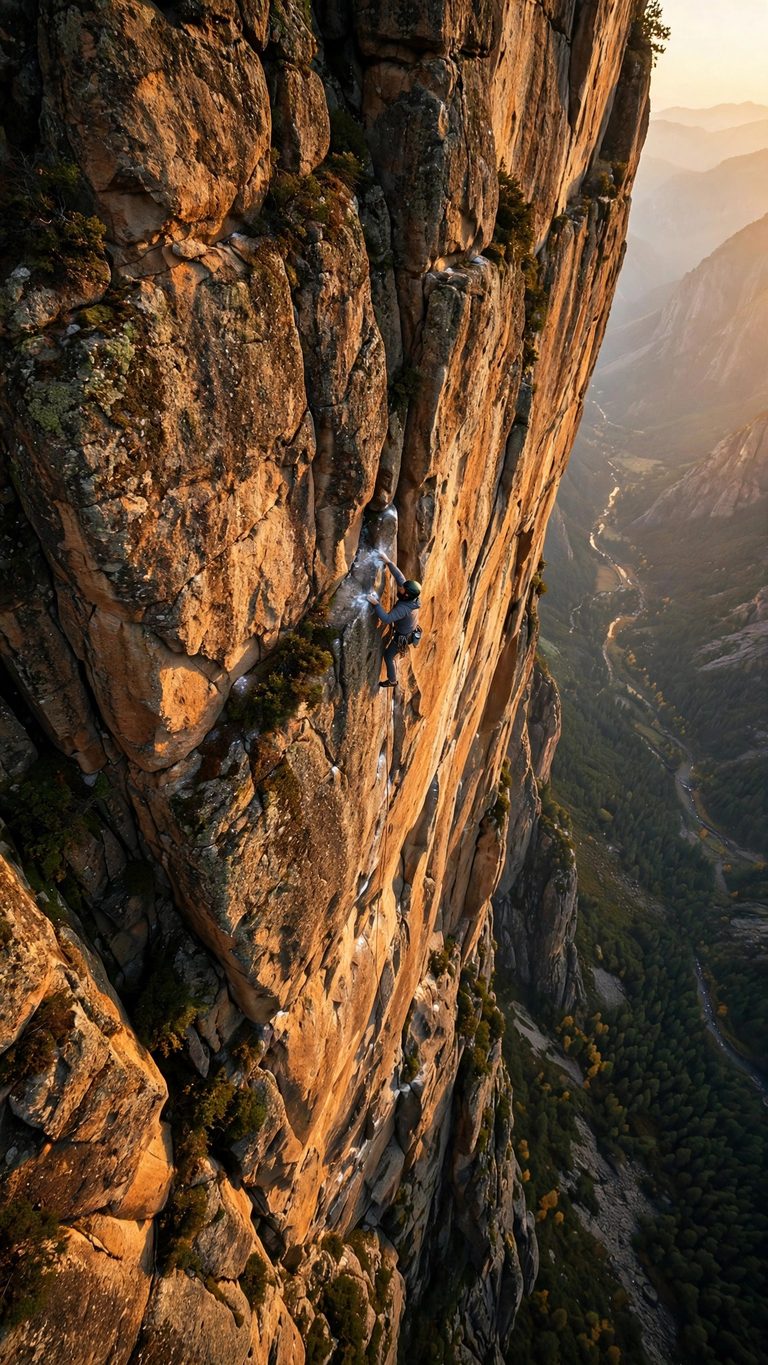
Nothing triggers the awe reflex quite like a tiny human silhouette clinging to an impossibly large wall of rock. Drone pull-back shots of climbers at golden hour routinely rack up millions of views because they compress an entire story, courage, scale, solitude, into a single sweeping camera move. The catch is that capturing one in real life demands a licensed drone pilot, a willing climber, perfect weather, and a cliff. This prompt erases all of that. In about ten seconds of vertical video, it delivers the vertigo, the warm light on textured stone, and the emotional punch of the reveal, all generated from a single paragraph of text.
This article hands you the complete prompt plus the full playbook: why each phrase earns its place, how to run it in Veo 3, Runway, Kling, Pika, or Sora with the correct 9:16, 10-second drone pull-back settings, creative variations to keep your feed fresh, and answers to the most common questions. Whether you run an adventure page or just want cinematic travel-style content without leaving home, the epic is one copy-paste away.
The Prompt
Copy the entire prompt below exactly as written and paste it into your AI video generator to create the shot:
Breathtaking drone shot of a rock climber scaling a massive cliff face at golden hour, tiny figure against giant rock wall, chalked hands gripping edges, camera pulling back to reveal epic scale and valley below, wind moving jacket slightly, heart-pounding height, warm sunlight on rock texture, ultra realistic, cinematic adventure film, 8k
Why This Prompt Works
This prompt is a masterclass in directing scale, which is the hardest thing for AI video models to fake and the most rewarding when they succeed. The opening phrase, “breathtaking drone shot,” immediately sets camera language the models understand from vast training data: smooth aerial motion, wide perspective, stabilized glide. Pairing it with “tiny figure against giant rock wall” gives the model an explicit size relationship to preserve, which is what creates the vertigo effect. Without that instruction, generators often drift the climber toward the camera or enlarge them until the scale contrast, the whole point of the shot, collapses.
The camera move is the narrative engine. “Camera pulling back to reveal epic scale and valley below” describes a classic reveal: the shot starts intimate and expands into grandeur. Models handle this pull-back arc well because it appears constantly in nature documentaries. Golden hour does the emotional work: “warm sunlight on rock texture” biases the render toward long shadows and saturated stone, the look audiences associate with premium adventure films. Small humanizing details, “chalked hands gripping edges” and “wind moving jacket slightly,” add micro-motion that sells realism; a completely still climber would read as a pasted sticker, but chalk dust and fabric flutter convince the eye the figure is alive.
Finally, “heart-pounding height” is an emotional direction rather than a visual one, nudging composition toward dizzying downward angles, and the closing tags, “ultra realistic, cinematic adventure film, 8k,” lock in the filmic quality bar. Every clause pulls weight, which is why the prompt reliably produces portfolio-grade output.
How to Use This Prompt
Follow this workflow to get the epic reveal exactly right:
Step 1: Choose a generator with strong camera control. Kling and Veo 3 handle drone-style pull-backs most reliably; Runway’s camera controls let you fine-tune the retreat speed; Sora renders gorgeous golden-hour light; Pika works for quick drafts.
Step 2: Apply the post settings. This prompt is designed for 9:16 vertical, 10 seconds, with a drone pull-back move. Set portrait aspect ratio first, then duration to 10 seconds so the reveal has room to breathe: the pull-back needs those extra two seconds beyond the standard 8 to travel from close to wide without rushing.
Step 3: Paste the full prompt. Include every detail phrase. The scale contrast and the reveal only work when the model receives the complete instruction set.
Step 4: Generate multiple seeds. Watch each take for the two failure modes: the climber growing too large, or the pull-back stalling. Keep the take where the figure stays small and the valley reveal lands in the final three seconds.
Step 5: Sound design sells it. Add swelling cinematic music and a deep wind bed. Pair with a caption about conquering fear. Avoid heavy color filters; the golden-hour grade is already baked in.
Pro Tips & Creative Variations
The base prompt is a template for an entire adventure series. Swap the setting while keeping the camera grammar: “massive cliff face” becomes “towering waterfall,” “glacier crevasse,” or “desert canyon at sunrise,” and each generates a fresh epic with the same proven pull-back structure. Change the time of day to “blue hour with headlamp glowing” for a moody night-climbing variant that performs well as a contrast post. For storytelling, generate a second clip with the prompt modified to “tight shot of chalked hands gripping the edge” and edit the two together: close-up struggle, then the epic reveal, a classic three-act mini-film in twenty seconds.
Advanced creators can push realism further. If your tool supports image-to-video, generate or source a still of a real cliff at golden hour and use it as the first frame; the model then only needs to animate the pull-back and the jacket flutter, which dramatically improves consistency. Add slow zoom-out speed ramping in your editor, easing into the reveal, to mimic professional drone piloting. Text overlays work beautifully here: a single line like “POV: you finally face your fear” timed to the moment the valley appears can double shares. And consider a series hashtag so followers can binge every climb you generate.
Frequently Asked Questions
Why does my climber look like a blurry blob?
Tiny human figures are genuinely hard for generators. Keep the phrase “tiny figure against giant rock wall” intact, render at the highest resolution available, and generate several seeds. Kling and Veo 3 currently resolve small figures best at 10 seconds.
Can I make the pull-back faster or slower?
Yes. Add “slow majestic pull-back” for a dreamier reveal or “fast dramatic pull-back” for urgency. Keep the 10-second duration for slow versions so the move does not feel rushed.
Will this work in landscape 16:9 for YouTube?
The prompt’s camera language is aspect-agnostic, but it was tuned for 9:16 vertical. For YouTube Shorts keep 9:16; for a 16:9 version, regenerate with the aspect changed rather than cropping, so the valley reveal keeps its full width.
How do I avoid the “AI look” in the rock texture?
The “warm sunlight on rock texture” phrase already pushes toward detailed stone. If texture still looks smooth or plastic, add “intricate cracked granite detail” to the prompt and avoid over-sharpening in post, which exaggerates the synthetic feel.
Epic scale, golden light, and a heart-pounding reveal: this prompt packs the entire language of adventure cinema into one paragraph. Paste it into your generator today, pick the take with the cleanest pull-back, add soaring music, and watch the awe roll in through your comments. Your audience is waiting at the top of that cliff.
Related Viral Prompts
- Underwater Swimming Laps: Mesmerizing AI Video Prompt for Serene Cinematic Pool Cinematics in Slow Motion
- Boxer Skipping Footwork: Stylish AI Video Prompt for Hypnotic Slow-Motion Boxing Gym Reels That Go Viral
- Tire Flip Bootcamp: Powerful AI Video Prompt for Gritty Outdoor Strength Training Reels in Slow Motion
# A I V i d e o # P r o m p t B a z a r # R o c k C l i m b i n g # A d v e n t u r e # E p i c # V i r a l R e e l s

Leave a Reply