
Introduction
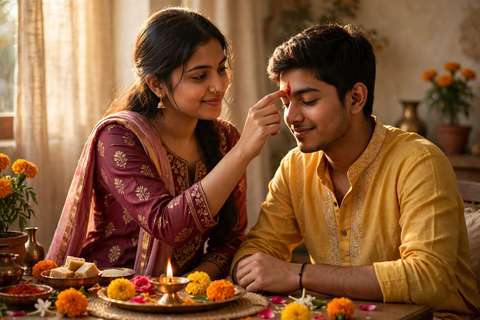
The tilak ceremony is the heart of Bhai Dooj. A sister applies a red kumkum tilak on her brother’s forehead, prays for his long life, and the whole house goes quiet for a moment before the celebrations begin. This Bhai Dooj 2026 AI photo prompt captures that sacred, tender second — the sister’s hand steady, the brother’s eyes closed in trust, and warm morning light falling across them both like a blessing.
What makes this image so shareable is its stillness. In a feed full of loud, colourful festival photos, a quiet moment of ritual stands out. The prompt keeps both faces exactly the same, uses soft golden light to create a gentle glow on the skin, and adds the small ritual details — the brass thali, the rice grains, the lit diya — that make the scene feel authentic. It is a portrait of love and tradition that families will treasure long after the festival ends.
The Prompt
Copy the complete prompt below and paste it into your favourite AI image tool. It is written to work with a photo of your own, so your face and the festive mood both stay true to life.
Create a tender Bhai Dooj tilak ceremony portrait from this photo: keep both faces exactly the same, same sister and brother, same features and same gentle expressions. Show a sister in a red and gold saree applying a red kumkum tilak on her brother's forehead with her ring finger, her other hand holding a small brass thali with kumkum, rice grains, and a lit diya. The brother sits with eyes gently closed, wearing a cream kurta, a calm and blessed expression on his face. Warm golden morning light streams through a nearby window, marigold flowers and a soft curtain visible in the background. Shallow depth of field, realistic DSLR photograph, 85mm lens, natural skin texture, serene and sacred mood, high detail, 4K quality.
Why This Prompt Works
This prompt works because it focuses on a single, meaningful gesture instead of a busy scene. The tilak application is the emotional centre, and everything else — the thali, the diya, the marigolds — supports it quietly. When an AI image has one clear focal action, the result is sharper, more believable, and more moving.
The lighting choice is deliberate. Warm morning light is soft, directional, and flattering, and it creates the gentle glow that people associate with blessings and prayer. The prompt also asks for the brother’s eyes to be gently closed, which removes the hardest problem in AI portraits — matching a gaze — and replaces it with a peaceful expression that is much easier to render well.
Face preservation matters most in close, emotional portraits like this one. The prompt repeats the instruction clearly, so the sister and brother remain recognisably themselves, and the image feels like a real family photograph rather than a generic festival illustration.
Finally, the stillness of this portrait is what makes it timeless. Loud festival photos fade from memory quickly, but a quiet image of a sister’s hand and a brother’s closed eyes stays with you, because it shows trust, love, and tradition in their simplest form. Print it, frame it, and put it on the family wall, or share it as your Bhai Dooj greeting with a short blessing in the caption. It is the kind of picture that parents keep on their phones and show to visitors with pride, because it says everything about the bond between a brother and a sister without a single word.
How to Use This Prompt
Follow these five simple steps to turn your photo into a beautiful festive portrait.
- Open Gemini or Nano Banana 2 on your phone or computer and upload a clear photo of yourself — a well-lit, front-facing picture works best for Sister applying tilak on her brother’s forehead in warm morning light on Bhai Dooj.
- Copy the full prompt from the box above and paste it into the prompt field exactly as written, without trimming the lighting, camera, or outfit details.
- Tap generate and wait for the first result. Check the faces, the festive details, and the overall framing before you decide whether to keep it.
- If something looks off, refine it with a short follow-up instruction such as “keep the faces exactly the same, make the diyas brighter” and generate again.
- Download your favourite version in the highest quality available and share it on WhatsApp, Instagram, or Facebook with a warm Bhai Dooj or Chhath Puja caption.
Pro Tips
- Use a close, clear photo of both siblings so the AI can preserve the faces at portrait distance.
- Keep the tilak small and realistic — ask for “a small neat red tilak” if the first result makes it too large.
- If the thali looks cluttered, simplify it in a follow-up edit to just kumkum, rice, and one diya.
- Try a version with the sister’s hand in sharp focus and the brother’s face softly blurred for an artistic feel.
- Print this one — the serene mood and warm light make it beautiful as a framed family photo.
Frequently Asked Questions
Can I use this prompt if I only have a solo photo of myself?
Yes. Upload your photo and the AI will create the sibling beside you, keeping your face exactly the same while generating a matching brother or sister.
Which tool handles close ritual portraits best?
Nano Banana 2 in Gemini is very good at close portraits with warm light, and ChatGPT image editing also renders tilak ceremonies beautifully.
Will the tilak look realistic?
It should, because the prompt describes it precisely — red kumkum applied with the ring finger. If it looks off, ask for a smaller, neater tilak in a follow-up.
Can I change the saree colour?
Of course. Red and gold is classic for Bhai Dooj, but any festive colour works — just name it in the prompt and the rest stays the same.
A tilak is a small mark with a lifetime of meaning. Capture that blessing in a portrait your family will keep forever.
Related Viral Prompts
- Bhai Dooj 2026 AI Photo Prompt: A Sister Cooking Her Brother’s Favourite Dish in a Warm Festive Kitchen
- Bhai Dooj 2026 AI Photo Prompt: A Grandmother Blessing Her Grandchildren in a Courtyard Full of Family
- Bhai Dooj 2026 AI Photo Prompt: A Brother and Sister Sharing Chai Together on a Balcony Lit With Diyas
#BhaiDooj2026 #AIPhotoPrompt #NanoBanana #TilakCeremony #SiblingLove


Leave a Reply