
Introduction
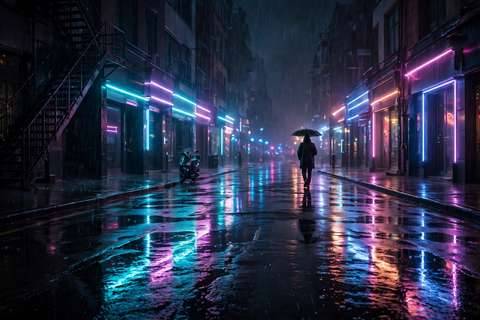
Some scenes stay with you long after the video ends, and a rainy street at night is one of them. A lone walker with an umbrella, neon signs bleeding colour onto wet pavement, the soft hiss of rain and the glow of a city that never quite sleeps, it is the kind of image that filmmakers return to again and again because it is pure atmosphere. With Sora 2 you can direct a scene like that yourself, no camera crew, no rainy night shoot and no budget required, just a well-written prompt and a few seconds of rendering.
This prompt builds a complete cinematic moment: the rain falling steadily, the neon reflections shimmering on the pavement, the walker moving slowly through the frame while the camera follows at a respectful distance. It is the perfect clip for a moody Reel, a music video background, a short film opening or simply a beautiful piece of moving art to share. The prompt is written with the camera movement, lighting and pacing that make AI video feel directed rather than random, so the result looks like a scene from a film you have always wanted to watch.
The Prompt
Copy the prompt below and paste it into Sora 2. It is written to work on the first try, so use it exactly as it is.
Cinematic video of a rainy street at night, a lone walker with a black umbrella walking slowly down a narrow city street, neon signs in pink, blue and orange reflecting on wet pavement, rain falling steadily, puddles rippling, cinematic anamorphic lens, slow tracking shot following the walker from behind, shallow depth of field, moody atmospheric lighting, mist rising from the ground, distant city lights glowing through the rain, film grain, 24fps, 16:9 widescreen, ultra realistic, no text, no watermark
Why This Prompt Works
- Neon reflections on wet pavement are the visual heart of the scene. The prompt pairs bright coloured signs with a dark rainy street, so the reflections become a second layer of light that makes the whole frame glow and shimmer.
- The lone walker gives the scene a story. Without a person the street would be a pretty background, but one figure with an umbrella turns it into a moment, and viewers immediately start wondering where that person is going.
- A slow tracking shot is what makes the clip feel cinematic. The prompt asks the camera to follow the walker gently from behind, which creates the smooth, deliberate movement of a real film crew instead of a static or jittery shot.
- Rain, mist and film grain add the texture that sells realism. The steady rain, the puddles rippling and the soft grain across the frame convince the eye that this is a real night in a real city, not a computer-generated image.
How to Use This Prompt
- Open your AI video generator and start a new project — Open Sora 2, Veo 3.1 or your favourite AI video tool and start a fresh text-to-video project. Choose a 16:9 widescreen frame so the scene has room to breathe, and set the length to the longest option available for the smoothest motion.
- Paste the full prompt exactly as written — Copy the entire prompt from the box below and paste it in without trimming it. The camera movement, lighting and pacing phrases are what turn a static-looking clip into a video that feels directed rather than randomly generated.
- Generate two or three versions and compare them — Render the prompt two or three times and watch each version all the way through. AI video varies the timing and motion on every run, so one take usually has the most natural movement while the others may stutter or rush a moment.
- Refine with one small follow-up edit — If a detail is wrong, ask for a single targeted fix, such as slower motion, softer light or a steadier camera. One small change at a time keeps the good parts of the clip intact instead of starting over from nothing.
- Export and share your finished video — Export the best take in the highest quality available and share it as a Reel, Short or status update. A simple caption describing the scene helps viewers enjoy the mood before they even press play.
Pro Tips
- Ask for slow, steady camera movement in your follow-up edit, because a slow tracking shot through the rain looks far more cinematic than a fast or shaky camera that distracts from the walker.
- Ask for natural, unhurried motion in your follow-up edits. Slower movement hides small AI glitches and makes the clip feel like it was shot by a real camera operator.
- Generate the clip in the highest resolution your plan allows. Extra detail in the light, texture and reflections is what sells the realism when viewers watch on a big screen.
- Watch the clip with the sound off first. If the visuals hold your attention without music, the video works; then add a gentle soundtrack that matches the mood of the scene.
- Save the version you love before trying variations. Once you have a great take, lock it in so a later experiment never overwrites the clip you actually want to share.
Frequently Asked Questions
Can I use this clip as a background for a music video?
Yes, it is ideal for that. The slow movement, the neon colours and the moody atmosphere sit beautifully behind music, especially lo-fi, jazz or cinematic tracks. Export the clip, add your song in your editing app, and the two will feel made for each other.
Why does my walker sometimes look strange or glitchy?
AI video can struggle with walking figures, especially the legs and the umbrella. If a take looks off, generate two or three versions and keep the best one, or ask for a slower walking pace in a follow-up edit, which gives the model more time to render the movement cleanly.
Can I change the city or the neon colours?
Absolutely. Ask for a Tokyo alley with Japanese signs, a London street with warm pub lights, or a New York avenue with yellow taxis, and the model will rebuild the scene around your chosen city while keeping the rain and the walker.
What length works best for this kind of clip?
Five to ten seconds is ideal for a Reel or a Short, because the mood lands quickly and viewers stay for the whole clip. For a film opening or a music video, generate a longer version and trim the best section in your editing app.
A rainy street at night is cinema in its purest form, and this prompt lets you direct that scene from your own phone. Try it, watch the neon shimmer on the wet pavement, and enjoy the quiet thrill of a film that only you could have made.
Related Viral Prompts
- Hyperlapse City AI Video Prompt: A Fast Hyperlapse Through a Busy City From Dawn to Midnight in Sixty Seconds
- ASMR Rain AI Video Prompt: Gentle Rain Falling on Leaves With Soft Thunder in the Distance for Deep Relaxation
- AI Product Ad Video Prompt: A Perfume Bottle Spinning in Golden Light With Petals Falling in Slow Motion
#Sora2 #CinematicVideo #RainyNight #NeonCity #AIVideoPrompt


[…] Sora 2 Cinematic AI Video Prompt: A Rainy Street at Night With a Lone Walker and Neon Reflections on… […]