
Introduction
Few moments are as moving as a bride walking down the church aisle in a white gown. The doors open, the organ plays, sunlight streams through the stained glass, and every guest rises to watch her walk toward the person she loves. In the winter wedding season of 2026, church weddings at sunset have become especially popular, because the low golden light turns the whole aisle into a glowing path of flowers and love.
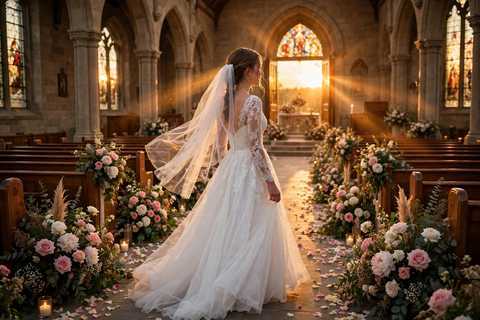
An AI photo of this moment captures the romance and reverence of a Christian wedding in a single frame. The prompt below is written to create a realistic, cinematic image of the bride, her white gown, the flower-lined aisle and the warm sunset light, perfect for a wedding invitation, a social media announcement, or a framed print for the family home.
Christian weddings in 2026 are embracing elegant simplicity. Brides choose flowing white gowns with delicate lace, long veils and small bouquets of white roses, while churches are decorated with soft floral arrangements and candles that glow as the sun sets. The winter season is ideal for sunset ceremonies, because the sun sets earlier and the golden hour lasts longer, giving photographers beautiful light for the aisle walk and the portraits afterwards. Many couples also choose a flower-lined aisle with petals scattered along the path, which photographs beautifully from the back of the church. An AI preview lets you test your gown style, your bouquet and your aisle flowers before the wedding day, so the real walk feels calm and magical.
The Prompt
Copy the prompt below exactly as it is written and paste it into your favourite AI image generator. It is written to work with tools like Midjourney, DALL-E, Leonardo AI, Firefly and Gemini, and it produces a warm, realistic photograph rather than a flat illustration.
Photorealistic cinematic photograph of a Christian bride in an elegant white wedding gown with lace details and a long flowing veil, walking down a flower-lined church aisle at sunset, holding a bouquet of white roses, warm golden sunlight streaming through stained glass windows, white and pastel flower petals scattered along the aisle, guests seated and smiling, groom waiting at the altar, serene and romantic atmosphere, shot on a Canon EOS R5 with a 50mm lens, soft glowing light, ultra detailed, no text, no watermark
You can customise this Christian wedding prompt in seconds to match your own celebration. Change the outfit colours to suit your family, swap the background to your own venue, or adjust the lighting from bright daylight to a soft golden-hour glow. Keep the heart of the scene the same, the white gown and the flower-lined church aisle at sunset, because that is what makes the image instantly recognisable and full of feeling. Small changes like these let you create a whole series of matching photos for your invitations, your social media posts and your wedding album, all with the same warm and joyful style. Try two or three variations and keep the one that feels most like your own special day.
Why This Prompt Works
- Sunset light is magical: golden light through stained glass creates colours and warmth that make the whole church glow.
- The aisle tells the story: a flower-lined path with scattered petals gives the photograph a clear journey from the door to the altar.
- The gown is the centrepiece: lace details and a flowing veil give the bride a timeless, elegant silhouette.
- Guests add emotion: smiling faces along the aisle show the love and support surrounding the bride.
How to Use This Prompt
- Open your AI image generator, such as Midjourney, DALL-E, Leonardo AI or Gemini.
- Copy the full prompt from the box above and paste it into the prompt field.
- Set the aspect ratio to 4:5 for a portrait that suits invitations and photo frames.
- Generate a few versions and choose the one where the bride’s gown and the light look most beautiful.
- Download the best image and use it for your invitation, wedding album or a romantic social media post.
Pro Tips
- Change the bouquet to your favourite flowers, such as ‘bouquet of blush pink peonies’ or ‘bouquet of lavender and white roses’.
- Add ‘bride walking with her father’ if you want the traditional father-daughter entrance in the image.
- For a brighter look, replace ‘at sunset’ with ‘in soft morning light’ for a fresh daytime ceremony.
- Try a version from behind the bride, by adding ‘view from behind, showing the long veil and the aisle ahead’, for a dramatic composition.
- Use the image as the cover of your wedding programme or order of service for a polished, personal touch.
Frequently Asked Questions
Can I change the church to an outdoor garden wedding?
Yes, replace ‘church aisle’ with ‘garden aisle lined with white chairs and flowers’ and keep the gown and sunset light the same for a beautiful outdoor Christian ceremony.
Why does the stained glass sometimes look blurry?
Stained glass has complex colours, so AI can simplify it. Adding ‘colourful stained glass windows glowing’ helps the generator render richer, more detailed windows.
Can I use this image for my wedding invitation?
Absolutely. The image is text free, so you can add your names, date and church details in your invitation editor without any clash.
How do I make the bride look like the real bride?
AI generators create new faces by default. Describe the real bride’s gown, veil, bouquet and hairstyle to make the image feel personal, or use a face-reference tool if your generator supports one.
A white gown, a flower-lined aisle and golden sunset light, that is a walk no one ever forgets. Try this prompt and let your Christian wedding glow with romance and grace.
Related Viral Prompts
- Destination Wedding 2026 AI Photo Prompt: A Couple Exchanging Vows on a Beach at Sunset
- Winter Wedding 2026 Bride Entry AI Photo Prompt: A Bride Walking Under a Floral Canopy
- Winter Wedding 2026 Couple Shoot AI Photo Prompt: A Newlywed Couple in a Misty Garden
#ChristianWedding #BrideEntry #WinterWedding2026 #AIPhotoPrompt #WhiteGown


Leave a Reply