
Introduction
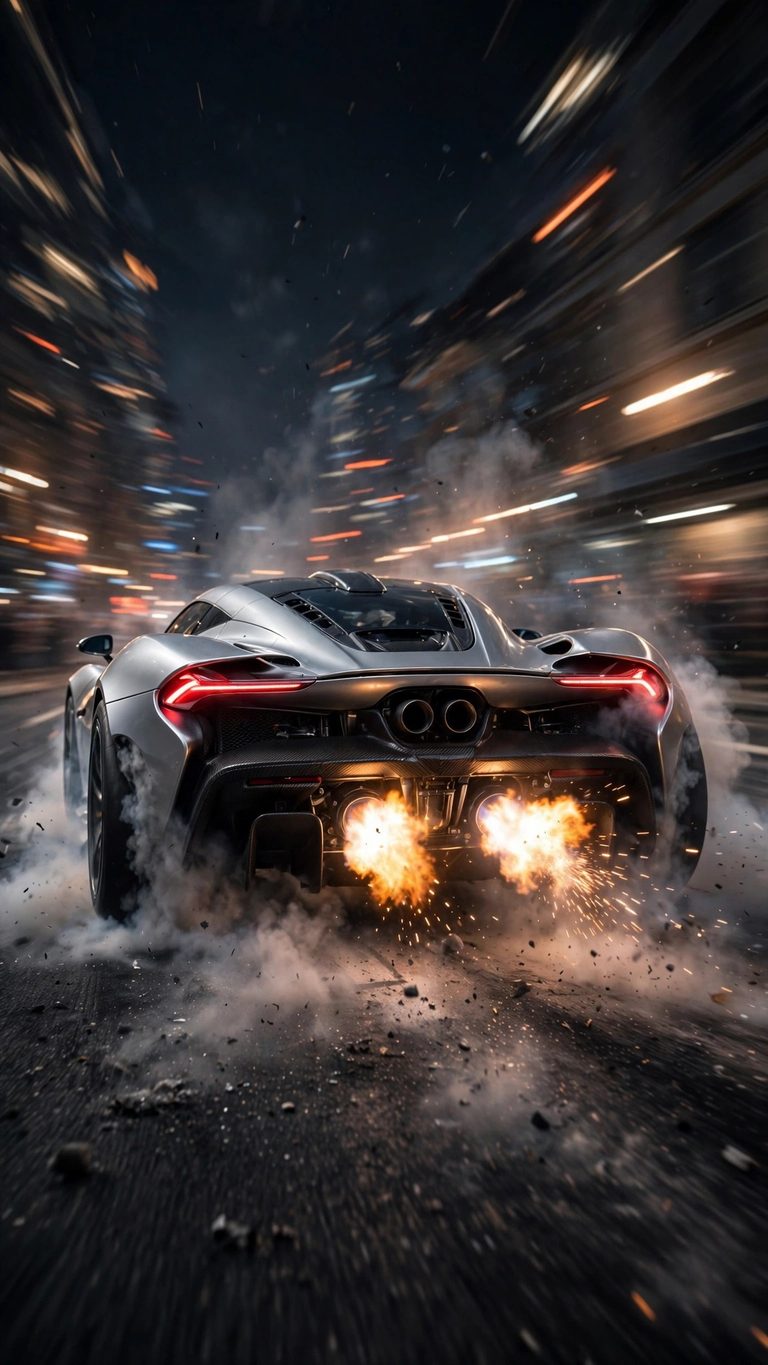
Zero to one hundred in under three seconds. The launch is the single most violent, most cinematic moment a car can produce – tires fighting for grip, the chassis squatting, exhausts spitting flame, the world dissolving into streaks. It is also nearly impossible to film well: you need a closed strip, a hypercar, a high-speed camera, and perfect timing. Miss the launch by half a second and the shot is gone. This AI Video Prompt freezes that impossible moment and stretches it into eight seconds of extreme slow motion, captured from a low rear angle that makes the acceleration feel like a detonation. Post it with #Hypercar tags and it will stop every speed lover mid-scroll. In this article we unpack the prompt, explain why launch footage dominates car culture, and show you how to generate it on Veo 3, Runway, Kling, Pika, and Sora with the right settings for maximum visceral impact.
The Prompt
Copy the prompt below exactly as written into your AI video generator. The slow-motion and camera details are precision-tuned, so do not paraphrase on the first render.
Heart-pounding launch control sequence, a silver hypercar rocketing from standstill, extreme slow motion of tires gripping and smoking, camera low at the rear capturing the violent acceleration, exhaust flames spitting, background blurring into streaks, raw power, cinematic intensity, ultra realistic, 8k
Why This Prompt Works
Launch footage works because it weaponizes the brain’s threat response. Violent acceleration, flame, smoke, and blur are sensory overload, and sensory overload commands attention – it is the same reason drag-race clips outperform dyno charts by orders of magnitude. The prompt’s masterstroke is extreme slow motion. Slow motion does two things at once: it lets viewers actually see physics they normally miss (tires deforming, smoke curling, suspension loading), and it stretches a two-second event into an eight-second spectacle that fits the short-form loop perfectly. That temporal distortion is inherently fascinating; humans will watch water balloons pop in slow motion forever, and a hypercar launch is the automotive equivalent.
The low rear camera angle is equally deliberate. Low angles make subjects look powerful – it is basic visual hierarchy, the same reason heroes are shot from below. From behind, the viewer sits in the blast zone: exhaust flames spit toward the lens, the background streaks past in radial blur, and the car appears to tear away from the audience, which triggers a chase instinct. “Background blurring into streaks” is the prompt’s way of forcing motion blur, the single most convincing speed cue in generated video. Silver paint is a smart choice because it reflects the launch environment – flames, smoke, track lights – turning the bodywork into a mirror of the chaos. In automotive content trends, launch-control clips are perennial top performers because they deliver a complete story arc – tension, explosion, aftermath – in seconds, which is exactly what retention algorithms reward.
How to Use This Prompt
Paste the prompt exactly into Veo 3, Runway, Kling, Pika, or Sora. Set 9:16 vertical aspect ratio and 8 seconds duration to match the post’s slow-motion launch settings. Use the highest quality tier and, if your tool offers it, a high frame-rate source like 60 fps – slow-motion renders interpolate more cleanly from higher base frame rates. Keep “ultra realistic, 8k” in place and do not add stylization terms. On tools with camera controls, lock the camera low and slightly behind the rear axle; if the first render drifts to a side profile, add “camera fixed low at rear, car accelerating away from lens” to the camera field.
Flames and smoke are seed-sensitive, so generate three to four seeds and pick the one with the most dramatic exhaust detail. Export at 1080 by 1920, then in post add a deep launch rumble, tire screech, and a sub-bass hit timed to the moment of launch – silent AI video needs this audio to feel violent. A subtle speed-ramp in your editor (slight ease into the slow motion) can smooth the AI’s motion interpolation. Post with #Launch and #Speed tags during peak evening hours, and pin a comment with the prompt for the inevitable “what prompt is this” replies.
Pro Tips & Creative Variations
The launch is a formula you can remix endlessly. Change the car: a matte-black hypercar at night with underglow for a street-racing mood, or a classic muscle car with a supercharger whine for American drag-strip nostalgia. Change the surface: wet asphalt for rooster tails of spray, or a desert airstrip for dust explosions. For maximum drama, append “night, launch lights reflecting on wet tarmac, sparks from the underbody” – night launches hide AI imperfections and make flames pop. Try a front three-quarter angle variant where the car launches toward the camera; it is riskier for the model but devastating when it works.
Build a launch series: same seed, three prompts – burnout (tires smoking, car stationary), launch (the full sequence), and flyby (car screaming past at top speed). Cut together, they form a 24-second mini-film with a natural three-act structure. Detail prompts that elevate realism include “heat distortion shimmering above the exhausts,” “individual embers in the flame,” and “suspension visibly compressing.” If wheels warp during the slow motion, regenerate at a shorter effective motion range or mask the worst frames in your editor – two clean seconds looped can beat eight flawed ones. Sound design is non-negotiable: layer a real launch-control recording, and sidechain your music to duck under the engine note at the launch instant for a professional mix.
Frequently Asked Questions
Why do the wheels look strange in slow motion? Rotating wheels are notoriously hard for video models because spokes alias between frames. Try a different seed first; if it persists, shorten the slow-motion emphasis or choose a render where the wheels are partially obscured by smoke.
Can I make the launch longer than 8 seconds? You can, but the violence of a launch fades with length. If your tool extends video, extend the aftermath – smoke clearing, heat shimmer – rather than stretching the launch itself, which dilutes the punch.
Which tool renders exhaust flames best? Veo 3 and Kling 2.0 currently produce the most convincing fire and smoke. Generate multiple seeds on either and select the render with the most natural flame shape; fire is highly seed-dependent.
Is it okay to imply a real car brand? Keep the car unbranded. AI models render logos inconsistently, and implying a specific marque in a synthetic video can mislead viewers and raise trademark concerns. A generic silver hypercar performs just as well.
The launch is automotive cinema at its most primal, and this prompt hands you the keys. Generate it tonight, pick your most violent seed, add a thunderous sound mix, and post it where speed lovers gather. Then build the burnout-to-flyby trilogy and watch your channel become the place people come for launch content. Eight seconds of controlled explosion is all it takes.
Related Viral Prompts
- Mountain Hairpin Chase AI Video Prompt: Thrilling FPV Drone Pursuit of Sports Cars Over Epic Switchbacks
- Vintage Village Bus AI Video Prompt: Nostalgic 8K Bengal Countryside Ride in Warm Golden Afternoon Light
- Supercar Studio AI Photo Prompt: Create Dramatic Luxury Car Advertising Shots With Glossy Black Paint and Rim Lighting
# A I V i d e o # P r o m p t B a z a r # H y p e r c a r # L a u n c h # S p e e d

Leave a Reply