
Introduction
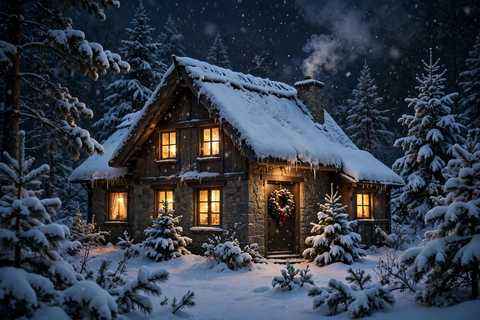
There is a video format that appears on every feed in December and never gets old: a cosy cottage in the snow, warm lights flickering in every window, snow falling gently through the dark, and smoke curling from the chimney. It is ten seconds of pure Christmas, and it is watched, saved and shared millions of times.
The format works because it is a feeling, not a scene. The cottage is small and warm, the night is big and cold, and the contrast between them is the whole story of Christmas — light and warmth winning against the dark and the snow. Viewers do not just watch it; they want to live in it.
The video prompt below is written for Veo 3, Sora 2 and Kling, with the snowfall, the flickering lights and the camera move designed so the video feels like a Christmas card that came to life.
The Prompt
Copy the prompt below and paste it into your favourite AI tool. It is written to work exactly as it is, with no editing needed.
Vertical 9:16 AI video, 8-10 seconds, photorealistic cinematic style, for Veo 3 / Sora 2 / Kling. A cosy stone cottage in a snowy forest clearing on Christmas Eve night, seen from a gentle distance. Snow falls softly and steadily through the dark blue night, each flake catching the warm light. Every window of the cottage glows warm golden yellow, the lights flickering gently like candles, a Christmas tree glowing through the front window, a wreath on the wooden door, smoke curling slowly from the stone chimney into the sky. A path of warm light spills from the door onto the fresh snow, a wooden fence dusted with snow, pine trees heavy with snow standing around the clearing, a small snowman beside the path, a red sled leaning against the cottage wall. The camera moves in a slow gentle push-in toward the cottage, then rises slightly to show the roof and the falling snow against the night sky. Sound: soft quiet snowfall, a distant church bell at 5 seconds, a faint crackle of a fireplace, gentle Christmas music box melody underneath. Lighting: warm golden windows against deep blue snowy night, soft glow on the snow, cinematic colour grading, shallow depth of field, peaceful magical Christmas mood, ultra-detailed snowflakes and window glow, smooth slow camera motion.
Why This Prompt Works
This prompt works because it is built on the oldest Christmas contrast there is: a small warm home against a vast cold night. The cottage is the heart, the snow is the world, and the flickering windows are the invitation.
- Flickering windows feel alive: lights that flicker gently like candles make the cottage feel occupied and loved, not empty.
- Soft snowfall adds the dream: steady gentle snow is the texture that makes the whole scene feel quiet, magical and real.
- The slow push-in creates intimacy: moving gently toward the cottage makes viewers feel like they are walking home to it.
- Small details tell the story: the wreath, the sled, the snowman and the chimney smoke each add a chapter to the Christmas story.
- Sound design completes the mood: a distant bell and a music box melody turn a pretty video into a Christmas memory.
The video ends with the cottage glowing and the snow still falling — a loop that viewers can watch forever, which is why it gets saved more than almost any other Christmas format.
How to Use This Prompt
- Open Veo 3, Sora 2 or Kling and start a new text-to-video or image-to-video project in 9:16 vertical format.
- Copy the full video prompt from the box above and paste it in, keeping the camera move, timing and sound cues exactly as written.
- If your tool supports a first frame, upload a still image that matches the opening shot so the subject and setting stay consistent.
- Generate two or three takes and pick the one with the smoothest motion, the cleanest loop point and the most natural sound.
- Trim the clip to 8 to 10 seconds, add captions if the platform mutes sound by default, and export in the highest quality available.
- Post it as a Reel, Short or TikTok with a short hook caption and the hashtags below, and reply to early comments quickly to boost reach.
Pro Tips
- Keep the snowfall gentle — heavy snow hides the cottage, while soft flakes frame it beautifully.
- If the windows look too bright, add “warm lights flickering gently like candles” to soften the glow.
- Generate three takes and pick the one with the smoothest push-in and the most natural snowfall.
- Add a caption like “home for Christmas” to give the video an emotional hook worth sharing.
- Try a second version with a reindeer standing in the clearing for a magical surprise that viewers will replay.
- Post in early December when Christmas content starts trending, and reuse it as a looped background for holiday greetings.
FAQ
Which AI video tool is best for Christmas cottage videos?
Veo 3 renders snow and window glow beautifully, and Sora 2 handles the slow push-in camera move well. Kling is a good free option for cosy winter scenes.
Can I use this video as a Christmas greeting?
Yes, it is ideal for one. Add “Merry Christmas” as a text overlay at the end and send it to family and friends — it beats a static card every time.
Can I add Santa or a reindeer to the scene?
Yes. Add “a gentle reindeer with a red nose standing in the snowy clearing” or “Santa’s sleigh flying across the moon” — small magical additions make the video even more shareable.
How do I make the video loop smoothly?
End the camera move where it began — a gentle push-in that settles on the cottage loops back cleanly to the opening wide shot.
The snow is falling, the windows are glowing, and Christmas is home. All it needs is your prompt — and someone to share it with.
Related Viral Prompts
Christmas Snow AI Photo Prompt
Christmas Tree Decorating AI Photo Prompt
Christmas Santa AI Photo Prompt
#Christmas2026 #AIVideoPrompt #MerryChristmas #CosyChristmas #PromptBazar


Leave a Reply