
Introduction
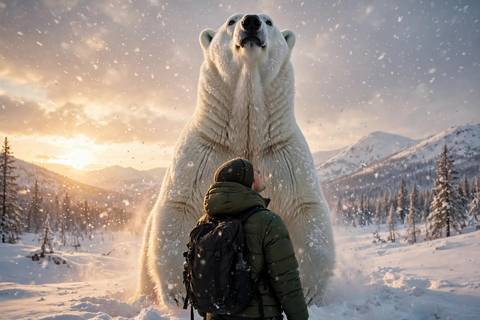
In November 2026, one video format took over every feed: a person standing alone in the snow, a giant polar bear rising slowly behind them, and then — one deep, resonant hum that seems to vibrate through the whole screen. It is strange, it is majestic, and it is impossible to scroll past. That is the polar bear meme, and this prompt lets you make your own version.
The format works because it is built on surprise and scale. The viewer expects a quiet snow selfie, and instead a creature the size of a house rises into frame and sings a single note. The contrast between the tiny person and the enormous bear, and between silence and that one deep hum, is what makes people watch it twice and send it to friends.
Below is a complete video prompt written for Veo 3, Sora 2 and Kling. It covers the subject, the camera move, the timing, the sound and the vertical format, so your clip comes out ready to post as a Reel, Short or TikTok.
The Prompt
Copy the prompt below and paste it into your favourite AI tool. It is written to work exactly as it is, with no editing needed.
Vertical 9:16 AI video, 8-10 seconds, photorealistic cinematic style, for Veo 3 / Sora 2 / Kling. A person in a thick winter coat stands alone in a vast snowy landscape at dusk, seen from behind, facing a pale orange horizon, snowflakes drifting gently. The camera holds steady in a wide shot, then slowly pushes in. At 3 seconds, a giant polar bear — three times taller than the person — rises slowly into frame behind them, its huge white form emerging from the falling snow, breath visible in the cold air. The bear lowers its massive head toward the person, opens its mouth, and hums one single deep resonant note that seems to vibrate through the snow. The person turns their head slowly, eyes wide with awe, not fear. The bear's fur is thick and detailed, individual snowflakes catching the golden dusk light, soft fog at the edges of the frame. Sound: soft wind, quiet snowfall, then one deep warm humming note at 5 seconds, fading into silence. Lighting: cold blue twilight mixed with warm golden horizon glow. Camera: slow steady push-in, no shake, smooth cinematic motion, shallow depth of field, epic scale contrast between tiny human and giant bear, magical and slightly surreal mood.
Why This Prompt Works
This prompt works because it follows the exact recipe of the viral original: a calm opening, a slow reveal, one surprising moment, and a clean ending. The bear is the twist, the hum is the payoff, and the timing is what makes both land.
- Scale creates the shock: a bear three times taller than the person is instantly, visibly impossible — and impossible is what stops the scroll.
- The slow rise builds suspense: three seconds of quiet snow before the reveal gives viewers time to settle in, so the bear hits harder.
- One note is the perfect payoff: a single deep hum is funnier, stranger and more memorable than a roar or a song.
- The person’s awe sells the moment: wide eyes and wonder, not fear, keep the video magical instead of scary.
- Vertical 9:16 fits the feed: the format fills the whole phone screen, so the bear feels even bigger and the snow feels closer.
Put together, these choices make a video that people watch to the end, replay, and share — which is exactly what the algorithm rewards.
How to Use This Prompt
- Open Veo 3, Sora 2 or Kling and start a new text-to-video or image-to-video project in 9:16 vertical format.
- Copy the full video prompt from the box above and paste it in, keeping the camera move, timing and sound cues exactly as written.
- If your tool supports a first frame, upload a still image that matches the opening shot so the subject and setting stay consistent.
- Generate two or three takes and pick the one with the smoothest motion, the cleanest loop point and the most natural sound.
- Trim the clip to 8 to 10 seconds, add captions if the platform mutes sound by default, and export in the highest quality available.
- Post it as a Reel, Short or TikTok with a short hook caption and the hashtags below, and reply to early comments quickly to boost reach.
Pro Tips
- Keep the person’s face out of frame or seen from behind — the bear is the star, and a hidden face avoids AI face errors.
- If the bear looks too small, add “the bear towers over the person, filling the top half of the frame”.
- Generate three takes and pick the one where the bear rises most smoothly — jerky motion breaks the magic instantly.
- Add a caption like “he just wanted to sing” to give viewers a reason to comment and share.
- Post in the evening when Reels traffic peaks, and reply to the first comments quickly to boost reach.
- Try a second version at night with aurora in the sky for an even more cinematic, shareable result.
FAQ
Which AI video tool works best for this prompt?
Veo 3 handles large creatures and snow best, Sora 2 is strongest on cinematic camera moves, and Kling is a good free option. Try Veo 3 first if you have access.
Can I use my own photo as the first frame?
Yes. Upload a photo of yourself standing in snow as the first frame in image-to-video mode, and the bear will rise behind your real image — it makes the result far more personal.
Why does my bear sometimes look like a dog or a seal?
Because the prompt is too short. This prompt specifies “giant polar bear, three times taller than the person, thick white fur” — keep those details in, and regenerate if the shape still drifts.
How long should the video be?
Eight to ten seconds is ideal. Shorter and the reveal feels rushed; longer and viewers scroll away before the hum. The prompt is timed for that exact window.
Some memes are funny, some are beautiful — this one is both, and it is waiting for your version. Let the bear rise.
Related Viral Prompts
Kitten Watermelon AI Video Prompt
Hamster Barista AI Video Prompt
Cat Doorbell Musician AI Video Prompt
#PolarBear #AIVideoPrompt #ViralVideo #Veo3 #PromptBazar


Leave a Reply