
Introduction
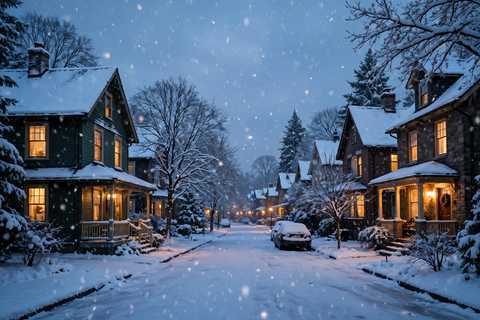
Snowfall has a sound, and it is silence. When gentle flakes fall on a quiet street and warm light spills from every window, the whole world feels softer, slower and kinder. This is the winter image people save to their phones and look at on hard days — and this prompt creates it in seconds.
The scene works because it is built on one perfect contrast: cold blue snow outside, warm gold light inside. Every window becomes a small story, every snowflake a small miracle, and the empty street makes the viewer feel like they are the only person awake in a sleeping town. It is the kind of image that slows people down and makes them feel at home, even if they have never seen snow.
Use the prompt below as a standalone winter landscape, or add yourself walking down the street. Either way, Gemini or ChatGPT will deliver a cinematic snowfall scene that looks like it was filmed, not generated.
The Prompt
Copy the prompt below and paste it into your favourite AI tool. It is written to work exactly as it is, with no editing needed.
Create a photorealistic winter snowfall photograph, 4K ultra-detailed, cinematic street scene. If a person is uploaded, keep their face 100% identical to the original photo — same facial features, same hairstyle, same skin tone, do not alter the face. A quiet residential street on a snowy winter evening, gentle snowflakes falling steadily through the cold air, each flake catching the light. Old brick houses line both sides of the street, every window glowing warm golden yellow, curtains half-drawn, a Christmas wreath on one door, smoke curling from chimneys into the dark blue sky. The street and pavements are covered in fresh untouched snow, a single set of footprints leading away down the centre, a vintage street lamp glowing warm orange and lighting the falling snow around it, a bicycle dusted with snow leaning against a fence, a cat sitting in a lit window watching the snow. Cool blue twilight in the sky, warm gold in the windows, soft bokeh from distant lights, peaceful, magical, storybook winter mood, shot on a 35mm lens, vertical 4:5 composition.
Why This Prompt Works
This prompt succeeds because it treats light as the main character. The snow is beautiful, but it is the warm windows that make people feel something — they suggest home, safety and belonging on a cold night.
- Warm-versus-cold contrast is irresistible: golden windows against blue snow is the single most loved colour pairing in winter photography.
- Footprints add a human story: one set of prints down an empty street makes viewers wonder who walked there, which pulls them into the image.
- Each window is a tiny scene: a wreath, a cat, half-drawn curtains — small details that reward a second look and earn a save.
- Soft bokeh adds the dream: glowing lamps and distant lights blurred into soft circles give the photo its cinematic, storybook finish.
- Empty streets feel peaceful: no cars and no crowds means the image works as a wallpaper, a card, or a moment of calm in a busy feed.
The result is less a photograph and more a feeling — the feeling of coming home on a snowy night to a house that is warm and waiting.
How to Use This Prompt
- Open Gemini (Nano Banana) or ChatGPT and upload a clear, well-lit photo of yourself — or the people in the scene — facing the camera.
- Copy the full prompt from the box above and paste it into the chat, keeping every detail exactly as written.
- If the first result changes a face too much, add this line at the end of the prompt: “Keep the exact same face, facial features, hairstyle and skin tone as the uploaded photo, 100% identical, do not beautify or alter the face.”
- Generate two or three versions and pick the one with the most natural faces, hands and lighting.
- Download the best version in the highest quality available and crop it gently to 4:5 for Instagram or 9:16 for Reels and Stories.
- Post it with a warm caption and the hashtags below, and tag the people in the photo so it reaches more feeds.
Pro Tips
- Add yourself by uploading a photo and asking for “a person in a long coat walking away down the snowy street, seen from behind”.
- If the snow looks too heavy, add “light gentle snowfall, individual flakes visible” to keep it delicate.
- Generate a wide 16:9 version for a desktop wallpaper and a 9:16 version for a phone lock screen.
- Pair the image with a short line about quiet winter evenings — the photo carries the emotion, the caption only needs to name it.
- Try a dawn version by swapping “evening” for “early morning” and “warm golden windows” for “soft blue dawn light”.
- Print it on a Christmas card — the wreath, the lamps and the snow make it ready-made for the season.
FAQ
Do I need to upload a photo for this prompt?
No. It works beautifully as a pure street scene with nobody in it. Upload a photo only if you want yourself walking down the snowy street.
Can I use this image as a Christmas card?
Yes, it is perfect for one. The wreath, glowing windows and falling snow are classic Christmas card imagery, and the vertical format fits a card exactly.
Why does my snowfall AI image sometimes look like rain?
Because the prompt does not describe the flakes. This prompt specifies “gentle snowflakes, each flake catching the light” and fresh untouched snow, which keeps the flakes large, slow and clearly snow.
Which tool renders snowfall best?
Gemini with Nano Banana handles falling snow and window glow very naturally, while ChatGPT is strong on the street composition. Generate in both and keep the softer, dreamier one.
Let it snow, let the windows glow, and let this one quiet street remind everyone who sees it what winter is really for.
Related Viral Prompts
Winter Foggy Morning AI Photo Prompt
Christmas Snow AI Photo Prompt
Winter Sunrise AI Photo Prompt
#WinterSnowfall #Winter2026 #AIPhotoPrompt #SnowyNight #PromptBazar


Leave a Reply