
Introduction
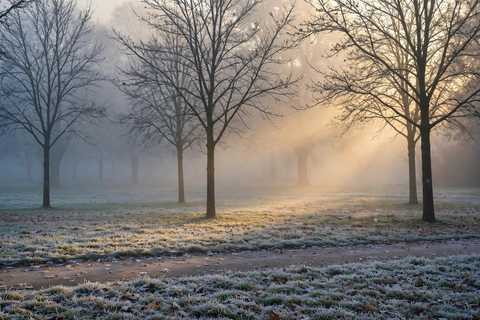
There is a quiet hour in winter when the world has not quite woken up yet. The fog hangs low over the park, the bare trees stand like pencil sketches against a pale sky, and then the sun breaks through in one soft golden beam — and for a few minutes, everything looks like a painting. This prompt bottles that hour.
Foggy morning photos are among the most saved and shared winter images on social media, because they feel calm in a feed full of noise. They work as phone wallpapers, as art prints, and as the kind of post that makes people pause and breathe. The bare trees give the image its structure, the fog gives it mystery, and the golden light gives it hope.
Use the prompt below to create that scene from your own photo, or as a standalone landscape. It is written for Gemini, Nano Banana and ChatGPT, with careful attention to light, depth and atmosphere so the result looks photographed, not generated.
The Prompt
Copy the prompt below and paste it into your favourite AI tool. It is written to work exactly as it is, with no editing needed.
Create a photorealistic misty winter morning photograph, 4K ultra-detailed, cinematic landscape. If a person is uploaded, keep their face 100% identical to the original photo — same facial features, same hairstyle, same skin tone, do not alter the face. A quiet public park on a foggy winter morning just after sunrise. Tall bare trees with dark branches stand in soft layers, fading into thick pale fog, their silhouettes growing fainter with distance. A narrow winding path covered in frost-covered fallen leaves leads through the centre of the frame, a wooden park bench sits empty beside it, dew glistening on its slats. Low golden sunlight breaks through the fog in soft visible rays, warming the edges of the branches and turning the mist pale gold near the horizon. A few crows perch silently on a high branch, a thin layer of frost coats the grass, the air itself looks cold and still. Muted colour palette of soft grey, pale gold and deep brown, gentle atmospheric haze, dreamy depth, serene and peaceful mood, shot on a 50mm lens, soft morning light, vertical 4:5 composition.
Why This Prompt Works
Fog is one of the hardest things to get right in AI images, and this prompt succeeds because it treats the fog as the subject, not as a filter. Every layer — trees, path, bench, light — is placed at a different depth so the mist has somewhere to live.
- Layered trees create real depth: branches fading into fog at different distances give the image a three-dimensional feel that flat AI landscapes usually lack.
- Golden light gives the fog colour: without the low sun, fog looks grey and dull; with it, the whole scene glows pale gold and feels hopeful.
- The path leads the eye: a winding frost-covered path pulls the viewer into the image and makes them feel like they are walking there.
- Small details sell the cold: frost on the grass, dew on the bench and silent crows tell the viewer this is a real winter morning, not a backdrop.
- A muted palette feels premium: soft grey, gold and brown look like fine-art photography and work beautifully as wallpapers and prints.
The result is an image people save rather than just like. It is calm, cinematic and timeless — the kind of winter photo that still looks good years from now.
How to Use This Prompt
- Open Gemini (Nano Banana) or ChatGPT and upload a clear, well-lit photo of yourself — or the people in the scene — facing the camera.
- Copy the full prompt from the box above and paste it into the chat, keeping every detail exactly as written.
- If the first result changes a face too much, add this line at the end of the prompt: “Keep the exact same face, facial features, hairstyle and skin tone as the uploaded photo, 100% identical, do not beautify or alter the face.”
- Generate two or three versions and pick the one with the most natural faces, hands and lighting.
- Download the best version in the highest quality available and crop it gently to 4:5 for Instagram or 9:16 for Reels and Stories.
- Post it with a warm caption and the hashtags below, and tag the people in the photo so it reaches more feeds.
Pro Tips
- Add yourself to the scene by uploading a photo and asking for “a person in a long coat walking away down the path” for a dreamy, anonymous figure.
- If the fog looks too thick, add “thin fog, trees clearly visible” to open the scene up.
- Use the 4:5 vertical version for Instagram and a wide 16:9 version for a desktop or laptop wallpaper.
- Pair the image with a short caption about slow mornings — the mood of the photo does the heavy lifting.
- Try a second version at blue hour, swapping “golden sunlight” for “cold blue dawn light” for a moodier result.
- Print it large on matte paper; the soft haze and muted tones look best without gloss.
FAQ
Do I need to upload a photo for this prompt?
No. This works beautifully as a pure landscape with no person in it. Upload a photo only if you want yourself or someone else standing in the park scene.
Why do my foggy AI photos usually look flat?
Because most prompts ask for fog without depth. This prompt layers trees at different distances and adds a path and a bench, which gives the fog structure and makes the image feel three-dimensional.
Can I use this image as a phone wallpaper?
Yes, it is one of the best uses for it. Generate in vertical 9:16 and the path and trees will frame your clock and icons perfectly.
Which AI tool gives the best result for this scene?
Gemini with Nano Banana handles atmospheric light very well, and ChatGPT is strong on composition. Try both and keep the one with the most natural fog gradient.
Winter mornings are brief, but this image keeps the fog, the gold and the silence for as long as you want to look at it.
Related Viral Prompts
Winter Snowfall AI Photo Prompt
Winter Sunrise AI Photo Prompt
Winter Fashion AI Photo Prompt
#WinterMorning #Winter2026 #AIPhotoPrompt #FoggyMorning #PromptBazar


Leave a Reply