
Introduction
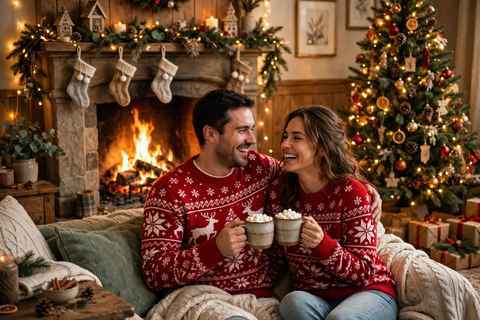
There is a kind of warmth that only December knows, and it lives in the smallest moments: two mugs of hot cocoa, one crackling fireplace, and two people in matching Christmas sweaters who have nowhere else to be. This is the photo every couple wants on their feed this Christmas, because it feels less like a photoshoot and more like a memory that already happened.
The magic of this prompt is how ordinary it looks and how cinematic it feels at the same time. The matching sweaters tie the couple together visually, the firelight paints both faces in the same golden glow, and the steam rising from the cocoa adds a soft, dreamy layer that no filter can fake. It is cosy, romantic and instantly recognisable as Christmas, without a single over-the-top decoration.
Below you will find a complete copy-paste prompt that turns any ordinary couple photo into this scene. It works with Gemini, Nano Banana and ChatGPT, keeps both faces identical to the original photo, and delivers a result that looks like it was shot by a professional photographer in a log cabin on Christmas Eve.
The Prompt
Copy the prompt below and paste it into your favourite AI tool. It is written to work exactly as it is, with no editing needed.
Create a photorealistic Christmas couple portrait, 4K ultra-detailed, using the uploaded photo as the exact face reference for both people. Keep both faces 100% identical to the original photo — same facial features, same smile, same hairstyle, same skin tone, do not beautify, slim or alter either face. A happy couple sits close together on a soft rug in front of a glowing stone fireplace in a cosy log cabin living room on Christmas Eve night. They wear matching chunky knit Christmas sweaters in deep red with white snowflake and reindeer patterns. Both hold ceramic mugs of hot cocoa topped with whipped cream and tiny marshmallows, gentle steam curling up between them. They lean toward each other, foreheads almost touching, laughing softly, eyes locked on each other. Behind them a decorated Christmas tree glows with warm fairy lights and gold ornaments, wrapped presents stacked beneath it, stockings hanging from the mantel, a garland of pine and red berries draped above the fire. Warm golden firelight flickers across their faces, soft shadows dancing on the wooden walls, a knitted blanket draped over their knees, a sleeping cat curled beside them. Cinematic warm colour grading, shallow depth of field, soft bokeh from the tree lights, cosy romantic festive mood, shot on a 50mm lens, vertical 4:5 portrait composition.
Why This Prompt Works
This prompt works because it builds the scene around connection rather than decoration. The fireplace, the tree and the sweaters set the Christmas mood, but the real subject is the couple leaning into each other, and every detail in the prompt protects that feeling.
- Face-lock wording protects both people: the prompt repeats that both faces must stay identical to the uploaded photo, so neither partner ends up looking like a stranger.
- Matching sweaters create visual unity: the same pattern in the same colours ties the couple together and makes the photo read as one deliberate, shareable moment.
- Firelight does the flattering: warm, flickering light softens skin, adds golden highlights and hides harsh shadows far better than any studio light.
- Small props tell the story: steam, marshmallows, the blanket and the sleeping cat add layers of realism that make viewers feel the warmth instead of just seeing it.
- Depth and bokeh add the cinema feel: the glowing tree blurred in the background gives the portrait a professional, expensive look with almost no effort.
Put together, these choices turn a simple selfie into a Christmas card. The prompt gives the AI enough specific detail to build a believable room, while leaving the couple and their connection as the clear centre of the frame.
How to Use This Prompt
- Open Gemini (Nano Banana) or ChatGPT and upload a clear, well-lit photo of yourself — or the people in the scene — facing the camera.
- Copy the full prompt from the box above and paste it into the chat, keeping every detail exactly as written.
- If the first result changes a face too much, add this line at the end of the prompt: “Keep the exact same face, facial features, hairstyle and skin tone as the uploaded photo, 100% identical, do not beautify or alter the face.”
- Generate two or three versions and pick the one with the most natural faces, hands and lighting.
- Download the best version in the highest quality available and crop it gently to 4:5 for Instagram or 9:16 for Reels and Stories.
- Post it with a warm caption and the hashtags below, and tag the people in the photo so it reaches more feeds.
Pro Tips
- Use a photo where both faces are clearly visible and well lit — the AI can only preserve what it can see.
- Ask for the sweaters in a colour that suits both of you; deep red and forest green photograph best against firelight.
- If the mugs look odd, regenerate once with the words “both hands wrapped naturally around the mugs” added to the prompt.
- Keep the tree slightly out of focus in the background so it glows instead of competing with your faces.
- Try a second version with the couple looking at the camera for a classic Christmas card, and one looking at each other for a candid feel.
- Save the best version at full resolution before cropping, so the fireplace and tree stay in the frame.
FAQ
Can I use this prompt with a photo of just me and my partner taken on my phone?
Yes. A clear phone photo works perfectly as long as both faces are visible and facing the camera. Upload it first, then paste the prompt, and the AI will rebuild the scene around your real faces.
Will the AI change our faces?
It should not, because the prompt explicitly locks both faces to the uploaded photo. If a result still drifts, add the face-lock sentence again at the end and regenerate. Two or three tries usually fix it.
Can I change the sweater colour or add our pet?
Absolutely. Swap “deep red” for any colour you like, and add a line such as “our golden retriever asleep at our feet” — the prompt is written so small swaps like this do not break the scene.
Is this prompt good for a printed Christmas card?
Yes, it is ideal for one. Generate in the highest quality, keep the 4:5 crop, and print on matte card so the warm firelight tones stay rich and soft.
Some Christmas photos are taken, and some are felt — this one is both. Copy the prompt, upload your photo, and let the firelight do the rest.
Related Viral Prompts
Christmas Tree Decorating AI Photo Prompt
Christmas Santa AI Photo Prompt
Christmas Gifts AI Photo Prompt
#ChristmasCouple #Christmas2026 #AIPhotoPrompt #CoupleGoals #PromptBazar


Leave a Reply