
Introduction
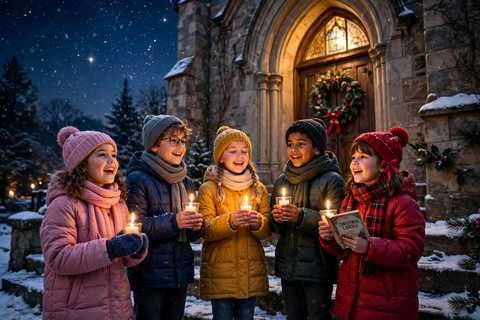
Children singing carols with candles outside a church on a starry evening is Christmas at its most heartwarming: small voices, warm candlelight, and a sky full of stars. This prompt captures that tender, glowing moment beautifully.
This Children singing Christmas carols with candles image is trending for a simple reason: it feels real. People are tired of stiff stock photos, and an AI photo built from a good prompt can look like a genuine moment caught on camera. Whether you want it for Instagram, a Thanksgiving or Christmas card, a blog post, or just a beautiful picture to share with family, the scene below gives you a head start. The colours, the light, and the little details are all chosen to make the image feel warm, natural, and worth saving.
In this article you will find the complete copy-paste prompt, a clear explanation of why each part of it works, step-by-step instructions for using it in Gemini or ChatGPT, pro tips for getting the best result, and answers to the questions people ask most. Copy the prompt exactly as written, or tweak one or two words to make the scene your own.
The Prompt
Here is the full prompt. Copy everything inside the box below and paste it into Gemini (Nano Banana) or ChatGPT. If you want your own face or your own family in the picture, upload a clear reference photo first, then paste the prompt and add the words ‘keep the same faces as the reference photo’ at the end.
Photorealistic Christmas photo, happy children singing carols with glowing candles outside a beautiful old church on a starry evening, the children in warm winter coats and scarves holding candles in both hands, soft golden candlelight glowing on their smiling faces, the church windows shining warm gold, a tall Christmas tree with fairy lights beside the church door, a deep-blue starry sky, gentle snowflakes falling, wreaths and garlands on the church entrance, candid documentary photography style, shot on a 50mm lens, warm gold tones against cool blue night, joyful peaceful mood, 4K detail, keep every face natural and consistent, no distorted hands, no extra fingers.
Why This Prompt Works
Great AI photos are rarely an accident. Every line in the prompt above is doing a specific job, from the lighting to the lens choice to the words that protect faces and hands. Here is why this particular combination works so well, and why it keeps producing images people actually want to share.
- Candlelight on young faces is pure warmth. Soft golden candlelight flatters every face and creates a glow that reads as innocence and joy, which is exactly the emotion people want from a Christmas carol image.
- The church gives the scene its heart. Warm windows, wreaths, and a glowing tree at the church door root the singing in tradition, so the image feels meaningful as well as pretty.
- A starry sky adds wonder. A deep-blue sky full of stars above the children turns a simple carol scene into a magical Christmas evening that feels like a storybook illustration come to life.
- Singing is a peak emotional moment. Open mouths mid-song and smiling eyes capture the joy of singing together, which is far more engaging than a posed group photo.
Put together, these choices do something simple but powerful: they give the AI a clear scene, a clear mood, and clear limits. The clearer the instructions, the less the model has to guess, and the more the final image looks like the picture you had in your head when you started.
How to Use This Prompt
Using the prompt takes less than a minute, but a few small habits make the difference between a decent picture and a great one. Follow these steps in order, and you will get a clean, natural-looking result on your first or second try.
- Copy the full prompt from the box above, including the lighting, lens, and face-lock wording at the end.
- Open Gemini (Nano Banana) or ChatGPT and start a fresh image chat so no old instructions interfere with the new scene.
- Upload a reference photo if you want your own face, your family, or your own home in the picture. A clear, well-lit, front-facing photo works best.
- Paste the prompt exactly as written. If you uploaded a reference, add ‘keep the same faces and ages as the reference photo’ at the end.
- Generate three or four versions and compare them side by side. Pick the one with the most natural faces and hands, not just the prettiest colours.
- Ask for a small follow-up edit if something is slightly off, such as ‘make the light warmer’ or ‘remove the extra person on the left’. Small edits are safer than starting over.
- Download your favourite version, crop it to 4:5 for Instagram or 9:16 for Stories and Reels, and share it with a short caption about the moment.
Pro Tips
A few small tricks can lift a good AI photo into a great one. These are the tips that make the biggest difference with this prompt.
- Upload a photo of your own children or choir as the reference so the carol singers are your real children.
- Ask for a version with songbooks in their hands instead of candles if you prefer a safer, simpler scene for younger children.
- Try a close-up version focused on two or three children and their candles for a more intimate, emotional shot.
- A vertical 4:5 crop suits Instagram, while a wide crop makes a beautiful Christmas card or church newsletter cover.
- Generate in the morning when you have fresh eyes, and compare versions side by side before you pick a winner.
FAQ
Can I use this carol image for my church or school Christmas event?
Yes. It is a warm, traditional scene that works beautifully for church newsletters, school Christmas concert posters, and community event announcements.
How do I keep the candles from looking dangerous for children?
Add ‘candles in safe glass holders, children holding them carefully with both hands’ and the AI will render protected, stable candles that look safe and pretty.
Can I use this prompt in ChatGPT as well as Gemini?
Yes. This prompt works in Gemini, which is also known as Nano Banana, and in ChatGPT, as well as in most other AI image tools. Just paste the full prompt into the image chat, and if you want your own face in the picture, upload a clear reference photo first and add ‘keep the same face as the reference photo’.
How do I keep the same faces in every photo I create?
Upload one clear, well-lit reference photo and use the same prompt wording each time, especially the ‘keep every face natural and consistent’ line. Using the same reference and the same seed or style words across generations is the easiest way to keep faces, outfits, and ages steady from one picture to the next.
This Children singing Christmas carols with candles scene is one of those images that feels like a memory the moment you see it, and that is exactly why it works so well on social media. Copy the prompt, make it your own with a reference photo, and share the result with the people who would love to be in the picture with you.
Related Viral Prompts
#Christmas2026 #AIPhotoPrompt #ChristmasCarols #HolidaySpirit #PromptBazar


Leave a Reply