
Introduction
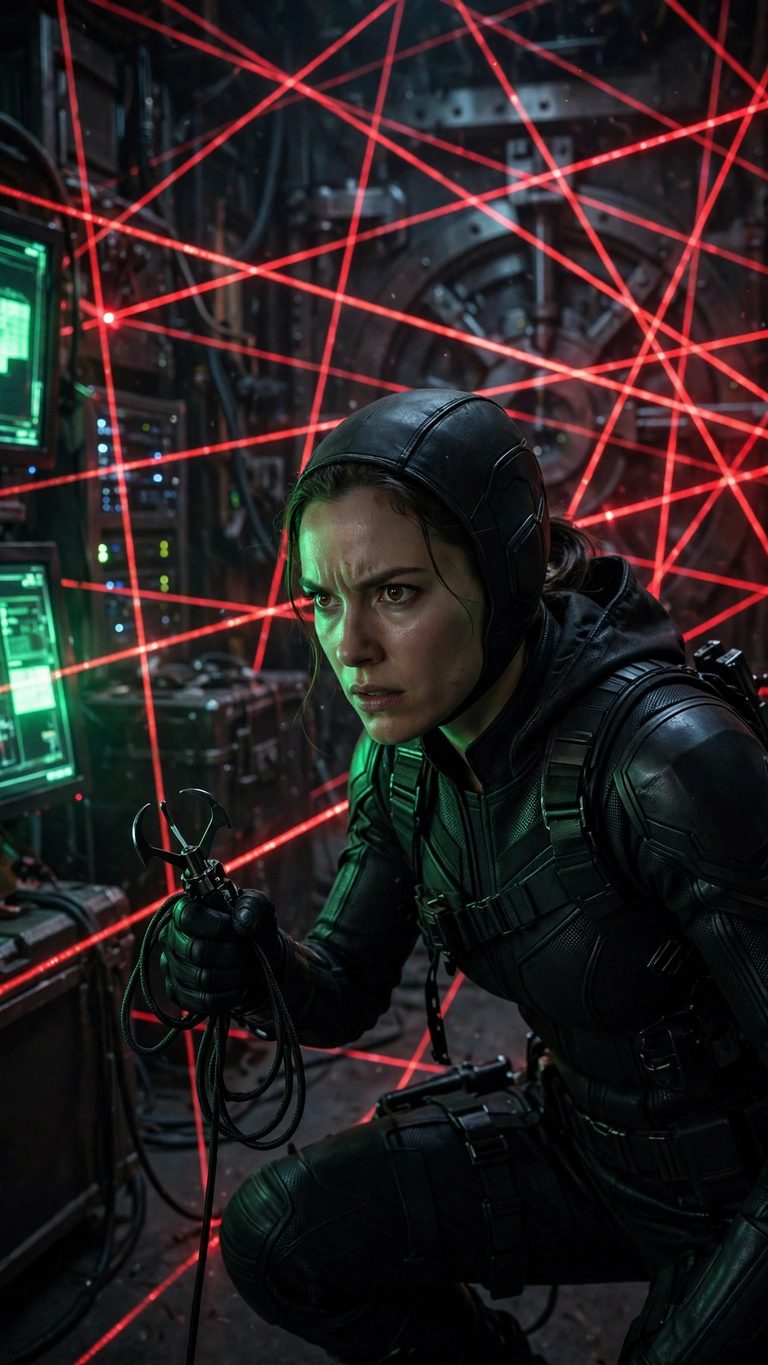
The loudest superhero moments get the posters, but the quietest ones get the goosebumps. Picture it: a hero pressed flat against a shadowed wall inside a villain’s high-tech vault, red laser grids stitching the darkness, armed guards sweeping past just meters away, one wrong breath from disaster. This is the infiltration scene — pure Mission-Impossible tension wrapped in a cape — and it makes for some of the most cinematic AI-generated photography in the entire #Superhero genre. While battle scenes shout, stealth scenes whisper, and that whisper pulls viewers in closer. Creators on #PromptBazar have found that #Stealth and #Infiltration themed images earn exceptional engagement because they tell a story frozen at its most dangerous second: the moment before everything goes wrong. The prompt below generates a stealthy superhero photograph dripping with that tension — laser grids, patrolling guards, a grappling line ready, and a face lit by green monitor glow. In this article, you’ll get the exact copy-paste prompt, a breakdown of why each detail matters, step-by-step instructions for Midjourney, DALL-E 3, Flux, and Stable Diffusion, plus pro variations that turn one image into an entire spy-thriller series.
The Prompt
Copy the exact prompt below and paste it into your favorite AI image generator — no edits needed for your first result:
Stealthy superhero photograph of a hero crouched in the shadows of a villain lair, red laser grids crisscrossing a high-tech vault room, guards with rifles patrolling, the hero mid-sneak with grappling line ready, green monitor glow on tense face, Mission-Impossible tension, ultra detailed, 8k, masterpiece
Why This Prompt Works
This prompt is a masterclass in contrast-driven composition. The single most powerful visual idea here is the collision of red laser grids against deep shadow. Red lasers on near-black backgrounds create instant graphic impact — the model’s training data is full of heist and spy imagery where red-on-black means danger, and it reproduces that association faithfully. The lasers do triple duty: they establish the setting (a high-tech vault), they create leading lines that draw the eye across the frame, and they raise the stakes visually — every beam is a tripwire the viewer instinctively understands. “Crisscrossing” is the key verb; it tells the model to weave the beams into a complex pattern rather than a few lazy parallel lines, filling the composition with geometric energy.
The second strength is narrative layering through secondary subjects. “Guards with rifles patrolling” puts living threats in the frame, which transforms the image from a portrait into a scene with cause and effect. The hero is hiding from someone, and the viewer can see exactly who. Patrolling guards also give the model human figures at a different depth plane, adding realistic depth of field and scale. Meanwhile, “the hero mid-sneak with grappling line ready” freezes the hero in a coiled, transitional pose — not standing, not running, but caught between. Mid-action poses are catnip for engagement because the viewer’s brain automatically completes the motion, making a still image feel like a paused film.
Third, the prompt nails motivated lighting with emotional color. “Green monitor glow on tense face” is doing enormous work in very few words. The green light has a source (the monitors), a color psychology (sickly, technological, uneasy), and a target (the hero’s tense face). Colored practical lighting like this is what separates cinematic photography from flat illustration, and AI models render it beautifully because film stills with neon and monitor glow dominate their training data. “Tense face” gives the emotional close-up that anchors the whole wide scene — without it, you’d have an empty room with lasers; with it, you have a character in jeopardy.
Finally, the genre anchor — “Mission-Impossible tension” — is a precision instrument. It invokes a specific franchise’s visual grammar: impossible odds, elegant technology, and a hero who survives on wits. Combined with the quality tokens “ultra detailed, 8k, masterpiece,” which sharpen the laser edges, guard uniforms, and gadget details, the prompt hands the model a complete creative brief. That completeness is why this prompt reliably produces frame-worthy stealth photography instead of generic dark superhero poses.
How to Use This Prompt
Midjourney: Run /imagine with the prompt plus --ar 16:9 --v 6.1 --style raw. The raw style preserves the dark shadows; default beautification tends to lift blacks and wash out the laser contrast. If the hero is too visible, add “barely visible, deep shadow” — stealth means the hero should be half-swallowed by darkness. For extra menace, try --chaos 8 to vary guard placements.
DALL-E 3 (via ChatGPT): Paste the prompt verbatim. DALL-E is excellent at understanding “laser grids” and spatial relationships, so if the first result has too few beams, follow up with “make the red laser grid denser, crisscrossing the entire room.” Request 1792×1024 for the full vault-room composition.
Flux: Use the prompt as-is with guidance around 3.5. Flux’s photorealism shines on the green monitor glow and the texture of tactical gear. If faces look off, Flux generally handles the “tense face” close-up better than most open models, so consider a second generation cropped tighter on the hero.
Stable Diffusion (SDXL): Positive prompt as written; negative prompt: “cartoon, bright daylight, blurry, deformed hands, extra fingers, flat lighting.” Use 30+ steps and a cinematic-realistic checkpoint. Add “volumetric lighting, haze” to get light beams cutting through dusty air — a small addition that dramatically sells the vault atmosphere. As always, generate a batch of four and select the frame where the hero’s pose reads most clearly against the laser pattern.
Pro Tips & Creative Variations
This prompt is a launchpad for an entire stealth-thriller portfolio. Change the security system: swap laser grids for “pressure-sensitive floor tiles glowing faintly,” “drone sentries with sweeping searchlights,” or “a hall of motion-sensor cameras with blinking red eyes.” Each creates a totally different visual puzzle while keeping the tension. Change the lair: a villain’s underwater base with porthole light, a mountaintop fortress during a blizzard, a neon-drenched casino vault, or a derelict oil rig at night — the infiltration formula works anywhere you can justify security.
Shift the moment: the prompt captures the sneak; try “the alarm just tripped, red lights spinning, hero sprinting” for the escape, or “hero dangling from the grappling line above the vault” for the heist payoff. A three-image sequence — infiltrate, steal, escape — makes a killer carousel post. Gadget swaps: replace the grappling line with “a holographic disguise flickering,” “EMP device armed,” or “a tiny drone scout hovering” to invent new spy-tech. Color script the danger: green monitor glow is classic, but “amber warning lights” or “cold blue server-room light” completely change the emotional temperature. Team stealth: add “a second hero disabling a camera in the background” for coordinated-operation energy. For maximum #Infiltration authenticity, append “security camera POV, timestamp overlay” to one variation — found-footage framing makes viewers feel like they’re watching the breach happen live, and #Stealth content with that raw surveillance aesthetic consistently stands out in the #AIPhoto feed on #PromptBazar.
Frequently Asked Questions
The hero keeps coming out too brightly lit. How do I keep them hidden? Add explicit shadow language: “hero half-hidden in deep shadow, mostly silhouette, rim light only.” Models sometimes over-light the main subject; telling it the hero should be hard to see is part of the stealth concept, so be direct about it.
Can I make it a specific hero or a heroine? Yes — insert your character description early in the prompt, e.g., “a heroine in a dark tactical suit.” Keep the rest unchanged. The lasers, guards, and glow will adapt around any character you describe.
Why do my laser grids look messy or random? Laser geometry is genuinely hard for models. If beams look chaotic, simplify with “a neat grid of red laser beams” or reduce complexity by specifying “three horizontal laser lines.” Fewer, cleaner beams often read more dangerous than a tangled mess.
What is the best use for this image style? Beyond social posts, stealth compositions make outstanding thumbnails, video game concept art, and book covers — anywhere you need instant intrigue. The dark palette with red accents is also perfect for profile banners since text overlays remain readable.
The vault is breached, the lasers are live, and the guards are closing in — all from one prompt. Generate your infiltration shot, share it with the #Superhero and #Stealth community, and see who can spot the hero first. Try it now on #PromptBazar.
Related Viral Prompts
- Superhero Team Pose Amidst a Lightning Storm: Free Viral AI Photo Prompt for Epic Cinematic Squad Poster Art
- Hero Carrying a Passenger Plane Above Clouds: Free Viral AI Photo Prompt for Epic Superhero Strength Feat Art
- Triumphant Sunrise Victory Flag Moment: Free Viral AI Photo Prompt for Epic Superhero Triumph Poster Art
# A I P h o t o # P r o m p t B a z a r # S u p e r h e r o # S t e a l t h # I n f i l t r a t i o n

Leave a Reply