
Introduction
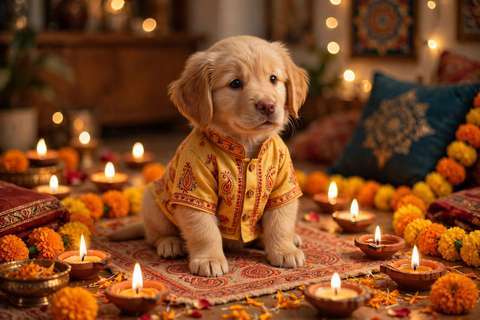
Some photos are just pictures, and some feel like memories, and this Diwali prompt is firmly in the second group. It builds a scene around a cute dog in a tiny embroidered kurta sitting proudly among glowing diyas and marigold flowers, a colourful rangoli behind it, and fairy lights twinkling in the background, with every detail chosen to make the image feel alive: the colours, the light, the small objects that tell you this is a real celebration, not a stock photo. If you have ever wanted a festival photo that your family will treasure, this is the prompt to try.
The Diwali season is also one of the busiest times for AI photo trends, with families, couples and friends all looking for fresh ideas that stand out from last year’s posts. A photo of a cute dog in a tiny embroidered kurta sitting proudly among glowing diyas and marigold flowers, a colourful rangoli behind it, and fairy lights twinkling in the background works because it is specific: it has a place, a moment and a feeling, and the AI can render all three when the prompt is written well. Vague prompts produce vague photos, but this one names the flowers, the light, the clothes and the expressions, so the result looks like a real photograph taken at a real celebration.
In this article, you will get the complete prompt ready to copy, a breakdown of why each part of it works, step-by-step instructions for Gemini and ChatGPT, pro tips for the best result, and answers to the questions people ask most about this Diwali photo idea. By the end, you will have everything you need to create a photo that looks professional, feels personal, and is ready to share with everyone you love.
The Prompt
Copy the full prompt below and paste it into Gemini or ChatGPT along with your photo. It describes the scene in rich detail, including the lighting, the setting, the outfits and the mood, so the AI has everything it needs to create a realistic, festive photograph.
Photorealistic adorable photo, Diwali evening at home, a cute golden retriever puppy wearing a tiny embroidered red and gold kurta with a small marigold garland around its neck, sitting proudly among glowing clay diyas and fresh orange marigold flowers, a colourful rangoli behind it, warm fairy lights and a brass diya in the background, soft golden light on the puppy's fur, big expressive eyes looking at the camera, keep the pet's face and markings 100% identical, ultra-detailed fur texture, cinematic warm tones, 4K, vertical portrait, shot on 85mm lens, shallow depth of field
Why This Prompt Works
Not every prompt produces a photo worth sharing, so it helps to understand why this one does. Each detail in the prompt solves a real problem that AI generators often struggle with.
- Pet photos are the most shared Diwali posts every year, and a dog in a tiny kurta is almost impossible to scroll past.
- The contrast of soft golden fur against bright marigolds and glowing diyas gives the image instant warmth.
- A pet looking directly at the camera creates an emotional connection that gets likes, comments and shares.
- The prompt works with any breed, so every pet parent can make their own version.
Put together, these choices do something simple but powerful: they give the AI a complete scene instead of a vague idea. That is why photos made with this prompt look like they were taken by a professional photographer at a real Diwali celebration, and why they keep getting shared long after the festival is over.
How to Use This Prompt
Using this prompt takes less than five minutes, even if you have never tried AI photo generation before. Follow these steps and you will have a share-ready photo on your first try.
- Open Gemini or ChatGPT on your phone or computer and start a new image chat.
- Upload a clear, well-lit photo of yourself or your family. A front-facing photo with a natural smile works best.
- Copy the full prompt from the box above and paste it into the chat, keeping the face-lock wording exactly as written.
- Wait for the first result, then look closely at the faces, the hands and the festival details before deciding anything.
- If something looks off, change one detail at a time, for example the outfit colour or the background, and generate again.
- When you are happy with the photo, download it in the highest quality available and save the original.
- Share it on Instagram, WhatsApp status or Facebook with a short festive caption and the hashtags at the end of this article.
If your first result is not perfect, do not worry, that is normal. Even professional photographers take many shots to get one great photo. Change one small detail, generate again, and within two or three tries you will have a Diwali photo you are proud to share.
Pro Tips
These small tips come from testing this prompt many times, and each one can lift your photo from good to unforgettable.
- Ask for ‘big expressive eyes looking at the camera’ to get that irresistible pet portrait look.
- Keep the kurta small and simple so the dog stays the star of the photo.
- Use a marigold garland, not a heavy collar, for a festive but comfortable look.
- Place the diyas in a loose circle, not too close to the pet, for safety and composition.
- Ask for ‘ultra-detailed fur texture’ so the coat looks soft and real.
- Generate a few versions and pick the one with the happiest expression.
Remember, the prompt is a starting point, not a rulebook. Once you have a version you love, feel free to experiment: change the colours, the time of day or the background, and make the photo truly yours. The best AI photos always have a personal touch that no prompt can write for you.
FAQ
Will this prompt work for my cat?
Yes. Just replace ‘golden retriever puppy’ with your cat’s breed and colour, and keep the kurta, marigolds and diyas the same. Cats look adorable in a tiny festive outfit too.
Can I use my own dog’s photo?
Absolutely. Upload a clear photo of your dog and add ‘keep the pet’s face and markings 100% identical’. The AI will dress your own dog in the kurta.
Is it safe to put diyas near my pet?
In real life, always keep lit diyas away from pets. This is an AI photo, so the diyas are only in the image. For real photos, use LED diyas around your pet.
What breed looks best in this prompt?
Every breed works, from golden retrievers to indie dogs and pugs. The prompt is written for a golden retriever, but you can swap in any breed you like.
The best festival photos are the ones that feel like your own story, and with this prompt, that story is only a copy and paste away.
Related Viral Prompts
Bhai Dooj 2026 Kids: Little Brother and Sister in Festive Dress Exchanging Sweets and Happy Hugs
Christmas 2026 Kids: Excited Children in Pyjamas Opening Presents on Christmas Morning by the Tree
#Diwali2026 #AIPhotoPrompt #PetDiwali #CuteDog #PromptBazar


Leave a Reply