
Introduction
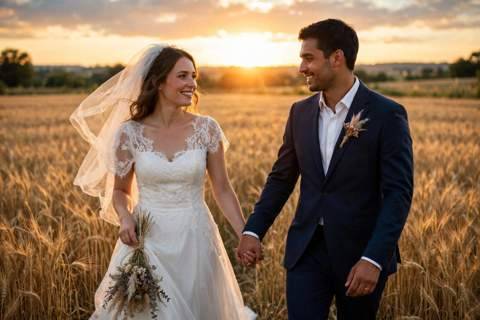
Some AI photo trends fade in a week, but the newlywed couple portrait at sunset trend is different. It looks beautiful, it feels personal, and it is incredibly easy to create once you have the right prompt. That is exactly what this post gives you: a ready-to-copy prompt for Newlyweds holding hands in a golden field at sunset after their wedding ceremony, plus simple tips to make your version look even better than the examples flooding your feed.
Whether you are creating this image for yourself, for a friend, or for a special celebration, this newlywed couple portrait at sunset style works beautifully because it combines a strong, recognisable idea with rich visual detail. The scene is tender, golden and timeless, the setting is full of character, and the result looks like it came from a professional shoot rather than a phone app. In this guide, you will find the full prompt, why each part of it matters, and how to use it step by step on any popular AI image tool.
AI photo prompts have become one of the most shared kinds of content in 2026. People love them because they turn one good idea into a photo that feels like a memory, a dream, or a fun alternate reality. This newlywed couple portrait at sunset prompt is perfect for newlyweds and couple photographers. You do not need editing skills, expensive software, or a studio. You only need the prompt below, a photo of your choice if the tool asks for one, and a minute of patience while the image generates.
The Prompt
Copy the entire prompt below exactly as it is, paste it into your favourite AI image generator, and generate. If the tool lets you upload a reference photo, upload a clear, front-facing photo for the most accurate and natural result.
Create a stunning, ultra-detailed, photorealistic image of Newlyweds holding hands in a golden field at sunset after their wedding ceremony. The scene should feel tender, golden and timeless, with a golden wheat field, a setting sun, flowing wedding outfits and a quiet, romantic mood. Use golden-hour portrait photography with warm backlight and soft depth of field. Capture realistic skin texture, natural expressions, accurate lighting and shadows, rich colours and sharp fine details. Compose the shot with a clear focal subject, pleasing background blur where appropriate, balanced framing and a professional, high-end finish. Avoid distorted faces, extra limbs, blurry features, watermark text or cluttered backgrounds. The final image should look like a premium professional photograph, ready to share on Instagram, WhatsApp and Facebook.
Why This Prompt Works
The biggest reason this prompt works so well is specificity. Instead of asking for a vague picture, it describes the subject, the mood, the setting, and the photographic style in one clear paragraph. AI image tools perform best when they have concrete details to work with, and this prompt gives them exactly that: a golden wheat field, a setting sun, flowing wedding outfits and a quiet, romantic mood, all wrapped in a tender, golden and timeless atmosphere.
It also controls the quality of the output. By asking for realistic texture, natural expressions, accurate lighting, and sharp detail, the prompt steers the tool away from the flat, plastic, or distorted look that weak prompts often produce. The instruction to avoid distorted faces and cluttered backgrounds acts as a safety net, so even a first attempt usually comes out clean and shareable.
Finally, the prompt is balanced. It is detailed enough to guide the image, but not so long that the tool gets confused or drops important parts. That balance is why this newlywed couple portrait at sunset style photographs so well on social media: every element supports the main subject, the colours feel rich without looking artificial, and the whole frame tells a small story at a glance. People stop scrolling for images like that, and they save and share them.
How to Use
Follow these simple steps to turn the prompt above into your own newlywed couple portrait at sunset photo:
- Open your preferred AI image generator, such as Gemini, ChatGPT image tools, Midjourney, or any photo app that accepts text prompts.
- Copy the full prompt from the box above and paste it into the prompt field without changing the wording on your first try.
- If the tool supports it, upload a clear, well-lit, front-facing photo so the generated person resembles you or the person you are creating it for.
- Generate the image and review it carefully, checking the face, the hands, the background details like a golden wheat field, a setting sun, flowing wedding outfits and a quiet, romantic mood, and the overall lighting.
- If something looks off, regenerate with the same prompt, or adjust one small detail at a time, such as the lighting, the colours, or the background, rather than rewriting everything.
- Once you are happy with the result, download the highest-quality version, crop it lightly if needed, and share it with a fun caption and the hashtags at the end of this post.
Pro Tips
These small tricks can lift your newlywed couple portrait at sunset image from good to outstanding:
- Use a high-quality reference photo with natural daylight on the face, because the AI copies lighting and expression from what you give it.
- Keep the background description intact on your first generation; changing too many details at once is the most common reason a good prompt produces a weak image.
- Generate two or three versions and pick the best one instead of settling for the first result, since small variations in expression and lighting make a big difference.
- Ask for a vertical 4:5 or 9:16 version if you plan to post it as a Reel cover, story, or WhatsApp status, and a square version for a feed post.
- Finish with a light touch-up only: a little brightness, contrast, or sharpness. Heavy filters can undo the realistic detail the prompt worked hard to create.
FAQ
Can I use this prompt for free?
Yes. The prompt itself is free to copy and use. Most AI image tools offer free generations every day, and you can paste this prompt into any tool that accepts text prompts without paying anything extra.
Do I need to upload my own photo?
Not always, but it helps a lot. Tools that accept a reference photo will match the face and features far better. If your tool is text-only, the prompt still works beautifully and will create a realistic person in the newlywed couple portrait at sunset style.
Why does my image look different from the examples?
Every AI tool interprets prompts slightly differently, and results vary with the reference photo, the tool version, and random generation. Try regenerating once or twice, keep the wording unchanged, and use a clearer reference photo for a closer match.
Can I change the colours, outfit, or background?
Absolutely. Once you like the base result, you can edit one detail at a time, such as swapping a colour, changing an outfit, or adjusting the background, while keeping the rest of the prompt the same so the quality stays high.
In short, this newlywed couple portrait at sunset prompt is your shortcut to a beautiful, tender, golden and timeless image that looks professionally made and feels deeply personal. Copy it, generate it, share it, and enjoy the reactions, because a great prompt plus a little creativity is all it takes to turn an ordinary photo into something people remember.
Related Viral Prompts
- Winter Wedding 2026 AI Photo Prompt: A Couple Exchanging Garlands Under Fairy Lights on a Cold Starry Night in Jaipur
- Christian Wedding 2026 AI Photo Prompt: A Bride Walking Down a Flower-Lined Aisle in a White Gown Inside a Church
- Wedding Photography 2026 AI Photo Prompt: A Photographer Capturing a Candid Laughing Moment of the Couple at Dusk
#CoupleGoals #GoldenHour #Newlyweds #AIPhotoPrompt #SunsetPortrait


Leave a Reply