
Introduction
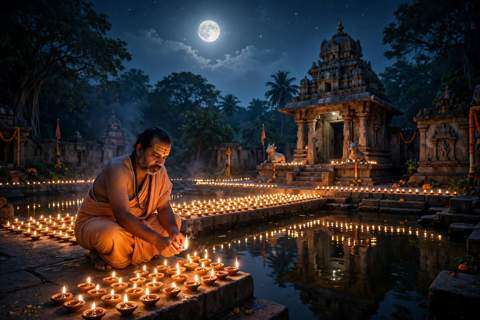
Every year, priest lighting rows of diyas around a shiva temple pond under kartik purnima moonlight becomes one of the most searched and shared festive moments in India, and in 2026 it is trending again across Instagram, WhatsApp and Facebook. People want a photo that feels real, warm and respectful — not a flat stock image, but a picture that carries the light, the colour and the emotion of the festival itself. That is exactly what this prompt is made for. It gives an AI image generator every detail it needs, from the setting and the light to the clothes, the expressions and the small objects that make the scene believable, so the result looks like a photograph taken at the perfect moment rather than something invented from nothing.
Whether you are creating a festive post for your family group, a devotional status for Gurpurab, Kartik Purnima, Dev Deepawali or Chhath Puja, a greeting card, or content for your page, this Kartik Purnima Shiva temple diyas prompt saves you hours of trial and error. You do not need to know photography terms or complicated prompt engineering. Just copy the prompt below, paste it into your favourite AI tool, and adjust one or two words if you want a different angle, a closer portrait, or a wider festival view. In this article we explain why each detail in the prompt matters, how to use it step by step, and how to get the most beautiful, shareable result on the first try.
The scene at the heart of this article — priest lighting rows of diyas around a shiva temple pond under kartik purnima moonlight — works so well because it combines three things that AI generators love: a clear subject, a strong light source, and a story the viewer understands instantly. When a viewer sees the image, they do not have to guess what is happening. They feel the devotion, the celebration and the togetherness at once. That emotional clarity is why festival photos like this one get saved, forwarded and liked far more than generic pictures, and why a well-written prompt is worth more than dozens of random attempts.
The Prompt
Copy the complete prompt below exactly as it is written, then paste it into your AI image generator. Every detail is there for a reason, from the setting to the light, so try the full version first before making changes.
A serene Kartik Purnima night at a Shiva temple pond, a priest in white dhoti and sacred thread lighting rows of small clay diyas arranged around the pond edge under bright moonlight, flames reflecting in the still water, temple tower and marigold garlands glowing softly, a few devotees praying quietly, cool blue moonlight mixed with warm diya light, photorealistic, cinematic, ultra-detailed, peaceful and sacred, no watermark
That single block is all you need. It describes priest lighting rows of diyas around a shiva temple pond under kartik purnima moonlight in full, so the generator does not have to guess the mood, the clothes or the background. If you want a variation, keep this block as your base and change only the camera angle or the time of day.
Why This Prompt Works
The first reason this prompt works is specificity. Instead of saying only a festival name, it describes priest lighting rows of diyas around a shiva temple pond under kartik purnima moonlight in concrete visual terms — who is present, what they are doing, what they are wearing, and how the light falls on the scene. AI image models perform best when they are given a complete picture in words, because every extra detail removes guesswork. Vague prompts produce vague faces and muddled backgrounds, while a detailed prompt like this one guides the model toward natural hands, realistic eyes, believable fabric and a coherent background.
The second reason is light and mood. Festivals in India are festivals of light — candles, diyas, sunrise, sunset, fire lamps and moonlight — and this prompt names that light explicitly. Warm golden tones, soft reflections on water, and gentle shadows give the image depth and make it feel cinematic rather than flat. When you describe light well, the whole photograph improves, even if you change nothing else. That is why photographers chase golden hour, and why this prompt is written around it.
The third reason is cultural accuracy. The prompt respects the tradition it shows, whether that means the seva spirit of Gurpurab, the moonlit devotion of Kartik Purnima, the grandeur of Dev Deepawali on the Ganga, or the disciplined devotion of Chhath Puja. It uses the right objects, the right setting and the right mood, so the result feels authentic to people who celebrate the festival. Authenticity matters for sharing: family members and followers can tell at a glance when a picture honours the occasion, and they are far more likely to forward it with pride.
Finally, the prompt is written to be flexible. The core scene stays the same, but you can change the camera angle, the time of day, or the number of people, and the image still holds together. That flexibility means one prompt can give you a portrait for a profile photo, a wide shot for a banner, and a warm close-up for a greeting card, all from the same starting point. Beginners get a great result immediately, and experienced creators can remix it endlessly without losing quality.
How to Use
Follow these simple steps to turn the prompt into a beautiful festive photo in just a few minutes, even if you have never used an AI image tool before.
- Copy the full prompt from the box below, including the style words at the end such as photorealistic and cinematic.
- Open your AI image generator of choice and paste the prompt into the text box.
- Choose your size: vertical for reels and status, square for a post, or wide for a banner or cover.
- Generate two or three versions and compare the faces, hands and lighting before picking a favourite.
- If needed, make one small change at a time — for example, a closer crop or warmer light — and regenerate.
- Download the best version, add your greeting text or caption, and share it with family, friends or followers.
Pro Tips
First, keep the faces natural by adding words like photorealistic and natural skin texture if your tool tends to make faces too smooth. Second, if the hands or the small objects look wrong, regenerate only that part or try a slightly simpler version of the prompt rather than changing everything at once. Third, try the same scene at two different times of day — morning light gives a fresh, hopeful feeling, while evening light gives warmth and drama — and pick the version that suits your post. Fourth, for printing or for a WhatsApp status, ask for a vertical version; for a Facebook cover or a blog banner, ask for a wide version. Fifth, always check the small details before posting: the diya flames, the flowers, the turbans and the saree patterns should look clean and respectful, because those details are what make the image feel real.
One more tip that experienced creators use: save your best version and your exact prompt text together, so you can recreate the same style next festival without starting from scratch. A small personal collection of winning prompts becomes more valuable every season, because you learn which words give you the warmest light, the most natural faces and the cleanest backgrounds. Over time, your festive posts will develop a recognisable style that friends and followers look forward to seeing.
FAQ
Can I use this prompt for free on any AI image generator?
Yes. This Kartik Purnima Shiva temple diyas prompt is free to copy and use in popular tools such as Midjourney, DALL-E, Gemini, Leonardo, Bing Image Creator and similar generators. Paste the full prompt exactly as written for the best result, then adjust the style words only if you want a different look. Each tool renders light and faces slightly differently, so trying the same prompt in two tools and picking the better image is a smart approach.
Will the image look like a real photograph?
In most modern generators, yes, especially when you keep the photorealistic and cinematic words in the prompt. The detailed description of light, clothing and setting helps the model avoid the plastic or cartoon look that vague prompts often produce. If a face looks slightly off, regenerate with the same prompt — the second or third attempt is often noticeably better — or crop a little tighter so the face fills more of the frame.
Can I change the prompt for my own family photo style?
Absolutely. You can change the age of the people, the colours of the clothes, the background, or the camera angle while keeping the festival core the same. For example, you could ask for a close-up portrait instead of a wide scene, or add your city name for a local feel. Keep the festival objects and the light description intact, because those are the parts that carry the mood, and change only one thing at a time so you can see what improved.
Is this prompt respectful for a religious festival?
Yes, it is written with respect for the tradition, focusing on devotion, service, family and celebration rather than on spectacle alone. When you share the image, add a kind caption or a greeting in your own words, and avoid adding humorous or unrelated text over a devotional scene. A respectful caption helps the image travel further in family groups and community pages, where people value sincerity over jokes.
This Kartik Purnima Shiva temple diyas prompt captures priest lighting rows of diyas around a shiva temple pond under kartik purnima moonlight with warmth, devotion and cinematic beauty, and it is ready to copy, create and share for the 2026 festival season. Try it today, pick your favourite version, and let your festive photo tell the story of the celebration itself.
Related Viral Prompts
Kartik Purnima 2026 Woman Leaf Boat Flowers Diya River Dusk
Kartik Purnima 2026 Holy Dip Devotees River Sunrise Chanting
Dev Deepawali 2026 Varanasi Ghats Thousands Diyas Boats Ganga
#DevDeepawali #KartikPurnima #AIPhotoPrompt #ViralPrompt #PromptBazar


Leave a Reply