
Introduction
Every year, Karthigai Deepam brings families, devotees and entire neighbourhoods together, and this AI photo prompt is designed to capture that atmosphere in a single, powerful portrait.
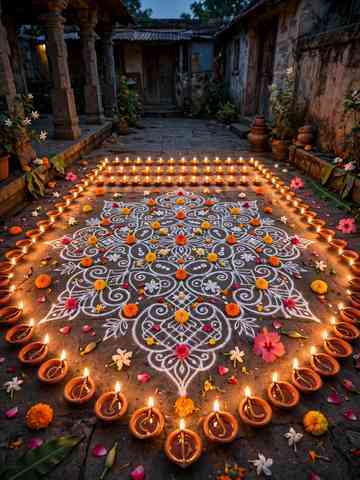
This article gives you a ready-to-copy prompt for radiant portrait of a courtyard kolam surrounded by rows of glowing oil lamps at dusk, flowers. Whether you want a profile picture, a festive post for Instagram or WhatsApp status, or a beautiful keepsake to share with family, this prompt is built to produce a clean, emotional and photorealistic result on the first try. You do not need photography skills or editing experience. Just copy the prompt, paste it into your favourite AI image tool, and let the tool do the work. In the sections below, you will also learn why this prompt works so well, how to use it step by step, and how to customise it for your own face, family or style.
What makes this prompt special is its attention to real detail. It does not ask for a generic festival picture. It asks for specific light, specific textures and specific human emotion, so the result feels like a moment that actually happened rather than an image that was generated. That is the difference between a photo people glance at and a photo people save, share and comment on. Read the full prompt carefully, try it once exactly as written, and then use the pro tips at the end of this article to make your second version even better.
The Prompt
Copy the complete prompt below exactly as written. It is designed to work in most popular AI image tools without any editing.
Create a hyper-realistic, photorealistic portrait photograph showing radiant portrait of a courtyard kolam surrounded by rows of glowing oil lamps at dusk, flowers. Capture the scene during Karthigai Deepam, with authentic festive details, natural human expressions, and true-to-life colours. Use warm, cinematic lighting that flatters every face and makes lamps, flowers, fabrics and decorations glow softly without looking artificial. Compose the image as a vertical portrait with the main subject in sharp focus in the foreground and a beautifully blurred festive background that still tells the story of the celebration. Shot on an 85mm portrait lens at f/1.8, with gentle depth of field, natural skin tones, realistic fabric texture, fine detail in jewellery, diyas, garlands and decorations, and balanced exposure. Avoid cartoon effects, distorted hands or faces, extra fingers, warped text, oversaturated colours and plastic-looking skin. The final image should look like a professional photograph taken at a real Karthigai Deepam celebration, emotional, respectful, warm and instantly shareable on social media, in ultra-detailed 8K quality.
Why This Prompt Works
Great AI prompts work because they are specific. This prompt tells the image tool exactly what to show, how it should feel, and what it must avoid, so there is very little left to chance.
First, it anchors the image in a real celebration. By describing radiant portrait of a courtyard kolam surrounded by rows of glowing oil lamps at dusk, flowers, it gives the AI a clear subject, a clear setting and a clear mood. Vague prompts produce vague pictures, but a prompt rooted in Karthigai Deepam produces a picture with a story, and stories are what make festival photos memorable.
Second, it controls light and colour. Festival photography lives or dies on light, whether it is the warm glow of diyas, the golden light of dawn, or the soft lamps of an evening celebration. This prompt asks for warm, cinematic lighting and natural skin tones, so faces look alive and the festive background glows without turning harsh or artificial.
Third, it controls the camera language. Mentioning an 85mm portrait lens, a wide aperture and gentle depth of field tells the tool to behave like a professional portrait photographer. The subject stays tack-sharp while the background melts into a soft blur, which is exactly the look that performs best on social media.
Finally, it lists what to avoid. Negative guidance about distorted hands, plastic skin and oversaturated colour is just as important as positive guidance. By ruling out the most common AI mistakes in advance, this prompt protects your result and saves you from generating the same image five times before you get one you like.
How to Use
Using this prompt takes less than five minutes. Follow these steps in order, and keep the prompt exactly as written for your first attempt.
- Copy the full prompt from the box above, including every detail about light, lens and mood, because each line shapes the final image.
- Open your favourite AI image generator, such as Midjourney, DALL-E, Gemini, Meta AI or any photo app that accepts text prompts.
- Paste the prompt into the image prompt box and, if the tool allows it, choose a portrait or vertical size so the photo fits phone screens and social media perfectly.
- If you want your own face in the picture, upload a clear front-facing photo of yourself and add a short line like ‘use my face and hairstyle’ before generating.
- Generate the image and wait for the tool to finish. Do not rush this step, because the best detail appears when the tool has time to render light and texture properly.
- Review the result closely. Check the face, hands, jewellery, diyas and background for errors, and if something looks wrong, regenerate once with the same prompt before changing anything.
- Download your favourite version, share it as your festive post or profile picture, and credit the festival in your caption so friends and family feel the celebration too.
Pro Tips
These small tips can turn a good festival photo into a great one.
Keep the festival details authentic. Real marigolds, real diyas, real fabrics and real expressions always look better than exaggerated or fantasy versions of Karthigai Deepam.
Try the prompt twice: once exactly as written, and once with one small change, such as evening light instead of morning light, so you can compare and pick the stronger photo.
If the face does not look like you, use a clearer reference photo with good lighting and a neutral expression, and keep the rest of the prompt unchanged.
For WhatsApp status or Instagram stories, crop the portrait slightly tighter on the face. For a feed post, keep the full vertical frame so the festive background stays visible.
Add a short, heartfelt caption in your own words when you post. A real caption about Karthigai Deepam makes an AI photo feel personal instead of generic.
FAQ
Can I use this Karthigai Deepam prompt for free?
Yes. The prompt in this article is free to copy and use for your personal festive photos, profile pictures and social media posts. You can use it as many times as you like, and you can adapt it for family members or friends who also want a Karthigai Deepam portrait.
Will the photo look like a real photograph?
Yes, that is the goal of this prompt. It asks for photorealistic detail, natural skin tones, professional portrait lighting and realistic textures, so the result should look like a photograph taken at a real celebration. Results vary slightly by tool, so try the prompt in two different tools if the first result is not perfect.
Can I change the background or outfit in this prompt?
Absolutely. Once you have a good base image, you can change one element at a time, such as the outfit colour, the time of day or the background decorations. Changing only one thing at a time keeps the rest of the image stable and makes it easier to get exactly the look you want.
Why does my AI photo sometimes look unnatural?
Unnatural results usually come from vague prompts, low-quality reference photos or too many changes at once. Use a clear reference photo, keep this detailed prompt intact, and avoid asking for extreme poses or impossible lighting. If a hand or face looks wrong, simply regenerate the image with the same prompt.
Festivals like Karthigai Deepam are about light, devotion and togetherness, and the best festival photo is the one that makes people feel they were there with you. Copy this prompt, create your portrait, and share the warmth of the celebration with everyone you love.
Related Viral Prompts
#KarthigaiDeepam #TamilFestival #FestivalOfLamps #KolamArt #AIPhotoPrompt


Leave a Reply