
Introduction
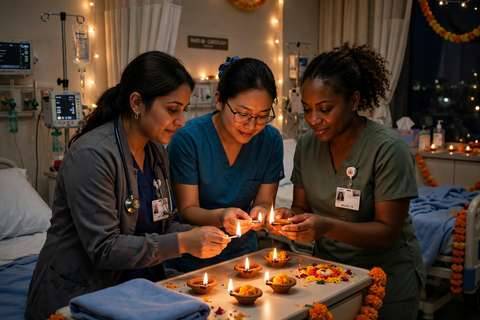
While most of us celebrate Diwali at home with family, thousands of nurses and hospital staff spend the festival night on duty, caring for patients under fluorescent lights instead of fairy lights. Yet even in a hospital ward, Diwali finds a way: a few small diyas on a windowsill, a shared box of sweets at the nurses station, and smiles exchanged between colleagues who have become family. This prompt honours those quiet heroes with a touching portrait of nurses lighting diyas in a ward on Diwali night.
This image is a tribute to everyone who works through festivals so others can be safe and cared for. Whether you are a healthcare worker, want to thank the nurses in your life, or wish to create a meaningful Diwali post, this prompt is ready to use. Below you will find the full prompt, why it works, and tips to make it respectful and realistic.
The Prompt
Copy the full prompt below and paste it into your favourite AI image generator. It is written to work with tools like Midjourney, DALL-E, Gemini, Leonardo AI and Meta AI, and you can adjust the names, colours and details to match your own celebration.
Photorealistic touching portrait of kind Indian nurses in uniform lighting small clay diyas in a hospital ward on Diwali night, two nurses smiling gently as they place diyas on a windowsill, soft warm diya glow contrasting with the cool hospital lights, a small plate of sweets on the nurses station, marigold garland on the door, patients beds softly visible in the background, festive spirit mixed with professional care, compassionate expressions, detailed uniforms and diyas, realistic hospital setting, cinematic warm and cool lighting contrast, sharp details, high resolution, 4k photography style
Why This Prompt Works
This prompt works because it uses contrast to tell its story. The warm glow of small diyas against the cool, clinical light of a hospital ward instantly communicates the theme: Diwali celebrated in an unexpected place, by people who put duty before festivity. That lighting contrast is also visually striking, giving the image a cinematic quality that draws the eye straight to the nurses and their diyas. The small plate of sweets and the marigold garland add just enough festivity without making the ward look unrealistically decorated.
The prompt also keeps the focus on compassion. Gentle smiles, careful hands placing diyas, and patients beds softly visible in the background all reinforce that these are caregivers first, celebrating second. Describing realistic uniforms and a believable ward prevents the AI from turning the scene into a glamorous set, and the result is a portrait that feels honest, respectful and deeply moving.
How to Use
Follow these simple steps to turn the prompt into a picture you will love sharing:
- Copy the full prompt from the box above, including every detail about the lighting, clothes and setting.
- Open your AI image tool of choice, such as Midjourney, DALL-E, Gemini, Leonardo AI or Meta AI, and paste the prompt into the text box.
- If the tool lets you upload a photo, add your own picture first so the result looks like you and your family.
- Generate the image, then look closely at the faces, hands and festive details before accepting it.
- If anything looks off, change one or two words at a time, for example the colour of an outfit or the time of day, and generate again.
- Download the best version in the highest quality available and share it on WhatsApp, Instagram or Facebook with your Diwali wishes.
Pro Tips
These small tweaks make a big difference to the final result:
- Keep decorations modest in your edits: a few diyas and one garland are realistic for a ward, while a fully decorated hospital would look staged.
- Ask for ‘a nurse in a white coat holding a diya’ as a single focal figure if you want a simpler, more powerful composition.
- Add ‘a thank-you card from patients’ on the nurses station for an extra emotional detail.
- If the ward looks too dark or too bright, adjust the balance by asking for ‘soft warm diya light in a calm night ward’.
- Use the finished image to thank healthcare workers publicly this Diwali; a kind caption makes the tribute complete.
FAQ
Are real diyas allowed inside hospital wards?
Open flames are usually restricted in hospitals for safety reasons, so real diyas are often replaced with electric or battery-operated ones. This AI image captures the spirit of the tradition safely, and if you want to thank hospital staff in real life, sweets, cards and kind words are always welcome and always safe.
Can I dedicate this image to a specific nurse or doctor?
Yes. Generate the portrait, then add a dedication caption naming the person you want to thank. The image itself stays generic, which is appropriate, while your words make the tribute personal and heartfelt.
Is this prompt free to use?
Yes, this prompt is completely free to use. You can copy it, change it and generate as many images as you like for personal sharing. If your AI tool has a paid plan, only the tool itself may charge you, never the prompt.
Which AI image generator works best with this prompt?
This prompt is written in plain, descriptive language, so it works well on almost every popular generator, including Midjourney, DALL-E, Gemini, Leonardo AI and Meta AI. Midjourney usually gives the most cinematic lighting, while Gemini and Meta AI are the easiest free options for quick festive portraits.
To every nurse, doctor and hospital worker spending Diwali on duty: thank you for being the light in someone’s darkest night. Use this prompt to honour them, and may your Diwali be blessed with health and gratitude. Happy Diwali!
Related Viral Prompts
- Diwali 2026 Office Party AI Photo Prompt: A Cheerful Portrait of Colleagues in Ethnic Wear Celebrating With Diyas and Sweets at Work
- Kali Puja 2026 Night AI Photo Prompt: A Powerful Portrait of Devotees Worshipping Goddess Kali With Red Hibiscus Flowers and Diyas
- Diwali 2026 Sky Lanterns AI Photo Prompt: A Magical Portrait of a Family Releasing Glowing Paper Lanterns Into the Night Sky Together
#Diwali2026 #Nurses #HospitalHeroes #AIPhotoPrompt #ThankYou


Leave a Reply