
Introduction
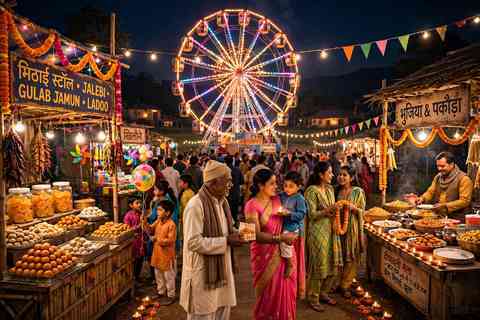
Nothing says Diwali in rural India quite like the village fair. As night falls, the ferris wheel lights up the sky, sweet stalls fill the air with the smell of jalebis and ladoos, children run laughing between the rides, and the whole village seems to gather in one noisy, joyful place. This prompt captures that lively, colourful chaos in a single portrait, a celebration that feels big, warm and wonderfully alive.
Village fairs are where many of our happiest Diwali memories are made, from winning a small prize at a game stall to sharing hot jalebis with cousins under the lights. Whether you want to relive those memories or share the spirit of rural Diwali with friends online, this prompt gives you a detailed, ready-to-use description. Read on for the full prompt, why each detail matters, and tips to make the fair feel like your own village.
The Prompt
Copy the full prompt below and paste it into your favourite AI image generator. It is written to work with tools like Midjourney, DALL-E, Gemini, Leonardo AI and Meta AI, and you can adjust the names, colours and details to match your own celebration.
Photorealistic lively portrait of a rural Indian village fair on Diwali night, a large ferris wheel covered in colourful lights towering in the background, crowded sweet stalls selling jalebis, ladoos and barfi, happy villagers in festive clothes walking between stalls, children laughing and holding balloons and candy floss, strings of fairy lights crisscrossing above the crowd, a small merry-go-round glowing nearby, warm festive colours of red, gold and green everywhere, night sky with fireworks, joyful bustling atmosphere, realistic crowd details, natural expressions, cinematic night lighting, sharp details, high resolution, 4k photography style
Why This Prompt Works
This prompt works because it layers the fair in the right order: the ferris wheel first, as the towering landmark that instantly says ‘fair’, then the sweet stalls and crowds in the middle ground, and finally small human details like balloons and candy floss that make the scene feel lived-in. The colour palette, red, gold and green, is the classic Diwali combination, and repeating it across lights, clothes and stalls gives the image a cohesive festive look instead of a random jumble of colours.
The prompt also asks for realistic crowd details and natural expressions, which matters because AI tools often turn crowds into blurry, faceless masses. By naming specific activities, children laughing, villagers walking between stalls, the generator has clear actions to render, so the crowd looks like real people enjoying a real fair. Cinematic night lighting ties everything together, letting the ferris wheel lights and fireworks glow against the dark sky.
How to Use
Follow these simple steps to turn the prompt into a picture you will love sharing:
- Copy the full prompt from the box above, including every detail about the lighting, clothes and setting.
- Open your AI image tool of choice, such as Midjourney, DALL-E, Gemini, Leonardo AI or Meta AI, and paste the prompt into the text box.
- If the tool lets you upload a photo, add your own picture first so the result looks like you and your family.
- Generate the image, then look closely at the faces, hands and festive details before accepting it.
- If anything looks off, change one or two words at a time, for example the colour of an outfit or the time of day, and generate again.
- Download the best version in the highest quality available and share it on WhatsApp, Instagram or Facebook with your Diwali wishes.
Pro Tips
These small tweaks make a big difference to the final result:
- Name your favourite fair attraction, like a giant wheel, a toy train or a magic show tent, to make the scene match your own village fair.
- Ask for ‘a child holding a balloon in the foreground’ if you want a strong focal point that draws the eye into the crowd.
- Keep the crowd description joyful and busy, but not overcrowded, so faces stay clear and natural in the final image.
- If the ferris wheel looks distorted, simplify it to ‘a ferris wheel with round cabins and colourful lights’ and generate again.
- Use the finished image as a nostalgic Diwali post celebrating the simple joys of village festivals.
FAQ
Can I add my own village name or a specific fair to this prompt?
Yes. Add a line like ‘a village fair in rural Bengal’ or mention your district, and the AI will adjust small details such as clothing styles and stall types. The ferris wheel, sweet stalls and festive lights will still anchor the scene beautifully.
Why do AI images sometimes make crowds look strange?
Crowds are one of the hardest things for AI to render, because every face and body needs to look natural at once. This prompt helps by describing specific, simple actions for the crowd, and generating two or three versions lets you pick the one where the people look most believable.
Is this prompt free to use?
Yes, this prompt is completely free to use. You can copy it, change it and generate as many images as you like for personal sharing. If your AI tool has a paid plan, only the tool itself may charge you, never the prompt.
Which AI image generator works best with this prompt?
This prompt is written in plain, descriptive language, so it works well on almost every popular generator, including Midjourney, DALL-E, Gemini, Leonardo AI and Meta AI. Midjourney usually gives the most cinematic lighting, while Gemini and Meta AI are the easiest free options for quick festive portraits.
The village fair is Diwali at its loudest, brightest and happiest. Copy this prompt, step into the lights and laughter of the fair, and share a picture that smells of jalebis and sounds like celebration. Happy Diwali!
Related Viral Prompts
- Diwali 2026 Office Party AI Photo Prompt: A Cheerful Portrait of Colleagues in Ethnic Wear Celebrating With Diyas and Sweets at Work
- Kali Puja 2026 Night AI Photo Prompt: A Powerful Portrait of Devotees Worshipping Goddess Kali With Red Hibiscus Flowers and Diyas
- Diwali 2026 Sky Lanterns AI Photo Prompt: A Magical Portrait of a Family Releasing Glowing Paper Lanterns Into the Night Sky Together
#Diwali2026 #VillageFair #FerrisWheel #AIPhotoPrompt #RuralIndia


Leave a Reply