
Introduction
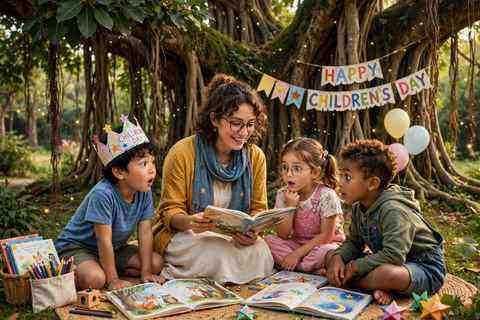
If you have ever wished for a photograph that looks like it was taken by a professional at just the right second, this prompt gets you there. Picture a kind teacher reading aloud from a picture book to a circle of wide-eyed children at beneath the spreading branches of a huge old banyan tree in a school garden, where every small detail, from the light to the expressions, tells a story without a single word. That is the photograph this prompt creates, and it is why it is already catching on with people who love sharing seasonal, heartfelt pictures online.
This guide gives you everything in one place: the complete prompt, the thinking behind it, and easy steps to turn it into a share-worthy picture. The scene itself is wonderfully specific: A magical Children’s Day portrait of a teacher reading stories to wide-eyed kids under a big banyan tree, picture books open, photorealistic. Rather than a vague idea, you get a complete moment with a clear subject, a real setting and an atmosphere you can almost step into. When an AI image tool receives that level of detail, it does not have to guess, and the result looks far more believable.
What makes this kind of image so shareable is its warmth. People do not just double-tap a pretty picture; they react to something that reminds them of their own family, their own celebrations and their own quiet mornings. Because the mood here is magical, calm and full of wonder, the photograph feels personal even to strangers, and that emotional pull is what turns an ordinary AI picture into one that gets saved, forwarded and recreated.
Whether you want a profile picture, a festive greeting card image, a social media post or simply a beautiful picture to keep, this prompt gives you a strong starting point. You do not need photography skills, expensive equipment or editing software. You only need to copy the prompt, paste it into your favourite AI tool, and let the scene come to life in seconds.
The Prompt
Copy the complete prompt below exactly as it is written. It is written in one block on purpose, so you can select it all at once and paste it without missing a detail. Every phrase in it has a job: the realism words keep the picture believable, the lighting words set the mood, and the framing words keep the subject beautifully placed in the centre of the frame.
Before you paste it, read it once through so you know what to expect. Notice how it describes the subject first, then the place, then the light and the feeling. That order helps the AI tool build the picture in layers, starting with who is in it and ending with the atmosphere that wraps around them.
Ultra-realistic high-resolution photograph of a kind teacher reading aloud from a picture book to a circle of wide-eyed children at beneath the spreading branches of a huge old banyan tree in a school garden. Cinematic lighting, sharp focus, natural skin texture, a magical, calm and full of wonder festive atmosphere, balanced portrait framing, softly blurred bokeh background, professional DSLR quality, photorealistic, Instagram-ready, no text or watermark. Details include open picture books, fallen leaves, dappled sunlight and curious little faces, realistic colours, gentle depth of field, and a natural, candid expression that feels like a real moment caught on camera.
Once you have pasted the prompt, you can generate the image straight away, or you can make one small change first, such as swapping the time of day or adding a colour you love. Small changes are fine, but try the original version first, because it has been balanced to give a clean, natural result without strange artefacts or crowded backgrounds.
Why This Prompt Works
The first reason this prompt works so well is its specificity. It does not say merely a person or a celebration; it describes a kind teacher reading aloud from a picture book to a circle of wide-eyed children at beneath the spreading branches of a huge old banyan tree in a school garden. AI image tools perform best when they are given a concrete subject, a concrete setting and a concrete action, because each of those details narrows down the possibilities and reduces the chance of a confusing or generic result.
The second reason is the lighting and texture language. Phrases like cinematic lighting, sharp focus and natural skin texture tell the tool to aim for a photograph rather than a painting or a cartoon. That matters enormously for portraits, because our eyes are very good at spotting skin that looks too smooth, light that looks too flat, or edges that look too soft. By asking for realistic texture and professional DSLR quality, the prompt pushes the result toward something that could pass for a real camera photograph.
The third reason is composition. Balanced portrait framing with a softly blurred bokeh background keeps the attention exactly where it belongs, on the people and the moment, while the background melts away into gentle colour. Including open picture books, fallen leaves, dappled sunlight and curious little faces adds richness without clutter, because those props are part of the story rather than random objects. They give the eye something to explore after the first glance, which makes the picture feel layered and real.
Finally, the mood does quiet but powerful work. Describing the atmosphere as magical, calm and full of wonder guides everything from facial expressions to colour tones. A warm, joyful scene will come out with softer light and happier expressions, while a moody scene will come out with deeper shadows and a more cinematic feel. When subject, setting, light and mood all point in the same direction, the final image feels coherent, and coherence is what makes people believe a photograph, even when they know it was made with AI.
How to Use
Using this prompt takes less than a minute, even if you have never made an AI picture before. Follow the steps below in order, and you will have a finished image ready to download and share.
1. Open your preferred AI image generator, such as a popular phone app or a web-based tool, and start a new image creation. Make sure you are in image mode rather than text or video mode, so the tool treats your input as a picture description.
2. Copy the full prompt from the box above, including the details about a kind teacher reading aloud from a picture book to a circle of wide-eyed children. Paste it into the prompt field in one go, and check that nothing has been cut off at the beginning or the end, because a missing phrase can change the lighting or the framing.
3. If your tool offers a size or ratio option, choose portrait orientation for a profile picture or story, or a square format for a feed post. Portrait framing suits this scene particularly well, because it keeps the subject large and the background beautifully soft.
4. Press generate and wait for the first result. Look closely at the faces, the hands and the background details, especially open picture books, fallen leaves, dappled sunlight and curious little faces, and decide whether the picture feels natural. If something looks odd, generate again with the same prompt, because a second attempt often fixes small glitches.
5. If you want a personal touch, change just one element at a time, for example the colour of an outfit or the time of day, and generate again. Changing one thing at a time helps you understand what each word does, and it stops the picture from drifting too far from the original idea.
6. Download the version you like best at the highest quality your tool allows, and save it with a clear name so you can find it later. Avoid heavy filters at this stage, because the prompt already includes cinematic lighting and balanced colour.
7. Share it with a short, honest caption about the moment, or use it as a festive greeting, a profile picture or a printed keepsake. A simple caption that mentions the occasion works better than a long explanation, because the picture itself already tells the story.
Pro Tips
A few small habits separate a good AI photograph from a great one, and they all apply beautifully to this scene. Keep these tips in mind, and your result will look noticeably more polished.
- Generate three or four versions before choosing, because the same prompt can produce slightly different expressions and lighting, and the best version is often the second or third one.
- Keep the background description intact, especially the softly blurred bokeh part, because a sharp, busy background is the fastest way to make a portrait look artificial.
- Pay attention to hands and faces in your chosen version, since those are the details viewers notice first, and pick the version where they look most natural.
- Use the picture at the size it was made for, rather than stretching it, so the framing and the proportions stay true to the original composition.
- Add your own caption or greeting text after generation, instead of asking the AI tool to write words inside the picture, because AI text inside images often comes out misspelled.
- If you are making a series of pictures for the same occasion, reuse the same lighting and framing phrases so the whole set feels consistent, like photographs from the same day.
One more tip that many people overlook is to generate in good light, metaphorically speaking: do not rush the first attempt. Let the tool finish fully, view the result at full size rather than as a tiny thumbnail, and only then decide whether to keep it or try again. That patience pays off, especially for a scene as detailed as a kind teacher reading aloud from a picture book to a circle of wide-eyed children.
FAQ
Can I use this prompt for free in any AI image tool?
Yes, you can paste this prompt into most popular AI image generators, whether they are free or paid. The wording is plain and descriptive, so it works across tools, although the exact style may vary slightly from one tool to another.
Will the picture look like a real photograph?
It is designed to look photorealistic, thanks to the DSLR quality, natural skin texture and cinematic lighting phrases. Results can still vary, so generate a few versions and choose the one where faces, hands and background blur look most natural.
Can I change the prompt to suit my own photo?
Absolutely. You can change an outfit colour, the time of day or a small prop while keeping the main scene, and the picture will still work well. Change one element at a time so you can see what difference each edit makes.
Is this prompt good for social media posts and greetings?
Yes, it is ideal for that purpose. The scene is warm, clear and instantly understandable, the framing suits stories and feed posts, and the Instagram-ready finish means it looks polished without extra editing.
In the end, a great AI photograph is not about complicated technology, it is about a clear moment, honest emotion and light that flatters the subject. This prompt brings all three together in a single, copy-ready block, so whether you are celebrating, remembering or simply sharing a beautiful scene, you can create something that feels real, looks stunning and is ready to share in under a minute.
Related Viral Prompts
If you enjoyed this prompt, you will love these other trending prompts from the same collection, each one built with the same photorealistic style and ready to copy.
- World Diabetes Day 2026 AI Photo Prompt: A Healthy Portrait of a Family Walking Together in a Park Wearing Blue for Diabetes Awareness
- Constitution Day 2026 AI Photo Prompt: A Proud Portrait of Students Reading the Preamble Together in a School Assembly Hall
- National Milk Day 2026 AI Photo Prompt: A Wholesome Portrait of a Child Drinking a Glass of Milk Beside a Village Dairy Farm
#Childrens #Day #Storytelling #Teacher #Aiphoto


Leave a Reply