
Introduction
Diwali is the festival of lights, and the best Diwali photos are the ones that glow — literally and emotionally. The Diwali 2026 Grandparents Blessing prompt is designed to do exactly that. It packs a complete festive scene into one detailed instruction, so AI tools can render a photorealistic image full of golden light, rich colours and genuine festive joy.
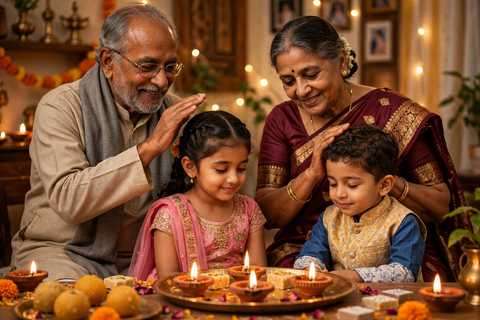
Below you will find the full prompt, ready to copy and paste, plus a simple guide to using it and pro tips for making the result even better. The scene at the heart of this prompt is: a heartwarming portrait of grandparents blessing grandchildren during diwali, diyas and sweets on a brass plate, warm home light, photorealistic. Whether you want a portrait for yourself, a greeting image for loved ones, or viral content for your page, this prompt is your shortcut to a stunning Diwali photo.
The Prompt
Copy the complete prompt below and paste it into Gemini, ChatGPT or your favourite AI image generator:
Create a stunning, ultra-realistic, high-resolution photograph based on this scene: A heartwarming portrait of grandparents blessing grandchildren during Diwali, diyas and sweets on a brass plate, warm home light, photorealistic. Use cinematic lighting with rich warm tones, sharp focus on the main subject, natural skin texture and realistic expressions. Capture the festive atmosphere in vivid detail — decorations, colours, lights and emotions should feel alive and authentic. Composition: balanced portrait framing, softly blurred background bokeh, professional DSLR quality, 85mm lens look, shallow depth of field. Style: photorealistic, Instagram-ready, no text or watermark, no distortion, natural colours, 4K detail.
Why This Prompt Works
Great prompts are specific, and this one is specific in all the right places. It names the occasion, the subjects, the decorations and the lighting, so the AI does not have to guess. When the generator has clear anchors, it spends its effort on quality — realistic faces, natural light falloff, believable shadows — instead of inventing random elements.
The prompt also triggers the festive mood that makes Diwali content perform so well online. Warm light and joyful expressions create an instant emotional connection, which is exactly what drives likes, shares and comments. In short, this prompt does not just make a pretty picture; it makes a picture people want to engage with.
Lastly, the style keywords at the end — photorealistic, professional quality, no watermark, natural colours — act as quality control. They filter out the flat, artificial look that weaker prompts often produce, and push the output toward something you would proudly post or print.
How to Use This Prompt
Follow these simple steps to create your image:
- Open your favourite AI image generator — Google Gemini, ChatGPT image generation, or any tool that creates photos from text.
- Copy the entire prompt from the box above, exactly as written, and paste it into the image prompt field.
- If you want the image to feature you or someone else, add a short line at the end, such as ‘use the face from my uploaded photo’ or ‘a young woman with long black hair’, and upload a clear reference photo if the tool supports it.
- Choose portrait orientation if you plan to post it as a Reel cover, story or WhatsApp status; choose landscape for a Facebook post or greeting card.
- Tap generate and wait a few seconds. If the first result is not perfect, change one detail — the outfit colour, the background, or the lighting — and generate again.
- Download your favourite version, and optionally enhance it with a light warm filter or slight brightness boost before posting.
Pro Tips
Use these tips to get the best possible result from this prompt:
- Add your own face: upload a clear, front-facing photo and mention it in the prompt for a personalised portrait.
- Keep the warm tones: avoid cool or blue filters, which can kill the festive Diwali glow.
- Try variations: change the outfit colour, the time of day, or the background to create a whole set of images from one prompt.
- Use the right size: portrait 4:5 works best for Instagram feed posts, while 9:16 is ideal for stories and Reels.
- Post at peak time: festive images perform best in the evening, when people are scrolling and celebrating.
- Add a caption with feeling: pair the image with a short Diwali wish or a personal memory for more engagement.
FAQ
Can I use this prompt for free in Gemini or ChatGPT?
Yes. Both Gemini and ChatGPT support text-to-image generation, and this prompt is written to work in either tool. Just copy the full prompt, paste it, and generate. Some advanced features, like face reference from your own photo, may depend on the plan or version you are using.
Will the image look like a real photograph?
In most cases, yes. The prompt specifically asks for photorealistic quality, natural skin texture, DSLR-style framing and realistic lighting. Results can still vary slightly between tools, so if one output looks too artificial, regenerate it or add the words ‘ultra-realistic, natural lighting’ for extra emphasis.
Can I change the prompt to feature my family or friends?
Absolutely. The prompt is a template. You can change the people, outfits, setting or decorations to match your own celebration. Keep the structure — scene, lighting, mood and style — and only swap the details you want to personalise.
Is it safe to post AI-generated festive photos on social media?
Yes, AI-generated festive portraits are widely shared on Instagram, Facebook and WhatsApp. If the image uses your own face, it is your content. If you post it publicly, it is good practice to mention that it is AI-generated, especially when it looks extremely realistic.
Conclusion
The Diwali 2026 Grandparents Blessing prompt is your shortcut to a glowing, festive, photorealistic Diwali image that looks like it was captured at a real celebration. Copy the prompt, make it your own with a few personal touches, and share the warmth of Diwali with everyone you love. Happy Diwali, and happy creating!
Related Viral Prompts
You may also like these trending prompts:
- Diwali 2026 Pet in Festive Wear AI Photo Prompt: An Adorable Portrait of a Dog Wearing a Tiny Kurta Beside Glowing Diyas
- Diwali 2026 Diya Lighting AI Photo Prompt: A Magical Family Portrait Glowing With Hundreds of Warm Clay Diyas at Dusk
- Diwali 2026 Fireworks Skyline AI Photo Prompt: A Breathtaking City Rooftop Portrait Under Bursting Gold and Pink Fireworks
#Diwali2026 #DiwaliPhotoPrompt #AIPhotoPrompt #FestiveVibes #PromptBazar


Leave a Reply