
Introduction
If your social media feed is already glowing with Diwali photos, you know how hard it is to stand out. The Diwali 2026 Metro City Lights prompt solves that problem by giving the AI a complete, vivid scene to work with instead of a vague idea. The result is a photograph that feels real — warm light on smiling faces, festive colours everywhere, and a mood that instantly says celebration.
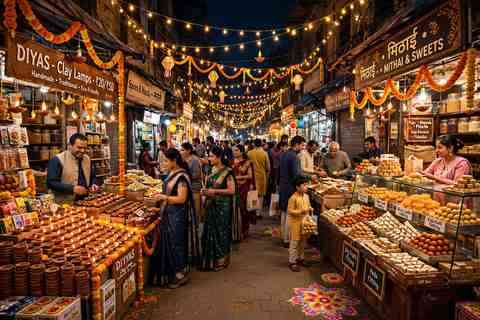
This article gives you the full ready-to-use prompt for this exact scene: a vibrant festive market street glowing with diwali lights, stalls selling diyas and sweets, happy crowds shopping at night, photorealistic. You will also learn why each part of the prompt matters, how to use it step by step in Gemini or ChatGPT, and how to tweak it so the final image looks personal and unique. No photography skills needed — just copy, paste and watch the magic happen.
The Prompt
Copy the complete prompt below and paste it into Gemini, ChatGPT or your favourite AI image generator:
Create a stunning, ultra-realistic, high-resolution photograph based on this scene: A vibrant festive market street glowing with Diwali lights, stalls selling diyas and sweets, happy crowds shopping at night, photorealistic. Use cinematic lighting with rich warm tones, sharp focus on the main subject, natural skin texture and realistic expressions. Capture the festive atmosphere in vivid detail — decorations, colours, lights and emotions should feel alive and authentic. Composition: balanced portrait framing, softly blurred background bokeh, professional DSLR quality, 85mm lens look, shallow depth of field. Style: photorealistic, Instagram-ready, no text or watermark, no distortion, natural colours, 4K detail.
Why This Prompt Works
The secret of this prompt is its balance of detail and freedom. It describes the scene precisely — the people, the setting, the lights, the mood — but it leaves small creative choices, like exact poses and background elements, to the AI. That balance produces images that feel both intentional and natural, never stiff or over-posed.
It also works because it leans on what AI generators do best: warm light, rich colour and festive detail. Diwali scenes are full of golds, reds, oranges and marigold yellows, and those colours render beautifully in modern image models. Combined with the photorealistic style instruction, the result is an image that looks ready for Instagram, WhatsApp status or a printed greeting card.
Another strength is its versatility. You can keep the prompt exactly as written for a classic result, or swap one or two details — a different outfit colour, a different background, your own face reference — and get a fresh image every time. That flexibility is why this style of prompt keeps going viral year after year.
How to Use This Prompt
Follow these simple steps to create your image:
- Open your favourite AI image generator — Google Gemini, ChatGPT image generation, or any tool that creates photos from text.
- Copy the entire prompt from the box above, exactly as written, and paste it into the image prompt field.
- If you want the image to feature you or someone else, add a short line at the end, such as ‘use the face from my uploaded photo’ or ‘a young woman with long black hair’, and upload a clear reference photo if the tool supports it.
- Choose portrait orientation if you plan to post it as a Reel cover, story or WhatsApp status; choose landscape for a Facebook post or greeting card.
- Tap generate and wait a few seconds. If the first result is not perfect, change one detail — the outfit colour, the background, or the lighting — and generate again.
- Download your favourite version, and optionally enhance it with a light warm filter or slight brightness boost before posting.
Pro Tips
Use these tips to get the best possible result from this prompt:
- Add your own face: upload a clear, front-facing photo and mention it in the prompt for a personalised portrait.
- Keep the warm tones: avoid cool or blue filters, which can kill the festive Diwali glow.
- Try variations: change the outfit colour, the time of day, or the background to create a whole set of images from one prompt.
- Use the right size: portrait 4:5 works best for Instagram feed posts, while 9:16 is ideal for stories and Reels.
- Post at peak time: festive images perform best in the evening, when people are scrolling and celebrating.
- Add a caption with feeling: pair the image with a short Diwali wish or a personal memory for more engagement.
FAQ
Can I use this prompt for free in Gemini or ChatGPT?
Yes. Both Gemini and ChatGPT support text-to-image generation, and this prompt is written to work in either tool. Just copy the full prompt, paste it, and generate. Some advanced features, like face reference from your own photo, may depend on the plan or version you are using.
Will the image look like a real photograph?
In most cases, yes. The prompt specifically asks for photorealistic quality, natural skin texture, DSLR-style framing and realistic lighting. Results can still vary slightly between tools, so if one output looks too artificial, regenerate it or add the words ‘ultra-realistic, natural lighting’ for extra emphasis.
Can I change the prompt to feature my family or friends?
Absolutely. The prompt is a template. You can change the people, outfits, setting or decorations to match your own celebration. Keep the structure — scene, lighting, mood and style — and only swap the details you want to personalise.
Is it safe to post AI-generated festive photos on social media?
Yes, AI-generated festive portraits are widely shared on Instagram, Facebook and WhatsApp. If the image uses your own face, it is your content. If you post it publicly, it is good practice to mention that it is AI-generated, especially when it looks extremely realistic.
Conclusion
The Diwali 2026 Metro City Lights prompt is your shortcut to a glowing, festive, photorealistic Diwali image that looks like it was captured at a real celebration. Copy the prompt, make it your own with a few personal touches, and share the warmth of Diwali with everyone you love. Happy Diwali, and happy creating!
Related Viral Prompts
You may also like these trending prompts:
- Diwali 2026 Grandparents Blessing AI Photo Prompt: A Heartwarming Portrait of Grandparents Blessing Grandchildren With Diyas
- Diwali 2026 Midnight Firecracker-Free Sky AI Photo Prompt: A Calm Rooftop Portrait of Friends Watching a Starry Diwali Night
- Diwali 2026 Rangoli Art AI Photo Prompt: A Colourful Courtyard Portrait of a Girl Drawing a Giant Peacock Rangoli With Powders
#Diwali2026 #DiwaliPhotoPrompt #AIPhotoPrompt #FestiveVibes #PromptBazar


Leave a Reply