
Introduction
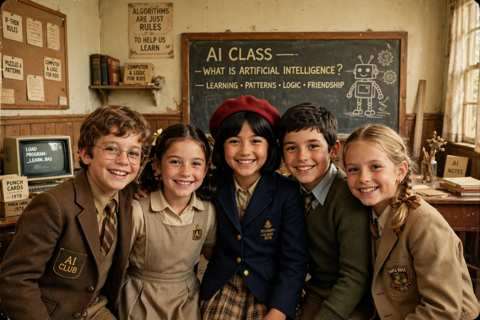
Everyone has a school photo that still makes them smile. The old uniform, the classroom, the friends who felt like family, those years felt simpler, and the nostalgia trend brought them back. An AI school photo video turns one old memory into a living moment.
This AI video prompt recreates that nostalgic school world. Old uniforms, a classroom, friends laughing together, all in a short vertical clip made for Reels. If you want a video that makes your whole batch comment at once, this is the one.
The Prompt
Copy the full prompt below and paste it into your AI tool. It is written to be used exactly as it is, with no editing needed.
Create a nostalgic, heartwarming vertical video of an AI school photo coming to life. Start with a still, slightly faded school photograph of a group of friends in old school uniforms, standing in a classroom with wooden desks, a blackboard and soft window light. Slowly the photo animates, the friends begin to smile, laugh and nudge each other playfully, one waves at the camera, and the classroom feels alive with warm afternoon light and gentle dust motes in the sunbeams. The camera moves very slowly forward into the group, capturing their joyful, innocent expressions and the authentic details of the old uniforms, badges and hairstyles. The mood is warm, innocent and deeply nostalgic, with realistic movement and soft, golden, film-like colours. Sound: soft nostalgic background music, faint classroom ambience and gentle laughter. Vertical 9:16, 10 seconds, cinematic, photorealistic, smooth motion, no text, no watermark.
Why This Prompt Works
This video prompt works because it starts from a still photo and animates it gently. Photo-to-video tools handle slow, small movements, smiles, waves, nudges, far better than big action, so the result looks like a real memory waking up.
The film-like colours and dust motes are the nostalgia triggers. Soft golden light, faded tones and sunbeams tell the viewer instantly that this is the past, and the brain fills in the rest of the feeling on its own.
The very slow camera move is the key technical choice. It lets the viewer settle into the classroom and recognise each friend, instead of rushing past the moment. Ten seconds is long enough to feel the nostalgia and short enough to loop.
Make It Your Own
Once you have tried the AI School Photo Nostalgia Video AI Prompt prompt exactly as written, make the next version your own by changing just one ingredient at a time. Swap the time of day, for example from morning to golden evening, or change the camera move from a slow push-in to a gentle circling shot, and keep everything else the same. Changing one thing at a time is important, because if you change five things at once and the result looks wrong, you will not know which change caused it. You can also change the sound line, replacing the background music with a different festive track, or adding one extra sound detail such as footsteps, laughter or flowing water. Small, careful changes like these turn one good prompt into a whole series of videos that still feel consistent, and a consistent series is exactly what grows a Reels or Shorts page faster than random one-off clips.
Variations to Try
- Evening version: recreate the AI School Photo Nostalgia Video AI Prompt scene in warm sunset light instead of morning light, keeping the same action and camera move.
- Close-up version: start the AI School Photo Nostalgia Video AI Prompt video on a tight close shot of the main subject, then slowly pull back to reveal the full scene.
- Festival series version: reuse the AI School Photo Nostalgia Video AI Prompt structure with a different festival or occasion, changing only the clothes, decorations and music.
How to Use This Prompt
- Open your favourite AI video tool (Veo, Flow, Kling, Seedance or CapCut AI) and upload a clear photo if the video needs a real person or pet in it.
- Copy the full prompt from the box above and paste it exactly as it is. Keep the action, camera move, lighting and sound line together, because video tools follow one clear shot much better than a long story.
- Set the video to vertical 9:16 and 5 to 10 seconds, which is the sweet spot for Reels, Shorts and TikTok.
- Generate two or three versions and pick the smoothest one. Watch the first second carefully, because the hook decides whether people keep watching.
- Download the best clip, add captions if needed, label it as AI-made where the platform asks, and post it with your hashtags.
Pro Tips
- Use your real school group photo as the first frame for the strongest effect.
- Keep movements small in the prompt, smiles and waves animate far better than running or jumping.
- Tag your school friends, batch nostalgia videos get tagged and reshared the most.
- Add a year in the caption, like batch of 2016, it triggers instant comments.
FAQ
Do I need a real school photo?
A real one works best, but the prompt also works as a pure text prompt that creates a general classroom scene.
Which tool handles photo-to-video best?
Veo, Kling, Seedance and CapCut AI all handle gentle photo animation well. Test with the cheapest model first.
Why does my video look too fast?
Fast movement breaks nostalgia. This prompt asks for very slow movement, which keeps it dreamy.
Can I make it with one friend instead of a group?
Yes, describe a single friend waving and smiling, and keep the classroom setting the same.
School days never really leave us, they just wait for one photo to bring them back. Make this video, tag your batch, and relive the classroom together.
Before You Post Checklist
Before you publish, run through this quick checklist so your post performs at its best. First, check the face and hands closely at full size, because small flaws that are invisible in a thumbnail become obvious once the post is opened. Second, confirm the colours look natural and not oversaturated, since realistic colour earns more trust than a neon look. Third, write a short caption that names the festival or trend in the first line, so viewers understand the post instantly. Fourth, add the hashtags from the end of this article, mixing broad tags with specific ones. Finally, post at a time when your audience is active, usually morning for devotional content and evening for entertainment, and reply to the first few comments quickly, because early engagement helps the platform show your post to more people.
Related Viral Prompts
- 2016 vs 2026 Self Meet Video AI Prompt
- 2016 vs 2026 Pet Meet Video AI Prompt
- 80s AI Trend Video AI Prompt
#SchoolNostalgia #Throwback #AIVideoPrompt #BatchLove #OldMemories


Leave a Reply