
Introduction
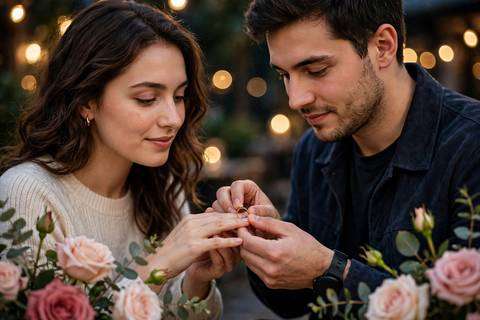
The engagement ring exchange is a tiny moment with enormous meaning. One hand, one ring, one question, and one answer that changes everything. Photographed well, with bokeh lights and roses softening the background, it becomes the image couples share first, frame forever, and look back on for decades.
AI can recreate that perfect close-up moment, with the ring sparkling and both faces glowing in the background, from a simple couple photo. This guide gives you a complete engagement ring prompt, explains why the close-up composition works, and shows you how to get the ring detail sharp instead of blurry.
The Prompt
Use my uploaded couple photo as the exact reference and keep both faces 100 percent real and unchanged. Create a romantic engagement ring exchange photo: a close-up of the groom gently sliding a sparkling diamond ring onto the bride's finger, with both hands in sharp focus at the centre of the frame. The bride wears an elegant outfit with delicate henna on her hands, and soft rose petals are scattered nearby. Behind the hands, the couple's smiling faces appear softly blurred, surrounded by warm bokeh lights and red roses. Use premium wedding photography colour grading, realistic skin texture, sparkling ring detail, and a dreamy romantic atmosphere. Shoot as a close-up on a 50mm lens at f/1.8, sharp focus on the ring and hands, no distorted fingers, vertical 4:5 format.
Why This Prompt Works
Close-up compositions work because they force the viewer to look at exactly one thing: the ring. By placing the hands in sharp focus at the centre and blurring the faces and background, the prompt creates a natural depth of field that professional photographers spend years learning. The bokeh lights and roses add romance without competing for attention, because they stay soft and out of focus by design.
The ring detail instruction, “sparkling ring detail,” is crucial. Without it, AI models often render rings as vague shiny blobs. Naming the sparkle tells the model to spend its detail budget on the ring itself. Face preservation, even for blurred background faces, keeps the couple recognisable, so the photo feels like your moment rather than a jewellery advertisement.
How to Use This Prompt
- Choose a couple photo with both faces visible and at least one hand reasonably clear.
- Upload it to Gemini, ChatGPT, or your preferred AI photo tool.
- Paste the full prompt and generate.
- If the ring looks blurry, add “ring in perfect sharp focus, detailed diamond facets” and regenerate once.
- Post the vertical photo as your engagement announcement, with the date in the caption.
Pro Tips
- Keep the hands relaxed and natural. Stiff, posed hands look worse after AI transformation.
- Ask for “soft rose petals” rather than a full bouquet, so the frame stays clean.
- Try a second version with a sunset background for a warmer, more golden announcement photo.
- Use the same prompt for a proposal recreation if you missed photographing the real moment.
- Do not add text overlays on the image itself. Put the date and names in the caption instead.
FAQ
Will the ring look like my actual ring?
Not exactly. The AI creates a beautiful generic diamond ring. For an exact replica, describe your ring’s cut, setting, and band in the prompt.
Why do fingers sometimes look distorted?
Hands are the hardest subject for AI models. Regenerate once or twice, and keep the version with the most natural fingers.
Can I use this prompt for a proposal photo?
Yes. Change “sliding a ring onto the finger” to “kneeling and holding out a ring box” for a classic proposal composition.
Which tool renders rings best?
Gemini is currently strongest on small sparkling details, while ChatGPT handles the overall romantic composition very well.
An engagement ring is small, but the moment it represents is enormous. Capture it in close-up, with light, roses, and the two people it belongs to, and it will never stop sparkling.
Related Viral Prompts
- Royal Palace Hug Wedding AI Photo Prompt
- Veil Twirl Wedding AI Photo Prompt
- Pre Wedding Beach Shoot AI Photo Prompt
#EngagementRing #WeddingPrompt #AIPhotoPrompt #SheSaidYes #Wedding2026


Leave a Reply