
Introduction
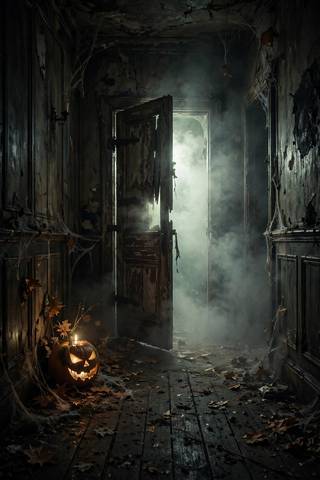
The scariest Halloween videos often show almost nothing. A dark hallway, a closed door, and then, slowly, the door opens by itself. No monster, no blood, no jump scare, just timing, sound, and fog. That is why the haunted door is one of the most reliable viral video ideas every October: it works on every platform, it needs no actors, and it scares people with atmosphere alone.
AI video tools are perfect for this idea because they handle slow camera movement and fog beautifully. This guide gives you a complete haunted door prompt, explains why timing beats gore, and shows you how to edit the clip for maximum impact.
The Prompt
Create a scary vertical video of a dark old hallway at night. A closed wooden door at the end of the hallway slowly creaks open by itself, revealing darkness and drifting fog behind it. Dust particles float in a thin beam of moonlight, fog curls along the floor, and the camera pushes in very slowly toward the door. Add realistic sound: a long wooden creak, faint wind, and a low distant rumble. Use muted cold colours, deep shadows, and cinematic horror lighting. Keep the motion slow and steady, no people, no gore, no sudden jumps, vertical 9:16 format, 8 seconds.
Why This Prompt Works
This prompt works because it understands how fear actually works on video. Fear comes from anticipation, not from showing the monster. By describing one slow action, a door opening by itself, the prompt gives the AI a simple motion it can render smoothly. Complex multi-action prompts cause warping and glitches, but a single slow push-in with fog stays clean and believable.
The sound instructions are doing half the scaring. A long wooden creak, faint wind, and a low rumble tell the viewer something is wrong before anything is visible. Fog and dust add texture that hides small AI imperfections, which is a classic horror trick: what you cannot quite see is always scarier than what you can. The “no people, no gore, no sudden jumps” line keeps the clip platform-safe and endlessly rewatchable.
How to Use This Prompt
- Open Veo, Kling, Seedance, or your preferred AI video tool and select vertical 9:16 format.
- Paste the full prompt and generate two or three versions.
- Keep the version with the slowest, steadiest camera push and the most natural creak sound.
- Trim the clip so the door finishes opening right at the end, which creates a perfect loop point.
- Post it with a short caption like “do not open it” and let viewers loop it themselves.
Pro Tips
- End on the same dark frame the clip started with to create a seamless loop and boost replays.
- Watch with sound on before posting. The creak is the hook, so a version with weak audio is worth regenerating.
- Try a second version with a flickering hallway light for extra unease.
- Do not add text overlays in the first second. Let the hallway itself hook the viewer.
- Pair this clip with a calm, normal video afterwards for a funny contrast in a series.
FAQ
Why is my door warping or changing shape?
Doors are hard for video models during fast movement. Slow the camera push by adding “very slow camera movement” and regenerate.
Can I add a figure behind the door?
You can, but it raises the risk of distorted shapes. A still, distant silhouette works better than a figure that walks toward the camera.
Which tool gives the best fog and sound?
Veo 3.1 is currently strongest on both fog texture and generated audio. Seedance is a good second choice for short clips.
How long should the clip be?
Eight seconds is ideal. Short enough to loop, long enough for the creak and the slow reveal to build tension.
The haunted door proves that you do not need a monster to scare anyone. You need a hallway, a creak, some fog, and the courage to let the door open on its own.
Related Viral Prompts
- Trick or Treat Street Video AI Prompt
- Witch Broom Crash Video AI Prompt
- Zombie Love Story Video AI Prompt
#HauntedDoor #HalloweenVideo #AIVideoPrompt #ScaryVideo #Halloween2026


Leave a Reply