
Introduction
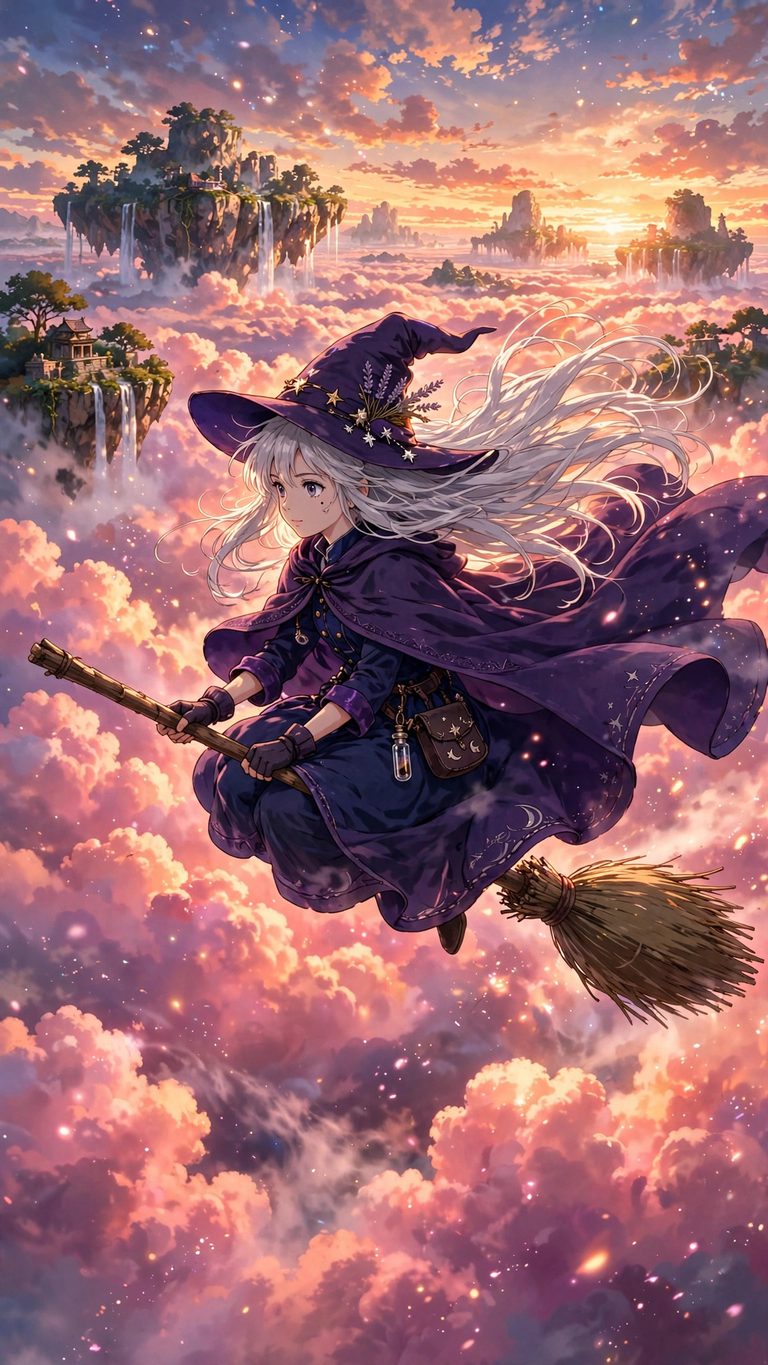
Every generation has its witch: Kiki, Howl’s moving castle, the broomstick silhouettes of childhood Halloweens. The flying witch is pure wish fulfillment, freedom with a cloak and a broomstick, and this AI photo prompt captures her at the most beautiful possible moment: a young witch with flowing silver hair soaring above a sea of glowing pink clouds at dusk. Anime illustration content has a massive advantage on visual platforms: a single stunning still can earn saves for years, circulating on Pinterest, wallpaper sites, and inspiration boards long after posting. Photo prompts are also the most accessible entry point into AI art; they require no video rendering, just one beautiful image. This guide gives you the exact prompt, why this composition is engineered to be saved and shared, step-by-step generation instructions for Midjourney, DALL-E 3, and Flux, and variations that build a witch’s entire skyward world.
The Prompt
Copy the prompt below exactly into your AI image generator:
Stunning anime illustration of a young witch with flowing silver hair flying on a wooden broom above a sea of glowing pink clouds at dusk, her purple cloak rippling in the wind, distant floating islands on the horizon, warm rim lighting, vibrant color palette, intricate details, Studio Ghibli inspired, ultra detailed, 8k, masterpiece
Why This Prompt Works
This prompt is composed like a Renaissance painting that happens to be anime. The sea of glowing pink clouds at dusk fills the lower two-thirds of the frame with luminous texture; cloud seas are inherently dreamlike, and the pink-dusk palette is the most saved color story in fantasy art. The witch herself is placed for maximum silhouette impact: flowing silver hair and a rippling purple cloak create dynamic diagonal lines against the soft clouds, and the human eye follows diagonals, which means viewers scan the whole image rather than glancing and leaving. Warm rim lighting is the professional touch; it outlines the witch in gold, separating her from the background with the kind of edge light that portrait photographers chase for hours. Distant floating islands on the horizon add depth and story: they say this world is bigger than one frame, which makes viewers imagine the rest. The Ghibli inspiration tag steers the model toward warmth, hand-crafted detail, and emotional sincerity rather than the cold perfection of generic AI fantasy. “Masterpiece” and “8k” are quality anchors that push the model toward its highest detail tier, which matters enormously for intricate elements like hair strands and fabric folds.
How to Use This Prompt
Photo prompts are straightforward, but settings matter. Step one: in Midjourney v7, paste the prompt and add “–ar 9:16” for vertical portrait format, which is ideal for phone wallpapers, Pinterest pins, and story posts. Use the default stylization or niji mode for anime; niji is Midjourney’s anime-tuned model and often produces superior anime illustrations. In DALL-E 3, paste the prompt as-is and request portrait orientation; DALL-E excels at following the literal composition, so the cloud sea and floating islands will appear as described. In Flux, paste the prompt and set 9:16; Flux renders intricate details like the cloak folds exceptionally well. Step two: generate four variations and select ruthlessly. Check the broomstick: it should read clearly as wood, not morph into the cloak. Check the hands: gripping a broom is a known trouble spot, so pick the version with the cleanest hands. Step three: upscale your chosen version to maximum resolution; this image deserves to be a wallpaper, and resolution is what separates a post from a product. Step four: post the image with minimal text; let the art breathe, and put the prompt or story in the caption.
Pro Tips & Creative Variations
The witch is a series waiting to happen. Change her journey: “the witch diving through the cloud sea, trailing stardust,” “the witch landing on a floating island, cloak settling around her,” or “the witch flying beside a giant paper crane” are episodes in her skyward life. Change the time: a dawn version with golden clouds, or a night version where the clouds glow blue and her broom leaves a trail of sparks. For the companion piece, generate “a black cat with a red bow riding on the back of the broom, looking thrilled”; animal companions double the charm and the shares. Try the perspective flip: “view from below as the witch’s silhouette crosses the huge setting sun” is an iconic composition. Build witch lore in your captions: name her, name her broom, describe where she is flying to. Named characters with ongoing journeys convert casual likers into followers who ask for the next chapter. Offer the highest-resolution version as a free phone wallpaper for saves and shares; wallpaper offers are the highest-converting call-to-action in anime art niches. Cross-post to Pinterest with keyword-rich descriptions; Pinterest is a search engine, and this image will be discovered for years.
One final tip for witch content: always generate a dawn and a dusk version of your best witch image. The same composition in different light becomes two separate posts, and followers love comparing which version they prefer; ‘dawn witch or dusk witch’ polls drive delightful engagement and double the mileage of every successful generation.
Frequently Asked Questions
Midjourney or DALL-E 3 for anime illustrations?
Midjourney’s niji mode is purpose-built for anime and usually wins on style. DALL-E 3 wins on prompt adherence, following your exact composition. Try both with this prompt and compare; many creators use Midjourney for beauty and DALL-E for precision.
The hands on the broom look wrong. Any fix?
Hands gripping objects are a classic AI weakness. Generate more variations, try “hands gently resting on the broom” for a simpler pose, or choose a composition where the hands are smaller in frame. Inpainting tools can also fix a single hand without regenerating the whole image.
What size should I export for wallpapers?
Export at the highest resolution your tool allows, ideally 2048 pixels or more on the long edge. Phone wallpapers need vertical 9:16; desktop versions can be cropped from the same master.
Can I sell prints of AI anime art?
Check your generator’s commercial terms carefully; they vary by plan and tool. Some allow commercial use, others restrict it. When in doubt, use the art for audience growth and sell original human-made derivatives.
Mount your broom, catch the dusk wind, and give the internet a witch worth following across the sky.
Related Viral Prompts
- Mecha Robot Desert Sunset: Free Viral AI Photo Prompt for Epic Anime Robot Key Visuals That Dominate Feeds
- Anime Mermaid Underwater City: Free Viral AI Photo Prompt for Enchanting Ocean Fantasy Art Full of Magic
- Demon Slayer Forest Portrait: Free Viral AI Photo Prompt for Intense Anime Warrior Art With Glowing Blades
# A I P h o t o # P r o m p t B a z a r # A n i m e # W i t c h # A I P h o t o P r o m p t

Leave a Reply