
Introduction
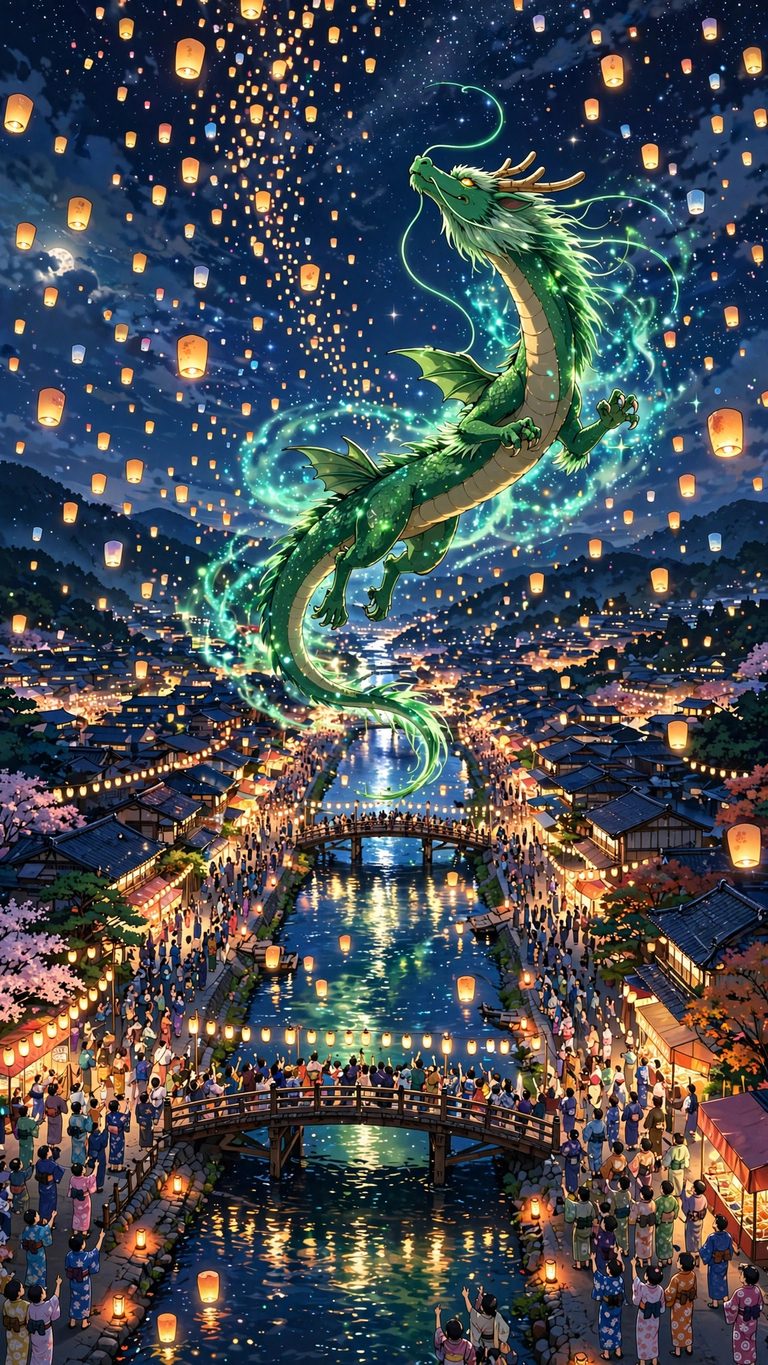
Festivals are humanity’s oldest viral content: crowds, lights, music, and a shared moment of wonder. This AI video prompt captures a riverside lantern festival from above, with a majestic emerald dragon soaring through hundreds of floating paper lanterns, and it delivers the kind of sweeping spectacle that makes viewers feel like they are inside a fantasy film. Festival scenes have a built-in share trigger: they evoke celebration, and people share celebratory content to spread the feeling. Dragon content, meanwhile, has a permanently massive global audience. Combine them with an aerial camera, and you have a clip engineered for awe. This guide gives you the exact prompt, the psychology of festival virality, rendering steps for every major AI video tool, and variations that turn one festival into a calendar of celebrations.
The Prompt
Copy the prompt below exactly into your AI video generator and render vertical 9:16 for ten seconds:
Magical anime night scene of a majestic emerald dragon soaring above a riverside lantern festival, hundreds of glowing paper lanterns floating upward into the starry sky, crowds cheering below in colorful yukatas, reflections shimmering on the water, sweeping aerial camera following the dragon, ultra detailed festive anime style
Why This Prompt Works
This prompt layers four spectacle systems that peak at different moments, which keeps eyes locked for the full ten seconds. The dragon is the majesty layer: an emerald dragon in flight is inherently cinematic, and its large, slow wing beats give the video a powerful, graceful rhythm that smaller subjects cannot provide. The lanterns are the magic layer: hundreds of glowing points rising into a starry sky create the upward motion that humans associate with wishes, hope, and release; floating lantern festivals are among the most photographed events on Earth for exactly this reason. The crowd in colorful yukatas is the life layer: tiny cheering figures make the scene feel like a real celebration rather than an empty postcard, and viewers unconsciously project themselves into the crowd. The shimmering water reflections are the polish layer: they double every light source and add liquid motion to the lower frame. The sweeping aerial camera ties it together with the language of blockbuster cinema; aerials signal scale and budget. Ten seconds matters here: festival scenes need time to breathe, and the longer duration lets each layer register before the loop restarts.
How to Use This Prompt
Spectacle scenes want smooth, grand motion. Step one: in Veo 3, paste the prompt, set 9:16 vertical, ten seconds, and medium motion so the dragon soars rather than flaps frantically. In Runway, use a slow aerial follow camera setting to match the prompt’s sweeping camera. In Kling, standard motion preserves the majesty; high motion would make the lanterns chaotic. In Pika, moderate motion strength and two to three takes, checking that the dragon’s wings stay symmetrical and the lanterns rise smoothly. In Sora, render as-is at ten seconds. Step two: verify the dragon’s anatomy across the clip; large flying creatures can morph, so select the take with the cleanest wing beats and most stable body. Step three: audio should feel like a celebration. Festival drums, soaring orchestral strings, or trending “magical night” audio tracks all work. Add a subtle crowd-cheer bed underneath at low volume; it makes the scene feel alive without overwhelming the music. Step four: consider starting the clip with a half-second of just lanterns before the dragon enters; a delayed reveal of the hero creature increases the wow moment.
Pro Tips & Creative Variations
One festival is a video; a festival calendar is a channel. Change the dragon: “a sapphire dragon coiling through fireworks,” “a golden baby dragon playing among the lanterns,” or “two dragons dancing in a spiral above the river” each become distinct episodes. Change the festival: “a snow festival with ice lanterns and a white dragon,” “a star festival with the dragon weaving through constellations,” or “a harvest festival with floating pumpkin lanterns.” For narrative depth, generate a ground-level companion clip: “a child in a yukata releasing a lantern as the dragon’s shadow passes overhead,” and post it as the human-scale companion to the aerial epic; the contrast between tiny human and vast dragon is emotionally devastating in the best way. Try the time-lapse variant: “lanterns rising from dusk blue into full starry night as the dragon circles” compresses an evening into ten seconds. Build festival lore in captions: name the festival, the river, the dragon. Recurring festivals with named traditions turn viewers into citizens of your world. Post festival content before real-world holidays; the algorithm favors timely celebration content, and your fantasy festival rides the same wave.
The aerial dragon shot is your blockbuster, but the ground-level companion clip is what makes it beloved. Generate a second video from a child’s perspective: small hands releasing a paper lantern as the dragon’s enormous shadow sweeps overhead. Post the aerial as the main video and the child’s view as a stitch or part two; the contrast between vast spectacle and tiny human wonder creates an emotional one-two punch that neither clip achieves alone. Build festival lore relentlessly: name the festival, the river, and the dragon itself, and reference them in every caption. Named traditions make followers feel like citizens of your world rather than tourists, and citizens return every year. Time your festival posts around real-world holidays and full moons; the algorithm already boosts celebration content during those windows, and your fantasy festival rides the same wave of collective joy. End each festival video with the lanterns still rising as the screen fades; an unresolved upward motion leaves viewers looking up, literally and emotionally.
Frequently Asked Questions
How do I keep the dragon looking consistent?
Lock the description: “majestic emerald dragon” with the same adjectives in every prompt. For a series, generate a reference still first and use image-to-video so the dragon’s design carries across episodes.
The lanterns look blurry. Any fix?
Hundreds of small glowing objects are demanding. Try “hundreds of glowing paper lanterns” as written, which the models handle well, and avoid asking for individual lantern detail. Slight bloom in post-processing enhances the glow.
What is the ideal length for festival videos?
Ten seconds lets the spectacle unfold. For maximum retention, ensure something new happens every two to three seconds: dragon enters, lanterns surge, camera sweeps, reflection shimmers.
Can this work as a wallpaper or thumbnail?
Absolutely. Pull the frame where the dragon is centered among the lanterns; it is a natural poster. Offer it as a free wallpaper for follows to convert viewers into community members.
Light the lanterns, loose the dragon, and give the internet a festival it will never forget.
Related Viral Prompts
- Spirit Fox in Bamboo Forest: Free Viral AI Video Prompt for Magical Nine-Tailed Anime Scenes at Moonlight
- Anime Astronaut Above Earth: Free Viral AI Video Prompt for Awe-Inspiring Space Anime Scenes That Inspire Wonder
- Ninja on Moonlit Rooftops: Free Viral AI Video Prompt for Stealthy Night Anime Action Scenes Full of Tension
# A I V i d e o # P r o m p t B a z a r # A n i m e # D r a g o n # F e s t i v a l

Leave a Reply