
Introduction
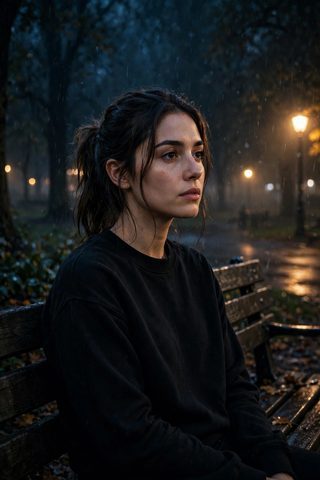
Moody night portraits are dominating Instagram feeds right now. A lone figure on a park bench, a black sweatshirt, a single street light, and deep shadows that hide half the frame, this style looks like a film still and instantly stands out against bright, overexposed selfies. It is popular because it feels emotional and artistic without needing any expensive camera or location. One street light in a local park is enough, and with AI image tools, you do not even need to leave your room.
This article gives you a complete night park bench black sweatshirt AI photo prompt for Gemini, ChatGPT, and other image generators. It controls the pose, the lighting, the mood, and the photo quality details, so you get a cinematic portrait that looks like it was shot on a professional camera at midnight.
The Prompt
Create an ultra realistic moody cinematic night portrait, vertical 4:5 format. Subject: a stylish young Indian man sitting alone on a wooden park bench at night, wearing a plain black oversized sweatshirt, black cargo pants, and white sneakers. He sits relaxed with one arm resting on the bench back, looking thoughtfully into the distance, not at the camera. Lighting: a single warm street lamp glows from the upper left, casting soft golden light on his face and sweatshirt while the rest of the park falls into deep blue-black shadows. Background: blurred dark trees, faint mist, an empty walking path, a distant dim lamp. Details: realistic skin texture, natural fabric folds on the sweatshirt, sharp focus on the face, gentle film grain, cinematic colour grading with warm highlights and cool shadows, shallow depth of field, no text, no watermark, no distorted hands or face, no extra people.
Why This Prompt Works
This prompt works because it uses the oldest trick in cinematic photography: one light source against darkness. A single warm street lamp creates natural contrast, sculpts the face with light and shadow, and gives the image depth that flat lighting never can. It also helps the AI image model enormously, because dark backgrounds hide the small errors that bright, detailed backgrounds would expose. The result looks intentional and artistic rather than generated.
The pose is the second key. Looking into the distance instead of at the camera creates a thoughtful, storytelling mood that viewers connect with emotionally. Direct camera stares can look confrontational in moody portraits, but a distant gaze invites the viewer to wonder what the person is thinking, which is exactly why these images get saved and shared. The relaxed arm on the bench back also gives the body a natural, believable shape that AI models render well.
The outfit choice is deliberate too. A plain black oversized sweatshirt is easy for the model to render consistently, with no logos, patterns, or complex textures to distort. The white sneakers add one small bright accent that stops the image from becoming a shapeless dark blob. Together with realistic skin texture and film grain instructions, the prompt pushes the generator toward a photograph rather than a digital illustration.
How to Use This Prompt
Copy the full prompt into Gemini, ChatGPT image generation, or any AI image tool you prefer. If your tool supports image to image, upload your own photo first and add “keep the same face” at the start of the prompt to turn yourself into the portrait. Choose vertical 4:5 format for Instagram feed posts, or 9:16 if you want it as a story or Reel cover. Generate once and inspect the hands, the face, and the sweatshirt folds closely before accepting the image.
If the first result looks too dark, ask for “slightly brighter lamp light” in a follow up message rather than rewriting the whole prompt. Most tools keep the composition and just adjust the light. Once you are happy, post it with a short emotional caption or a song lyric, because moody portraits perform best when the caption matches the mood. This style also works beautifully as a profile picture or a music cover image.
Pro Tips for Best Results
- One light source beats three. Every extra light you describe makes the image flatter and more artificial, so stick to the single street lamp.
- Keep the outfit plain. Logos and graphics on the sweatshirt are the first things AI image models distort.
- Ask for the subject to look away from the camera. Averted gazes hide facial imperfections and add cinematic storytelling.
- Use film grain and cinematic colour grading in the prompt. These two phrases alone move most generators from “clean digital” to “real photograph” territory.
- Generate in 4:5 for the feed. It fills more screen space than square and gets better engagement than wide formats.
Frequently Asked Questions
Can I use my own face in this night portrait?
Yes. Upload your photo to an image to image tool like Gemini and add “keep the same face and hairstyle” to the prompt. The result will be a moody night version of you on the bench.
Why does my night portrait look too dark or too bright?
Night prompts are sensitive to light balance. If it is too dark, add “soft lamp glow on the face” in a follow up. If it is too bright, add “deeper shadows” and regenerate.
Which tool gives the most realistic night portraits?
Gemini’s image model and ChatGPT image generation both handle moody night light very well right now. Gemini tends to be stronger for realistic skin texture.
Can I change the sweatshirt colour?
Yes, but dark colours work best for this mood. Charcoal grey or dark olive keep the cinematic feel, while bright colours break the night mood entirely.
One bench, one lamp, and a whole story in the shadows. Copy this prompt, create your moody night portrait, and let your feed look like a film still tonight.
Related Viral Prompts
- Dark Denim Jacket Fashion Video AI Prompt: Create a High — a high end night fashion clip in denim.
- Night City Friends Dance Video AI Prompt: Create an Energetic — friends dancing under neon city lights.
- Rain Dance Couple Video AI Prompt: Create a Romantic Monsoon — a romantic monsoon dance under dramatic skies.
#NightPortrait #MoodyPhotography #BlackSweatshirt #AIPhotoPrompt #Cinematic #PromptBazar


Leave a Reply