
Introduction
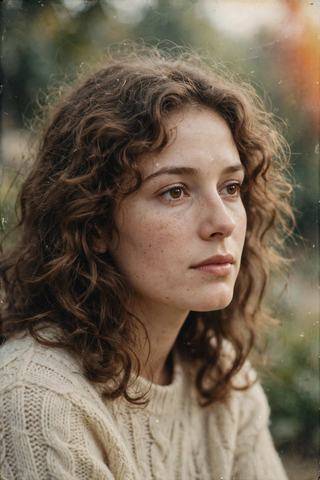
Modern photos are too perfect. They are sharp, saturated, and flawless, and somehow that perfection makes them forgettable. Vintage film grain portraits are the opposite. Their colours are faded, their focus is soft, their grain is visible, and their tiny imperfections make them feel human. A vintage film portrait does not look like it was taken yesterday; it looks like it was found in a drawer, kept for decades, and loved the whole time. That feeling of discovered memory is why film grain portraits have become one of the most enduring aesthetics on social media.
The film look works because imperfection signals authenticity. Our brains associate grain, fading, and soft focus with real photographs from the pre-digital era, a time when every picture cost money and therefore mattered more. When a modern photo adopts those textures, it borrows that sense of value and permanence. The viewer treats it as something precious rather than something disposable, and that shift in perception is incredibly powerful for a simple portrait.
You do not need an old camera, expired film, or a darkroom to achieve this look. With one AI prompt, Gemini can transform your sharp digital photo into a timeless film grain portrait with faded colours and soft focus. This article gives you that exact prompt, explains the science of why film textures move us, and shows you how to get the most beautiful version of your own photo.
The Prompt
Copy the full prompt below and paste it into Gemini along with your photo:
Transform the person in this photo into a timeless vintage film grain portrait, keeping their face, hairstyle and features exactly the same. Render the image like an old analog photograph shot on 35mm film: faded, slightly desaturated colours with warm vintage tones, soft focus with gentle blur at the edges, visible film grain across the whole image, subtle light leaks in one corner, slight vignetting, and small authentic imperfections like dust specks and faint scratches. Use natural soft lighting, a simple uncluttered background, realistic skin texture with a matte film finish, and a warm nostalgic colour palette. The portrait should feel like a cherished photograph discovered in an old family album, timeless, emotional, and beautifully imperfect.
Why This Prompt Works
The film grain prompt works because it triggers nostalgia even in people who never shot film. Grain, fading, and vignetting are visual cues that the brain has learned to associate with old family albums, historical photographs, and meaningful moments. These associations are cultural, passed down through films, books, and the photo albums of parents and grandparents. When your portrait adopts those cues, it inherits decades of emotional meaning in an instant.
The soft focus and faded colour do equally important work. Sharpness and saturation are the signatures of the digital present, so removing them removes the present-day feeling. Soft focus flatters the face by smoothing harsh details, while faded colours create a gentle, dreamlike mood. Together, they make the portrait feel less like a document and more like a memory, and memories are what people save, frame, and return to.
The imperfections are the final masterstroke. Dust specks, light leaks, and faint scratches should logically make a photo worse, but in the film aesthetic they make it better, because they prove the photo has a history. A flawless image feels mass-produced; a slightly imperfect one feels unique and personal. AI models understand this paradox well, because film photography has such a strong, consistent visual tradition. When the prompt names the imperfections explicitly, the model reproduces them as intentional artistry rather than random errors.
How to Use This Prompt
Creating your vintage film portrait takes only a few steps:
- Choose a clear photo of yourself with good lighting and a natural expression.
- Open the Gemini app and upload your photo.
- Copy the full prompt from the box above and paste it with your photo.
- Generate the image and check the grain, colours, and face.
- If the effect looks too strong, add “subtle film grain, lightly faded” to soften it.
- Download the result and share it as a nostalgic post, a printed keepsake, or an artful profile picture.
Almost any original photo works for this style, because the film treatment unifies everything. A simple selfie, a travel photo, or a family snapshot all become beautiful film portraits. The most important factor is a clear face, since the soft focus already reduces sharpness, and a blurry original combined with soft focus can lose too much detail.
Pro Tips for Best Results
- Ask for a square or 4:5 format for Instagram, where film portraits look most at home.
- If the light leak looks distracting, remove that phrase from the prompt and regenerate.
- Try a version with a sepia tone for an even older, early-1900s photograph feel.
- Pair the portrait with a handwritten-style caption or a date stamp for a full album effect.
- Print the result on matte photo paper. Film grain looks even better in print than on screen.
- Generate a black and white version too. Film grain and monochrome are a perfect pairing.
Frequently Asked Questions
Will my face stay recognisable with soft focus?
Yes. The soft focus in this style is gentle, like an old lens, not a blur filter. Your features remain clear, just rendered with a softer, more flattering finish.
Can I control how strong the grain is?
Absolutely. Add “heavy film grain” for a gritty analog look, or “subtle fine grain” for a cleaner vintage feel. The prompt is easy to tune to your taste.
Is this style good for family photos?
It is wonderful for family photos. The film treatment makes group portraits feel like treasured album pages, and many people print them as gifts for parents and grandparents.
Why does my result look too yellow?
Warm vintage tones can sometimes shift too far towards yellow. Add “balanced warm tones, natural skin colour” to keep the warmth while protecting realistic skin.
Perfection is forgettable, but a faded photograph with grain and soft light stays with you. This prompt turns your sharp digital moment into something that feels like it has already been loved for years, and that is a rare kind of beautiful.
Related Viral Prompts
Love this style? Try these next:
- 1970s Bollywood Family Album AI Photo Prompt: Create a
- 1980s Retro Portrait AI Photo Prompt: Create a Classic Vintage
- 90s Flash Bedroom AI Photo Prompt: Create a Nostalgic Grainy
#FilmGrain #VintagePortrait #AnalogLook #AIPhotoPrompt #Nostalgia #PromptBazar


Leave a Reply