
Introduction
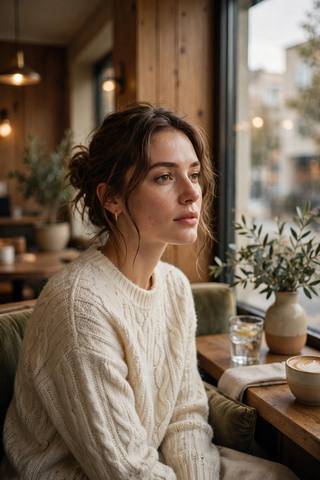
There is a particular kind of photo that instantly makes a feed look expensive. It is not a luxury car or a designer logo. It is a quiet portrait in a warm coffee shop: a person sitting by the window, a cup of coffee steaming gently, soft golden light falling across the table, and a thoughtful expression that suggests a life well lived. This is the cafe editorial look, and it has become the signature style of premium lifestyle creators, because it communicates taste, calm, and confidence without saying a word.
The cafe editorial portrait works so well because cafes are universally understood as places of comfort and creativity. Everyone has a favourite coffee shop memory, so the setting feels familiar and aspirational at the same time. When you place yourself in that warm, window-lit scene, viewers do not just see a photo; they feel the mood. They imagine the smell of coffee, the quiet music, and the slow morning, and that sensory association makes the image far more memorable than a generic outdoor portrait.
You do not need to visit an aesthetic cafe, buy a fancy coffee, or wait for perfect window light. With one AI prompt, Gemini can place you in a beautiful coffee shop scene that looks like it was shot for a lifestyle magazine. This article gives you that prompt, explains why the cafe editorial style performs so consistently, and walks you through creating your own version in minutes.
The Prompt
Copy the full prompt below and paste it into Gemini along with your photo:
Transform the person in this photo into a calm premium lifestyle editorial portrait at a warm coffee shop, keeping their face, hairstyle and features exactly the same. Place them sitting at a wooden window seat table in a cosy modern cafe, holding a ceramic cup of coffee with gentle steam rising, looking thoughtfully out of the large window. Warm golden afternoon light streams through the window, creating soft shadows and a gentle glow on their face. The background shows blurred cafe shelves with plants, warm pendant lights, and other softly out-of-focus customers. Use premium editorial photography style, natural skin texture, realistic steam and light, warm colour grading, shallow depth of field, and a refined magazine-quality finish. The portrait should feel calm, thoughtful, and effortlessly stylish, like a lifestyle editorial photograph from a premium magazine.
Why This Prompt Works
The cafe editorial prompt works because it combines warmth with restraint. The warm light and wooden textures create comfort, while the shallow depth of field and thoughtful pose create sophistication. Neither element overwhelms the other, and the balance is what reads as premium. Viewers associate this balance with high-end magazines and brands, so your photo inherits that association instantly, even though it was made in under a minute.
The window seat detail is doing quiet but important work. Window light is the most flattering light in photography because it is directional and soft at the same time. It sculpts the face gently, adds a natural catchlight to the eyes, and creates a glow that no ring light can fully replicate. By specifying window light, the prompt gives the AI a lighting setup it renders beautifully, and the result is a portrait that looks professionally lit without looking artificially lit.
The third strength is the storytelling. A person holding coffee and gazing out a window suggests a narrative: a writer thinking, a traveller resting, a dreamer planning. Viewers fill in the story themselves, and that participation makes the image stick. Lifestyle content that invites imagination gets saved at much higher rates than content that simply shows a face, because people save images that represent the life they want, not just the photo they liked.
How to Use This Prompt
Creating your cafe editorial portrait is straightforward:
- Select a clear photo of yourself, preferably a half-body shot with your face well-lit.
- Open the Gemini app and upload your photo.
- Copy the full prompt from the box above and paste it with your photo.
- Generate the image and check the face, coffee cup, and lighting.
- If the cup or hands look unusual, regenerate once. Small hand details often improve on the second attempt.
- Download the result and use it as a profile picture, feed post, or even a blog header image.
A calm, thoughtful expression in your original photo matches this aesthetic best, but even a smiling selfie works, because the AI adapts the mood to the scene. For the most editorial feel, choose an original photo where you are wearing a smart casual outfit, such as a shirt, blazer, or elegant top, since the cafe setting elevates whatever you are wearing.
Pro Tips for Best Results
- Ask for a vertical format for Instagram and Pinterest, where lifestyle portraits get the most saves.
- If the background looks too sharp, add “strong background blur, creamy bokeh” to push the cafe further out of focus.
- Try a version with a book or laptop on the table for a creative professional vibe.
- Warm outfits like beige, brown, or cream blend beautifully with the cafe’s golden light.
- Generate an evening version with warm pendant lights for a cosier, moodier cafe portrait.
- Use the result as a LinkedIn or portfolio photo too. It looks professional without looking corporate.
Frequently Asked Questions
Can I use this prompt for a business profile photo?
Yes, and it works very well. The cafe editorial look is professional but approachable, which is ideal for freelancers, creators, writers, and consultants who want to look polished without looking stiff.
Will my outfit change in the result?
The prompt preserves your features and adapts your outfit to the scene naturally. If you want a specific outfit, describe it in the prompt, for example “wearing a beige trench coat”, and the AI will apply it.
Why does the coffee cup sometimes look strange?
Cups and hands are detailed objects that AI sometimes renders imperfectly. Regenerating once or twice almost always produces a clean version, and adding “realistic ceramic coffee cup” helps.
Is the cafe background based on a real place?
No, the AI creates an original, generic premium cafe interior. It will not match any specific real cafe, which also means you can use the image freely without worrying about location rights.
Some photos show a face. The best ones suggest a life. A warm window, a quiet moment, and a cup of coffee are all it takes to turn your portrait into something people want to save. Try this prompt today and give your feed its most premium photo yet.
Related Viral Prompts
Love this style? Try these next:
- Mirror Selfie Aesthetic AI Photo Prompt: Create a Stylish
- Gemini Cinematic Editorial AI Photo Prompt: Create a Premium
- Golden Hour Street Style AI Photo Prompt: Create a Confident
#CafeEditorial #LifestylePortrait #AIPhotoPrompt #CoffeeShopVibes #PremiumLook #PromptBazar


Leave a Reply