
Introduction
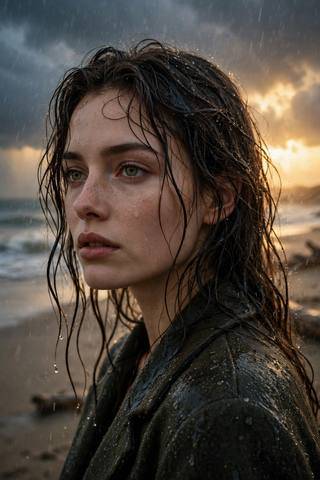
Rain and golden hour should not work together, and yet they create some of the most beautiful portraits on the internet. Picture this: dark monsoon clouds breaking open just enough to let warm evening light through, rain falling in soft streaks, wet hair clinging to your face, and the sea turning silver behind you. It is dramatic, romantic, and deeply cinematic, like a still from a film where the hero finally finds peace in the storm. That is the magic of the rain-soaked cinematic beach portrait, and it is currently one of the most saved photo styles on Instagram.
What makes this style special is its emotional range. The same image can feel melancholic, romantic, powerful, or peaceful, depending on the pose and expression. Rain adds texture and movement that a dry sunny beach photo simply cannot match. Every droplet catches light, every wet strand of hair tells a story, and the dramatic sky gives the whole frame a depth that makes people stop and stare. It is no surprise that creators, couples, and solo travellers are all racing to recreate this look.
The best part is that you do not need to wait for a real storm, ruin your clothes, or risk your phone in the rain. With a single AI prompt, Gemini can transform an ordinary photo of you into a rain-soaked golden hour beach portrait that looks like it was shot by a professional film crew. This article gives you that exact prompt, explains the science behind why it looks so good, and shows you how to get the best possible result on your first try.
The Prompt
Copy the full prompt below and paste it into Gemini along with your photo:
Transform the person in this photo into a rain-soaked cinematic beach portrait at golden hour, keeping their face, hairstyle and features exactly the same. Place them standing on a sandy beach as light rain falls around them, with wet hair and slightly damp clothing, looking thoughtfully towards the horizon. The sky is dramatic with dark monsoon clouds breaking open to reveal warm golden sunlight, and soft rain streaks are visible in the air. The sea behind them is moody with gentle waves and silver reflections of the sunset light. Use cinematic colour grading with warm golden highlights and cool blue shadows, realistic wet skin texture, detailed raindrops, shallow depth of field, and a film-like quality. The portrait should feel emotional and powerful, like a still from a romantic drama film, shot on a cinema camera at golden hour in the rain.
Why This Prompt Works
This prompt works because rain and golden light create natural contrast, and contrast is what makes images memorable. Warm light against a cool, dark sky is one of the oldest tricks in cinematography. It separates the subject from the background, adds depth, and makes the viewer’s eye settle exactly where you want it: on the face. The AI understands this colour relationship well, so the result has a richness that flat daylight portraits lack.
Rain also adds something no filter can fake convincingly: texture. Wet hair, droplets on skin, damp fabric, and streaks in the air give the image dozens of small details that reward a second look. Social media rewards this kind of detail because people zoom in, screenshot, and save images that feel layered. A dry portrait is consumed in one second; a rainy portrait invites the viewer to linger, and lingering is what the algorithm notices.
Finally, the prompt works emotionally. Rain in a portrait signals vulnerability and honesty. Combined with a thoughtful expression and a vast sea behind you, it creates a story the viewer completes in their own mind. Is this a moment of heartbreak, hope, or quiet strength? The ambiguity is the point. People project their own feelings onto the image, and that personal connection is why rainy cinematic portraits get more comments and shares than ordinary beach photos.
How to Use This Prompt
Creating your rainy beach portrait takes only a few minutes. Follow these steps:
- Pick a clear photo of yourself, ideally a half-body or full-body shot with your face visible.
- Open the Gemini app and upload your photo.
- Copy the full prompt from the box above and paste it into the chat.
- Generate the image and check the face, hair, and rain details.
- If the rain looks too heavy or too light, adjust by adding “light drizzle” or “heavy monsoon rain” and regenerate.
- Download your favourite version and post it with a short emotional caption for maximum impact.
The original photo does not need to be taken at a beach. A simple indoor selfie works fine, because the AI rebuilds the entire scene around you. What matters most is a clear face and a natural expression. A calm, thoughtful look matches the rainy mood better than a big grin, so choose an original photo with a soft, relaxed expression if you can.
Pro Tips for Best Results
- Ask for a vertical format for Instagram Reels covers and stories, where this style performs best.
- If your hair looks too neat, add “windblown wet hair strands across the face” for extra realism.
- Try a version looking over your shoulder at the camera for a more dramatic, editorial feel.
- Keep the outfit simple in your original photo. The AI will render damp clothing more convincingly on plain fabrics.
- Pair the image with rain sounds or a slow romantic song if you post it as a Reel.
- Generate both a close-up and a wide version. The wide shot shows off the sky, while the close-up shows the rain detail.
Frequently Asked Questions
Will my face stay recognisable in the rain effect?
Yes, as long as your original photo is sharp and well-lit. The prompt explicitly preserves your features. Rain effects are applied around you, not over your facial structure, so likeness usually survives very well.
Can couples use this prompt together?
Absolutely. Upload a couple photo and change “the person” to “the couple” in the prompt. Rainy beach couple portraits look especially romantic and are hugely popular for anniversary posts.
Does the prompt work in other AI tools besides Gemini?
Yes, the description is detailed enough for most modern image tools. Gemini tends to handle face preservation best, but the same prompt also works well in other AI photo editors that support image-to-image generation.
Why does my result look like a cartoon sometimes?
That happens when the cinematic styling is overemphasised. Add “ultra realistic, natural skin texture, real photograph” to the prompt to pull the result back towards photorealism.
There is a strange comfort in standing in the rain while the sun still shines, and this portrait captures exactly that feeling. You do not need a storm, a beach, or a film crew. You just need one photo and one prompt, and the golden hour rain is yours.
Related Viral Prompts
Love this style? Try these next:
- Gemini Golden Hour Beach AI Photo Prompt: Create a Natural
- Attitude Boy Rain AI Photo Prompt: Create a Dramatic Cinematic
- Rain Dance Couple Video AI Prompt: Create a Romantic Monsoon
#RainPortrait #CinematicBeach #GoldenHour #AIPhotoPrompt #MonsoonVibes #PromptBazar


Leave a Reply