
Introduction
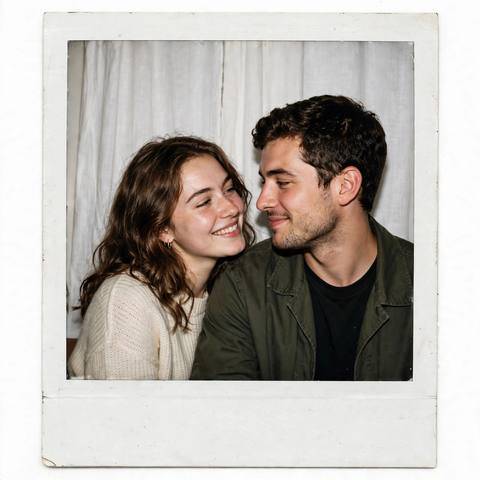
There is a reason polaroid couple photos never go out of style. A polaroid is not just a picture; it is a small, physical memory with a white border, a slightly faded image, and a moment frozen exactly as it happened. When a couple stands close together in front of a white curtain, a camera flash fires, and the instant film captures it all, the result feels honest in a way that no studio portrait ever can. It feels like a real afternoon, a real laugh, and a real relationship, and that honesty is why these photos get saved, shared, and framed.
Right now, polaroid-style couple photos are trending hard on Instagram Reels and Pinterest boards. Couples are recreating the look for anniversaries, pre-wedding shoots, Valentine’s posts, and simple “just because” pictures. The good news is that you do not need an instant camera, film packs, or perfect lighting. With one AI prompt and a normal photo of the two of you, Gemini can produce a convincing polaroid-style portrait that looks like it came straight out of an old photo album.
This article gives you the full copy-paste prompt, explains why this simple style performs so well online, and walks you through every step of creating your own version. You will also find pro tips for making the result look genuinely vintage rather than digitally faked, plus answers to the questions couples ask most often before trying it.
The Prompt
Copy the full prompt below and paste it into Gemini along with your couple photo:
Transform the couple in this photo into a candid vintage polaroid instant photo, keeping both faces, hairstyles and features exactly the same. Place the couple standing close together, shoulders touching, in front of a plain white curtain backdrop, with soft daylight coming from a window on one side. Use a direct camera flash look with bright, slightly overexposed skin, gentle shadows, faded vintage colours, soft focus, and visible instant film grain. Frame the image like a classic polaroid photograph with a thick white border at the bottom, slightly imperfect colours, and a warm nostalgic tone. The photo should feel spontaneous and unposed, like a genuine snapshot taken by a friend on an instant film camera, capturing a natural smile and a relaxed, loving moment between the couple.
Why This Prompt Works
The polaroid look works because it combines three things people love: simplicity, nostalgia, and authenticity. The white curtain backdrop removes all distractions, so the viewer’s eye goes straight to the couple. There is no busy street, no cluttered room, and no competing colours. That clean simplicity is exactly what makes the photo feel intimate, because nothing comes between the viewer and the emotion in the picture.
The flash and faded colours do the second half of the work. Instant film was never technically perfect, and that imperfection became its charm. Slightly washed-out tones, soft focus, and gentle grain tell the viewer, without words, that this is a memory rather than a production. AI models understand this visual language very well, because millions of real polaroid scans exist in their training data. When the prompt names the specific traits, the flash, the border, the grain, the model can reproduce them faithfully instead of guessing.
The third reason is emotional. Couple photos perform best when they look like a real moment, not a performance. The prompt asks for a spontaneous, unposed feeling, with natural smiles and relaxed body language. That is the difference between a photo people scroll past and a photo people comment on. Friends and family recognise the couple instantly, and strangers feel the warmth of the moment, which is why this style gets saved and shared far more than heavily edited couple shoots.
How to Use This Prompt
You only need one good photo of the two of you and the Gemini app. Here is the full process:
- Choose a clear photo where both faces are visible and well-lit. A simple selfie or a friend’s snapshot works best.
- Open Gemini and upload the photo to the chat.
- Copy the complete prompt from the box above and paste it with your photo.
- Wait for the image to generate, then check that both faces still look like you.
- If one face looks off, regenerate once or twice. Small variations in each generation often fix likeness issues.
- Download the final image and share it as a post, story, or printed keepsake.
For the most convincing result, pick an original photo where you are both facing the camera and standing at a similar distance from it. Photos taken from very far away or at extreme angles make it harder for the AI to preserve both faces accurately. A waist-up or chest-up photo is ideal for this polaroid framing.
Pro Tips for Best Results
- Wear simple, light-coloured outfits in your original photo. They match the white curtain aesthetic beautifully.
- Ask for a square format if you want the classic polaroid shape for Instagram posts.
- If the border looks too clean, add “slightly uneven white polaroid border, like a real scanned instant photo” to the prompt.
- Try a second version where you are laughing naturally instead of posing, for a more candid feel.
- Pair the photo with a short handwritten-style caption on your post to complete the nostalgic effect.
- Avoid heavy makeup or sunglasses in the original photo, since the flash look emphasises natural skin texture.
Frequently Asked Questions
Can this prompt work with a single photo of each person?
Yes, you can upload two separate photos and ask Gemini to place both people together, but a single photo of the couple together gives a more accurate result, because the AI can already see your relative heights and how you naturally stand together.
Will the polaroid border appear automatically?
The prompt asks for a thick white border, and Gemini usually includes it. If your result comes out borderless, simply add “with a classic polaroid white frame border” and regenerate once.
Is it okay to print the result?
Definitely. The square format and soft vintage colours print beautifully on photo paper, and many couples use these images for anniversary cards, framed prints, and wedding invitations.
Why does one face look different from the original?
This happens when the original photo is blurry or one person is partly in shadow. Use a sharper, evenly lit photo and regenerate. Two or three attempts usually produce a version where both faces look right.
A polaroid does not try to be perfect, and that is exactly why it is perfect. One flash, one white curtain, and two people who belong together are all you need for a photo that will still make you smile years from now. Try the prompt today and create your own little instant memory.
Related Viral Prompts
Love this style? Try these next:
- Couple Garba Dandiya Night AI Photo Prompt: Create a Vibrant
- Couple Diwali Diya Rooftop AI Photo Prompt: Create a Romantic
- 90s Flash Bedroom AI Photo Prompt: Create a Nostalgic Grainy
#PolaroidCouple #AIPhotoPrompt #CoupleGoals #VintagePhoto #InstantFilm #PromptBazar


Leave a Reply