
Introduction
Golden hour is the most flattering light in photography, and it is no surprise that golden hour beach portraits dominate Instagram, TikTok, and Pinterest every summer. That warm, low sunlight softens skin, adds a natural glow, and turns an ordinary beach snapshot into something that feels cinematic and effortless. The problem is that real golden hour lasts only a few minutes, the weather does not always cooperate, and not everyone lives near a beach. This Gemini prompt solves all of that in seconds.
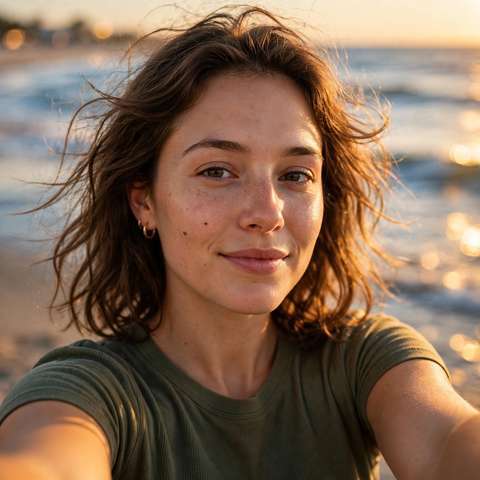
The Gemini golden hour beach prompt recreates that perfect sunlit moment from any photo you already have. It keeps your natural features, preserves realistic skin texture, and places you on a beach at sunset with warm light on your face and soft ocean bokeh behind you. The result looks like a candid smartphone selfie taken at just the right moment, not like a heavily edited studio portrait. That natural, unposed feeling is exactly why these images go viral.
In this article you will find the full copy-paste prompt, a clear explanation of why it works so well, and practical tips for getting a realistic, flattering result. Whether you want a new profile picture, a summer feed refresh, or a dreamy portrait to share with friends, this prompt gives you golden hour on demand, no beach trip required.
The Prompt
Transform this photo into a natural golden hour beach portrait. Keep the person's face, features, and identity exactly the same, with realistic natural skin texture, visible pores, and no plastic smoothing or over beautifying. Place them at a beach during golden hour, with warm low sunlight glowing softly on their face, gentle wind in their hair, and a relaxed natural expression. Use a smartphone selfie look with a slightly candid, unposed feel, natural colours, and soft warm tones. In the background, show the ocean, soft waves, and warm bokeh light from the setting sun, slightly blurred so the focus stays on the face. Keep the lighting believable, the shadows soft, and the overall image photorealistic, warm, and sunlit, like a real photo taken on a phone at sunset.
Why This Prompt Works
This prompt works because it prioritises realism over perfection. Many AI portrait prompts accidentally create a plastic, airbrushed look that viewers instantly recognise as fake. By explicitly asking for natural skin texture, visible pores, and no over beautifying, this prompt keeps the image believable. People engage more with photos that look real, and that realism is the secret behind the viral golden hour trend.
The lighting instructions are equally important. Warm low sunlight, soft shadows, and ocean bokeh work together to create depth and atmosphere. The sun is not just a filter here, it is a light source with direction, warmth, and softness. The blurred background keeps attention on your face while still telling a beach story, which is why the image feels both intimate and scenic at the same time.
The smartphone selfie framing also matters. A candid, slightly imperfect composition feels authentic in a way that a perfectly centred studio shot never will. It matches how real golden hour photos are actually taken, on a phone, quickly, while the light is perfect. That familiarity makes viewers stop scrolling, because the image feels like a memory, not an advertisement.
How to Use This Prompt
Start with a clear portrait photo taken in decent light. A front facing photo with a neutral expression works best, because the AI can then add the warm sunlight and relaxed beach expression naturally. Avoid photos with heavy filters, sunglasses covering your eyes, or extreme angles, as those make it harder for the model to preserve your true features.
Upload your photo to Gemini image generation and paste the full prompt exactly as written. Resist the urge to shorten it, because the details about skin texture, warm light, and ocean bokeh are what separate a realistic result from a generic sunset filter. Generate the image and check it closely. Your face should still be unmistakably yours, the light should fall naturally across your features, and the background should feel soft rather than distracting.
If the first result looks too orange or too artificial, regenerate with the same prompt rather than adding more adjectives. Small variations in lighting often resolve themselves on a second generation. Once you are happy, save the highest quality version and post it as a before and after, a summer throwback, or a fresh profile picture. Golden hour portraits perform especially well with simple captions about sunlight, summer, and real moments.
Pro Tips for Best Results
Keep your outfit simple and beach appropriate in your mind when you review the result. A light top, a casual shirt, or a summer dress will feel more believable at the beach than formal wear. If the AI keeps your original outfit, that is fine too, but a relaxed look sells the beach story much faster. You can add a short phrase about a casual summer outfit if you want to guide the result.
Watch the eyes and the hair. Real golden hour photos often have a slight squint from the sun, gentle wind blown strands, and a warm catchlight in the eyes. If your result looks too posed or too still, those small natural details are usually what is missing. A second generation often fixes them, and you can also mention gentle wind in hair more strongly if needed.
Do not over sharpen or over saturate the final image. The beauty of golden hour is its softness. A light warm tone is enough. If you edit after generation, keep adjustments subtle so the photo stays believable. The most viral golden hour portraits are the ones people cannot quite tell are AI generated, and subtlety is what protects that illusion.
Frequently Asked Questions
Will this prompt change my face?
No, the prompt is written to preserve your face, features, and identity exactly. It changes the light, location, and background, not who you are. Starting with a clear, unfiltered photo gives the AI the best reference, and checking the result against your original photo helps you spot any drift before you post it.
Can I use this prompt without a beach photo?
Yes, that is the whole point. You can start with an indoor selfie or a studio portrait and the AI will place you at the beach. You do not need to have visited a beach, waited for sunset, or owned a professional camera. Any clear portrait can become a golden hour beach portrait.
Why does my result look too orange or fake?
Overly orange results usually come from missing realism constraints. This prompt already asks for natural colours, soft warm tones, and believable lighting, so keep those phrases intact. If the image still looks too saturated, regenerate once or twice, because lighting varies between generations and a softer version often appears quickly.
Is this good for a profile picture?
Absolutely. Golden hour beach portraits are warm, friendly, and eye catching, which makes them ideal for Instagram, Facebook, and dating profiles. The natural light flatters most faces, the ocean bokeh adds interest without distraction, and the candid selfie feel makes the photo approachable rather than staged.
Golden hour may only last a few minutes in real life, but with this prompt you can carry that warm light with you anywhere. Try it with your favourite portrait, let the sun do its magic, and share a beach moment that feels as real as it looks.
Related Viral Prompts
Direct Flash Instagram Party AI Photo Prompt: Create a Viral Night
Gemini Cinematic Editorial AI Photo Prompt: Create a Premium 4:5
Gemini Professional Headshot AI Photo Prompt: Create a Sharp Linke
#AI photo prompt #GoldenHour #BeachPortrait #PromptBazar #GeminiPrompt


Leave a Reply