
Introduction
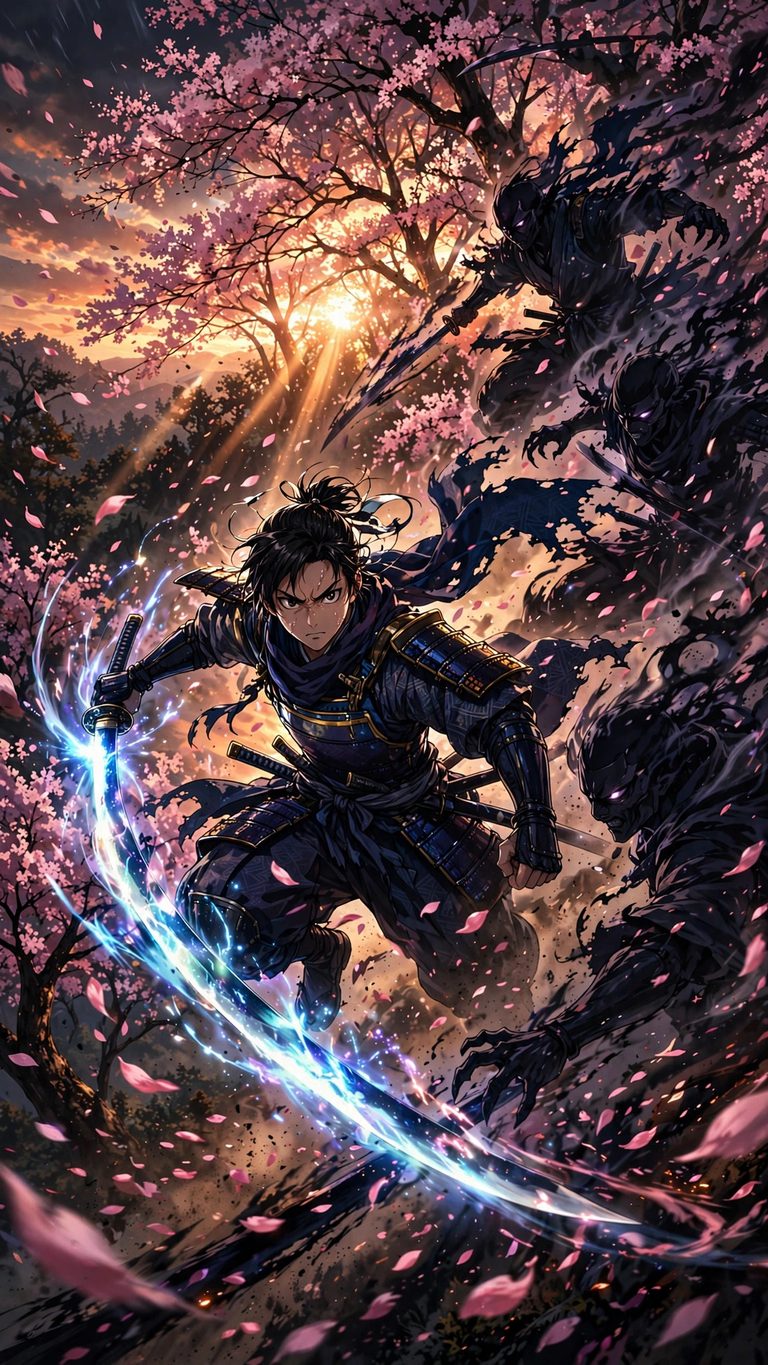
Nothing stops a scroll like a sword being drawn. The samurai duel is one of cinema’s oldest spectacles, and when you wrap it in a storm of pink cherry blossoms with petals swirling in slow motion, you get a visual that feels both ancient and electric. This AI video prompt generates an epic anime battle scene of a lone samurai with a glowing katana clashing against shadow warriors, and it is tailor-made for the action-hungry audiences of TikTok, Reels, and YouTube Shorts. Battle scenes consistently outperform calm scenes on raw view counts because motion and conflict trigger the brain’s attention system. In this article, you will get the exact prompt, a breakdown of why this specific composition goes viral, step-by-step rendering instructions for every major AI video tool, and creative variations that turn one prompt into a whole channel of content.
The Prompt
Copy the prompt below exactly, paste it into your AI video generator, and render in vertical 9:16:
Epic anime battle scene of a lone samurai with glowing katana clashing against shadow warriors under a storm of pink cherry blossoms, petals swirling in slow motion, dramatic camera orbit around the fighters, sunset light flaring through the trees, intense cinematic energy, ultra detailed anime style, dynamic action
Why This Prompt Works
This prompt is engineered around contrast, and contrast is what makes action go viral. The glowing katana against dark shadow warriors creates instant visual hierarchy: the viewer’s eye knows exactly where to look within the first half second, which is critical because you lose most viewers before second two if the frame is confusing. The cherry blossom storm does something cleverer. Pink petals are culturally coded as beautiful and delicate, so surrounding brutal combat with them creates the beauty-violence tension that made films like classic chanbara cinema and modern anime blockbusters iconic. Slow motion stretches the sword clash across the clip, and slow motion is a proven retention device because the brain keeps watching to see the impact resolve. The dramatic camera orbit adds parallax, which reads as high production value; static cameras feel cheap, moving cameras feel expensive. Sunset light flaring through trees gives the AI strong volumetric lighting cues, which is exactly the kind of lighting that renders beautifully in current video models. Finally, the “lone samurai versus many” framing triggers the underdog narrative instinct, and underdog stories are the most shared narrative shape in human culture.
How to Use This Prompt
Action prompts need slightly different handling than calm ones. Step one: in Veo 3, paste the prompt, set 9:16 vertical and eight seconds, and set motion strength to high so the clash feels explosive rather than floaty. In Runway, use the prompt with camera motion set to “orbit” if the tool exposes camera controls, which reinforces the prompt’s orbit instruction. In Kling, high motion mode works best for battle scenes; keep the prompt as-is. In Pika, set motion strength to the upper range and generate at least three takes, because fast action is where artifacts appear most. In Sora, the prompt works directly. Step two: review every take for the classic AI action artifacts, extra fingers on sword grips, blades bending, warriors melting into each other, and keep only the cleanest. Step three: sound design is half the video. Layer a sword-shing sound effect at the clash moment, a deep whoosh under the camera orbit, and taiko drums or epic orchestral music underneath. Step four: cut the first three frames if they show morphing; starting clean matters more than keeping every generated second.
Pro Tips & Creative Variations
The samurai prompt is a franchise starter. Change the warrior: “lone kunoichi with twin glowing daggers” or “ronin with a broken blade” each produce a distinct hero viewers will ask about by name. Change the season and setting: “under a blizzard of snow at a mountain shrine” or “in a bamboo forest at dawn with god rays” gives you fresh episodes without rewriting the formula. For a power-up arc, generate a follow-up clip with “the samurai’s katana erupting in blue flame as petals ignite around him” and post it as part two; multi-part battles drive profile visits because viewers hunt for the next episode. Try the villain swap: replace shadow warriors with “a giant oni demon with iron club” for a boss-fight episode. If your tool supports image-to-video, generate a stunning still first, then animate it; this two-step pipeline gives you far more control over composition than text-to-video alone. For thumbnails, freeze the exact clash frame, add a subtle zoom punch in editing, and use a bold two-word title like “PETAL DUEL.” Post timing matters for action content: evenings and weekends when younger audiences are most active.
Beyond the base prompt, editing is where samurai videos become legendary. Try cutting on the exact frame the blades meet and adding a single-frame white flash; this impact-frame technique is borrowed from professional anime fight choreography and makes the clash feel ten times more powerful. Layer the sound in three passes: first the metallic shing of the draw, then the deep boom of the impact, then the whisper of petals settling. This three-layer approach mirrors how film sound designers build fight scenes. For maximum retention, start your video mid-swing rather than with a wind-up; the first frame should already contain motion. End with the samurai’s silhouette against the sunset as petals fall, a closing image so iconic it becomes your channel’s signature.
Frequently Asked Questions
Why do my battle scenes look blurry or melted?
Fast action is the hardest thing for video models. Lower the motion slightly, generate more takes, and favor wider shots where fighters are smaller. The orbit camera move also helps because it keeps the background moving, which masks small figure artifacts.
Can I make a longer fight scene?
Yes. Generate multiple eight-second clips with consistent character descriptions, then edit them together with hard cuts on the beat of the music. Keep the samurai’s visual description identical across prompts for continuity.
What music fits a samurai battle?
Taiko drums, shakuhachi flute over modern trap beats, or epic orchestral hybrid tracks. Search for royalty-free “epic Japanese battle” music and match your cuts to the drum hits.
Will this work for YouTube Shorts monetization?
AI-generated action content is generally eligible, but always check current platform policies on synthetic media and disclose AI generation where required. Original prompts and editing count in your favor.
One samurai, one glowing blade, one storm of petals: that is all it takes to own the action niche. Generate it, sound-design it like a movie trailer, and let the algorithm do the rest.
Related Viral Prompts
- Sky Whales Over Floating Islands: Free Viral AI Video Prompt for Dreamlike Ghibli-Style Fantasy Worlds
- Ghibli Meadow Wind: Free Viral AI Video Prompt for Peaceful Nostalgic Anime Nature Scenes That Calm Your Mind
- Anime Train at Sunset: Free Viral AI Video Prompt for Nostalgic Lo-Fi Anime Travel Moments and Wistful Journeys
# A I V i d e o # P r o m p t B a z a r # A n i m e # S a m u r a i # E p i c B a t t l e

Leave a Reply