
Introduction
If you have been scrolling past beautiful Halloween portraits and wondering how people make them look so effortless, the answer is almost always a good prompt. A great prompt does not just describe a picture; it tells the AI about a pumpkin-themed dress, pumpkins of all sizes, warm orange light, and fairy lights, the warm adorable lighting, and the feeling the photo should carry. That is exactly what this article delivers: a complete, copy-paste prompt for a pumpkin princess in an autumn pumpkin patch in a golden pumpkin patch with fairy lights, built for autumn lovers and cute Halloween fans. Whether you want it for your profile picture, a family post, or a festive greeting, this one prompt will get you there without any editing skills.
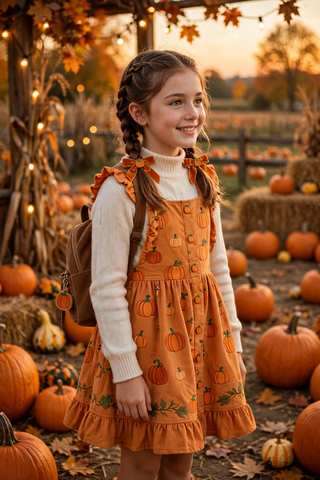
Not every Halloween portrait needs to be scary. The pumpkin princess is autumn at its sweetest: a pumpkin patch, warm orange light, fairy lights, and a dress made for the season. This prompt turns your photo into a storybook autumn portrait that feels warm, adorable, and completely shareable, even for people who skip the horror side of Halloween.
In this article you will find the complete copy-paste prompt, a clear explanation of why it works, a simple five-step method to use it, pro tips for the best result, and answers to the questions people ask most often. By the end, you will be able to create a pumpkin princess in an autumn pumpkin patch in a golden pumpkin patch with fairy lights on your own, as many times as you like, and share it anywhere.
The Prompt
Copy everything inside the box below and paste it into Gemini or ChatGPT together with your photo. Do not change the wording on your first try; the prompt is written to keep your face natural and the scene believable.
Transform this photo into an adorable pumpkin princess portrait in a golden autumn pumpkin patch. Keep the person's face and features exactly the same and fully natural, with soft warm makeup and a sweet smile. She wears a charming pumpkin-themed dress in orange and cream with delicate autumn details and a small pumpkin crown. Around her, pumpkins of all sizes, warm orange evening light, twinkling fairy lights, and soft falling leaves. Golden-hour glow, realistic skin texture, gentle bokeh, and a warm storybook autumn atmosphere. Ultra-realistic photography, sharp focus on the face, cosy autumn colour palette, vertical portrait composition, high detail, no text, no watermark.
Tip: upload a clear, front-facing photo with good light. The AI will keep your facial features and blend them into a golden pumpkin patch with fairy lights with a pumpkin-themed dress, pumpkins of all sizes, warm orange light, and fairy lights.
Why This Prompt Works
The secret of this prompt is the combination of a familiar subject and a rich, believable setting. a pumpkin princess in an autumn pumpkin patch is something people instantly connect with, and a golden pumpkin patch with fairy lights gives the AI a strong visual anchor. When you add a pumpkin-themed dress, pumpkins of all sizes, warm orange light, and fairy lights and warm adorable lighting, the model has everything it needs to build depth, texture, and a natural colour palette. The result does not look artificial or over-processed. It looks like a moment someone actually lived, and that realism is what makes people stop scrolling, double-tap, and ask in the comments how you made it.
Cute autumn content has one of the longest shelf lives on social media because it stays relevant all season, not just on Halloween night. Warm orange tones and fairy lights are naturally eye-catching, and the pumpkin princess theme is instantly understandable. That combination of beauty and clarity is why pumpkin patch portraits get saved and reshared for weeks.
There is also a sharing advantage. Photos like this travel well on autumn aesthetic posts and adorable Halloween photos because they are instantly understandable: anyone who sees the image knows what it celebrates and feels the mood at once. A photo that needs no explanation gets more likes, more comments, and more forwards, and that is exactly the kind of image this prompt is designed to produce.
How to Use This Prompt
You need only two things: one clear photo of yourself and the prompt below. Here is the full process, step by step.
Step 1: Open Gemini or ChatGPT on your phone and start a new image chat. Choose a photo where your face is clearly visible, well-lit, and looking at the camera.
Step 2: Upload the photo and paste the full prompt from the box above in the same message. Mention nothing else in the first message, so the AI follows the prompt exactly.
Step 3: Wait for the image to generate, then look closely at the face, the hands, and a pumpkin-themed dress, pumpkins of all sizes, warm orange light, and fairy lights. If anything looks off, ask for one small correction, such as better face match or softer light, rather than starting over.
Step 4: If you want a variation, keep the same prompt and only change one detail, for example the time of day or the background crowd. Small changes keep the quality high.
Step 5: Download the result in the highest quality available and share it. This look works beautifully as a profile photo, a festive post, or a printed family keepsake.
Pro Tips for Best Results
These small tips make the difference between a good result and a great one. Keep them in mind before you generate.
Use a sharp original photo. Blurry or dark uploads give blurry results. Daylight selfies with a plain background work best.
Keep your face the hero. The prompt already protects your facial features, but avoid sunglasses, heavy filters, or side profiles in the uploaded photo.
Generate twice and pick the better one. AI results vary slightly each time. Two generations give you a clear winner almost every time.
Do not over-edit afterwards. A light brightness adjustment is enough. Heavy filters fight against the warm adorable look the prompt creates.
Shoot for golden hour. Ask the AI for warm low evening light rather than bright daylight, because golden-hour glow is what turns a pumpkin patch photo from nice to magical.
Frequently Asked Questions
Is this prompt free to use?
Yes, the prompt in this article is completely free. Copy it, use it as many times as you like, and share your results anywhere. No sign-up or payment is needed to use the prompt itself; you only need a free Gemini or ChatGPT account to generate the image.
Which app should I use with this prompt?
Gemini and ChatGPT both work very well with this prompt. Gemini is excellent for realistic faces, while ChatGPT is strong on detailed festive scenes. Try both with the same photo once, and use whichever result you like more for your final post.
Will the AI keep my real face in the photo?
Yes, that is exactly what the prompt is written to do. It instructs the AI to preserve your facial features, skin tone, and expression while changing only the scene around you. For the best match, upload a clear front-facing photo with natural light and no sunglasses.
Can children use this pumpkin princess prompt?
Yes, it is a wholesome, non-scary autumn portrait and works beautifully for children. Use a clear photo of the child and keep the dress and setting exactly as described for the sweetest result.
Now you have everything you need: the exact prompt, the method, and the pro tips. Paste it, generate your photo, and let Halloween shine through your feed with a pumpkin princess in an autumn pumpkin patch in a golden pumpkin patch with fairy lights.
Related Viral Prompts
Love this style? Try these next:
- Ghost Photoshoot Pet Dog AI Photo Prompt: Create an
- Zombie Bride Halloween AI Photo Prompt: Create a Glamorous
- Halloween Haunted House AI Photo Prompt: Create a Spooky
#Halloween #PumpkinPrincess #AutumnVibes #AIPhotoPrompt #PromptBazar


Leave a Reply