
Introduction
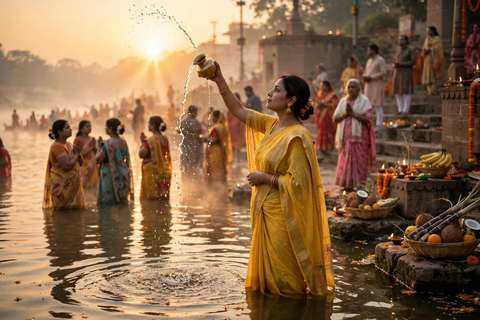
Morning Chhath Puja has a magic that a still photograph can only partly capture. The first light breaks over the river, water ripples gently around devotees, diyas flicker, and a woman raises her soop basket toward the rising sun. A short video brings all of that movement to life, and Google Flow makes it possible to create such a moment in just ten seconds.
This video prompt is designed for Flow and Veo, the AI video tools that turn words into moving scenes. In ten seconds, viewers see the golden sunrise, the slow camera movement, the water offering, and the peaceful devotion of the ghat. It is short enough to share as a Reel, a Short, or a festive status, yet rich enough to feel like a real cinematic clip.
Whether you want a viral festival video, a devotional greeting, or a beautiful opening clip for a longer Chhath Puja post, this prompt gives you a ready-to-use video script. Copy it, paste it into Flow, and watch a golden sunrise ghat scene unfold on your screen.
The Prompt
Copy the complete prompt below and paste it into your AI image or video generator exactly as written. You can change small details, such as clothing colors or the number of people, but keep the setting, lighting, and devotional mood unchanged for the best result.
Create a cinematic 10-second devotional video of Chhath Puja sunrise arghya at a river ghat, in Google Flow video style. Shot: a wide, slowly rising cinematic shot that begins low over calm golden river water and gently lifts to reveal a woman in a bright yellow saree standing waist-deep in the river, holding a decorated bamboo soop basket filled with fruits and marigold flowers above her head toward the rising sun. Camera movement: slow, smooth upward tilt and gentle forward push-in, keeping the devotee centered as golden sunlight breaks across the water. Motion: water ripples softly around her, diyas float and flicker nearby, marigold petals drift on the surface, her saree moves lightly in the morning breeze, and fellow devotees in the background slowly raise their own offerings in unison. Lighting and mood: warm golden sunrise light, soft mist over the river, glowing sky in gold and pale orange, peaceful and deeply devotional atmosphere. Duration: exactly 10 seconds, smooth realistic motion, photorealistic cinematic quality, no text, no watermark.
Why This Prompt Works
This prompt works because video generators need motion instructions, not just a description of a scene. By naming the shot, the camera movement, and the exact motion of water, diyas, petals, and saree, it tells Flow what should move, how fast, and in which direction, so the result feels smooth and intentional rather than shaky or random.
The prompt also works because it keeps the scene focused for a short ten-second clip. One main devotee, one clear action of raising the soop toward the sun, and a single slow camera move are easy for the AI to render cleanly. A crowded, fast-changing scene would blur or distort, but this calm, centered composition stays sharp from the first frame to the last.
Finally, the prompt controls light, mood, and quality in video terms. Golden sunrise light, soft mist, and a peaceful devotional atmosphere guide color and feeling, while photorealistic cinematic quality and no text or watermark keep the clip clean and ready to share on any platform.
How to Use This Prompt
- Open Google Flow and start a new video generation with text to video.
- Copy the full video prompt from the box above and paste it into Flow exactly as written.
- Set the duration to 10 seconds if Flow asks you to choose a clip length.
- Generate the video and watch it fully, checking the camera movement, water motion, and sunrise light.
- If the motion looks too fast or the figure distorts, regenerate with the same prompt for a smoother result.
- Download your favorite version and share it as a Reel, Short, status, or festive greeting video.
Pro Tips for Best Results
- Keep camera movement slow and simple, because a gentle tilt or push-in looks far more cinematic than a fast pan.
- Center one main devotee in the frame so Flow can render her face, saree, and soop basket clearly.
- Add small moving details like floating diyas and drifting petals to make the water feel alive without cluttering the scene.
- Use golden sunrise light in the prompt to give the whole clip a warm, sacred glow.
- Generate two or three versions and choose the one with the smoothest motion and most natural water ripples.
- Add devotional music or a soft Chhath song after generation, since Flow clips are usually silent, for a complete festive video.
Frequently Asked Questions
Can I use this prompt in Google Flow for free?
Flow availability and free credits depend on your Google account and region, but the prompt itself works in Flow and Veo wherever text-to-video generation is offered. Paste it as written and adjust duration only if your plan offers a different clip length. This added care makes the final portrait feel timeless, because a well-balanced sunset silhouette works as a wallpaper, a greeting, and a keepsake that families treasure long after the festival evening has ended.
Why is the video only 10 seconds long?
Ten seconds is ideal for Reels, Shorts, and festive statuses, and it is also the length most AI video tools render most cleanly. A short, focused clip stays sharp and smooth, while longer clips risk distortion or flicker. This added care makes the final portrait feel timeless, because a well-balanced sunset silhouette works as a wallpaper, a greeting, and a keepsake that families treasure long after the festival evening has ended.
Can I change the saree color or the devotee?
Yes, you can change the saree color or describe a different devotee, but keep the sunrise, river, soop basket, and slow camera movement unchanged. Those elements are what make the clip instantly recognizable as Chhath Puja. This added care makes the final portrait feel timeless, because a well-balanced sunset silhouette works as a wallpaper, a greeting, and a keepsake that families treasure long after the festival evening has ended.
Should I add text or music to the video?
Keep the generated clip free of text for a clean cinematic look, then add your own caption or devotional music in your editing app. This gives you full control over fonts, songs, and festive greetings. This added care makes the final portrait feel timeless, because a well-balanced sunset silhouette works as a wallpaper, a greeting, and a keepsake that families treasure long after the festival evening has ended.
Conclusion
May the rising sun bless your mornings with light, may your ten-second sunrise video carry devotion to everyone who watches it, and may this Chhath Puja fill your life with warmth, hope, and new beginnings.
Related Viral Prompts
- Chhath Puja Sunrise Arghya AI Photo Prompt A divine golden morning portrait of arghya offered at the river ghat.
- Chhath Puja Couple Video AI Prompt for Flow A romantic devotional ghat video of a couple celebrating Chhath Puja together in Flow.
- Chhath Puja Village Pond Morning AI Photo Prompt A rustic beautiful portrait of a village pond morning during Chhath Puja.
#ChhathPuja #FlowAI #AIVideoPrompt #SunriseVideo #ChhathVideo #DevotionalVideo #GhatVideo #VeoVideo


Leave a Reply