
Introduction
Evening arghya, or Sandhya Arghya, is the most cinematic moment of Chhath Puja. As the sun sinks towards the river, the sky turns orange, pink, and gold, and thousands of diyas begin to glow along the ghat. Devotees stand in the water, offering prayers to the setting sun, and the whole river looks like it is on fire with light. It is no wonder that sunset Chhath photos are among the most shared festival images every year.
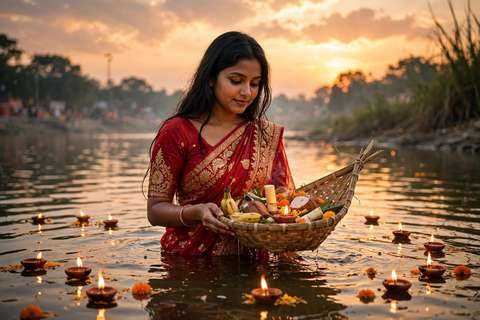
This Chhath Puja evening arghya AI photo prompt creates a dreamy sunset river portrait of a young woman in a red saree with golden embroidery, standing in the river with a soop as diyas float around her. The warm cinematic light, the rich red and gold colours, and the peaceful expression make this portrait elegant, emotional, and perfect for Instagram during the festival evenings.
If you have ever tried to write your own AI prompt, you know how easily the result can go wrong — the wrong outfit, flat light, or a background that looks nothing like a real ghat. That is why a ready-made, tested prompt like this one saves so much time and frustration, and lets you focus on celebrating the festival instead of struggling with technology.
The Prompt
Copy the full prompt below and paste it into Gemini. You can keep it exactly as written, or change one small detail, such as the background or the colour of the outfit, to make it your own. Read it once before you paste it, so you know exactly what scene Gemini will create for you.
Create a photorealistic vertical 4:5 portrait of a young Indian woman during Chhath Puja evening arghya at sunset, standing gracefully in a calm river. She wears an elegant red saree with intricate golden embroidery, traditional gold jewellery, a red bindi, and sindoor, her long hair flowing softly in the evening breeze. She holds a decorated bamboo soop basket with fruits and lit diyas in both hands, raised gently towards the setting sun. The sky glows in shades of orange, pink, and gold, the sun's reflection shimmers on the water, and small floating diyas with tiny flames drift around her. A decorated ghat with marigold garlands and glowing lamps blurs softly behind her. Warm cinematic sunset light, dreamy golden haze, ultra-detailed embroidery and jewellery, realistic water ripples, and a serene, divine, romantic festival mood.
Why This Prompt Works
Sunset portraits succeed or fail on colour, and this prompt controls colour carefully. Red and gold are a classic, regal combination, and against an orange and pink sky they glow without clashing. The prompt also asks for golden embroidery detail, which gives Gemini a reason to render the saree richly instead of as a flat red shape.
The floating diyas are the secret ingredient. They add small points of warm light across the water, leading the eye towards the subject and making the scene feel magical. Combined with the dreamy haze and the cinematic sunset light, the portrait feels like a film still — emotional, beautiful, and instantly shareable, while still staying respectful of the sacred ritual.
Another reason this prompt is so reliable is that it balances tradition with beauty. It never turns the ritual into a costume or a joke; it treats the arghya, the prasad, and the diyas with respect, while still asking for the cinematic light and colour that make a photo shareable. That balance is exactly why family members love these portraits and why they feel right to post during the festival.
How to Use This Prompt
Follow these simple steps to turn the prompt into a beautiful, share-ready photo in just a few minutes. Each step takes less than a minute, and you do not need any photo editing skills to get a beautiful result.
- Open Gemini on your phone or computer and start a new image generation chat.
- Copy the entire prompt from the box above and paste it exactly as written.
- If you prefer a different saree shade, swap red for maroon or deep pink, but keep the golden embroidery so the sunset light still catches it.
- Generate the first version, then look closely at the face, the hands, the outfit details, and the lighting.
- If something looks off, change only one detail at a time — for example, the pose or the background — and generate again.
- Download your favourite version, crop it slightly if needed, and share it on Instagram, WhatsApp, or Facebook.
Pro Tips for Best Results
- Keep the words photorealistic, golden light, and cinematic in the prompt — they set the warm, festival mood instantly.
- Keep the golden embroidery in the description — it is what makes the red saree glow beautifully in sunset light.
- Ask for a vertical 4:5 frame so the photo fits Instagram posts and stories without awkward cropping.
- If the face looks unfamiliar, regenerate with the same prompt rather than rewriting everything from scratch.
- Add a short phrase like soft smile or peaceful expression to keep the devotional feeling natural and calm.
- Generate two or three versions and pick the one with the most natural hands, eyes, and diya glow.
Frequently Asked Questions
What is the difference between morning and evening arghya?
Evening arghya, called Sandhya Arghya, is offered to the setting sun on the third day of Chhath Puja, while morning arghya, called Usha Arghya, is offered to the rising sun on the fourth day. Both are sacred, but evening arghya is famous for its dramatic sunset colours and glowing diyas.
Can I use this prompt for a profile photo?
Yes, the vertical portrait framing and the warm sunset glow make it a lovely profile photo during the festival season. Crop it to a square in your phone’s photo editor if your profile needs a square shape.
Will the embroidery details show clearly?
The prompt asks for ultra-detailed embroidery and jewellery, which usually produces clear, rich patterns. If the details look soft, generate again with the same prompt, or add the words intricate golden zari work for extra sharpness.
Can I add my own face to this portrait?
Gemini image generation works from text prompts, so you cannot upload a photo to guarantee your exact face. You can, however, describe your hairstyle, jewellery, or features briefly, and generate several versions to find the closest, most flattering result.
Conclusion
As the sun sets on the river and the diyas begin their journey across the water, Chhath Puja shows its most dreamlike face. With this prompt, you can step into that golden evening yourself — graceful, glowing, and full of devotion. Try it this festival season and share your sunset portrait with the people you love.
Related Viral Prompts
- Chhath Puja Sunrise Arghya AI Photo Prompt — a golden sunrise arghya portrait on a decorated river ghat.
- Chhath Puja Sunset Silhouette AI Photo Prompt — a breathtaking cinematic silhouette portrait at sunset.
- Chhath Puja Night Floating Diya AI Photo Prompt — a magical night river portrait with hundreds of floating diyas.
#ChhathPuja #AIPhotoPrompt #EveningArghya #RedSaree #SunsetPortrait #DiyaLights #ChhathPuja2026 #GoldenHour


Leave a Reply