
Introduction
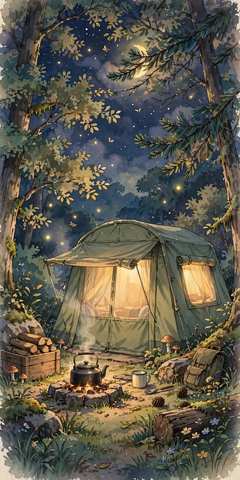
Some of the most beloved Ghibli moments happen at night: a campfire glowing in the dark, stars spilling across an impossible sky, the feeling that the world is both huge and safe. This Ghibli style camper tent night AI photo prompt captures exactly that feeling, placing you beside a warmly glowing tent with a crackling campfire, the Milky Way arching overhead, and your real face lit by firelight. It is the coziest portrait in the collection, and it has become a nighttime favorite.
Here is what the finished portrait looks like. You sit on a log beside a small campfire, sparks spiraling up into a sky crowded with hand-painted stars. Behind you, your tent glows amber from the lantern inside, a little beacon of warmth in the blue dark. Tall pines stand sentinel around the clearing, their tops brushing the Milky Way. Your face carries the fire’s warm light and the calm of someone with nowhere else to be, wrapped in a blanket against the cool night air.
This portrait works because it is the visual equivalent of a deep breath. The contrast of warm firelight and cool starlight, the tiny human figure under an enormous sky, the tent glowing like a promise of rest: it is everything people love about camping, distilled. Night owls, stargazers, and anyone who has ever stared into a campfire will feel instantly at home in this frame.
In this guide, you get the exact copy-paste prompt that creates this look, a breakdown of why it works so well, step-by-step instructions for using it with free AI image tools, pro tips for keeping your face recognizable, and answers to the most common questions. By the end, you will be able to turn any ordinary photo of yourself into a hand-painted anime moment that looks like a still frame from a beloved film, ready to share with friends or frame on your wall.
The Prompt
Copy the prompt below and paste it into your favorite AI image generator along with your photo:
Transform my photo into a Studio Ghibli anime portrait of a camper beside a glowing tent under a starry night sky, keeping my exact face, hairstyle and peaceful expression. Show me sitting by a small campfire with sparks rising, the tent glowing warmly behind me, and the Milky Way arching overhead. Use soft cel shading, deep indigo night colors, warm firelight on my face, hand-painted stars and pines, and the cozy wonder of a Ghibli night. Portrait orientation, highly detailed anime illustration.
Why This Prompt Works
First, Studio Ghibli is famous for animating motion, and this prompt leans into that strength. Instead of a stiff posed portrait, you are captured sitting peacefully by the campfire, sparks spiraling upward as firelight dances across your face and the tent glows behind you, with fabric, hair, and the world around you responding to the movement. Think of Think of the starry night scenes in Howl’s Moving Castle, where the sky becomes a sea of impossible, glittering detail., where every gesture feels alive. This prompt paints your campsite under that same enchanted sky, as if Calcifer himself were tending your little fire. That sense of living motion is what separates a flat filter from a true anime illustration, and it is the reason these images stop people mid-scroll.
Second, Ghibli backgrounds are practically characters themselves, and this scene gives the AI a rich one to paint. You camp in a pine clearing at night, with a glowing tent, a crackling campfire, rising sparks, and the Milky Way arching over dark treetops. The prompt asks for layered, hand-painted detail: drifting particles in the air, textured surfaces, and a sky full of feeling. Warm campfire gold plays across your face while deep indigo night and silver starlight fill the world beyond the fire’s glow. When the setting is this alive, the portrait gains the depth and warmth that make Ghibli frames so comforting to look at.
Third, the prompt protects your identity. Many anime filters redraw your face into someone else entirely, which is fun for a day but forgettable. Here, the instructions explicitly tell the AI to keep your exact face, hairstyle, and expression, then build the Ghibli world around the real you. The result still feels like you, just translated into soft cel shading with expressive anime eyes and painterly color. That personal connection is why people love sharing these: friends instantly recognize you inside the magic.
Finally, the color and light do the emotional heavy lifting. Ghibli films like Howl’s Moving Castle and My Neighbor Totoro are masterclasses in golden-hour glow, luminous skies, and shadows that feel soft rather than harsh. Warm campfire gold plays across your face while deep indigo night and silver starlight fill the world beyond the fire’s glow. The prompt calls for that same gentle cinematic lighting, and it dresses you in a cozy layered outfit with a warm jacket and a blanket over your shoulders, a knit beanie keeping you snug in the mountain night, so every element of the frame works together. The outcome is an image with mood, not just a costume swap.
How to Use This Prompt
Using this prompt takes about two minutes. You do not need any editing skills, and most of the tools below are free to try. Here is the full process:
Step 1: Pick a clear, front-facing photo of yourself with good lighting. A simple background and a natural expression work best, because the AI will preserve your face and redraw everything else.
Step 2: Open an AI image generator that accepts photo uploads, such as ChatGPT with image generation, Gemini, Midjourney, Leonardo AI, or any similar tool you already use.
Step 3: Upload your photo and paste the prompt from the box above exactly as written. Add nothing else for your first try, so you can see the baseline result.
Step 4: Set portrait orientation if the tool offers aspect ratio choices. A 2:3 or 3:4 ratio suits phone wallpapers and profile pictures, while 9:16 is ideal for stories and reels.
Step 5: Generate the image, then refine if needed. If a detail looks off, regenerate with one small tweak, for example asking for a warmer sky or a different camera angle, rather than rewriting the whole prompt.
Step 6: Download your favorite version in the highest resolution available. Share it on social media, set it as your profile picture, or print it. Tag it with the hashtags below so other Ghibli fans can find it.
Pro Tips for Best Results
Small choices make a big difference with AI portraits. These tips will help your camper image look its best:
Tip 1: A calm, relaxed photo makes the best source. The peaceful nighttime mood pairs beautifully with a soft, natural expression.
Tip 2: Add camping details in a follow-up. ‘With a steaming mug in my hands’ or ‘marshmallows roasting on a stick’ adds charming storytelling touches.
Tip 3: Try an aurora variation. ‘With the northern lights dancing above the pines’ transforms the same campsite into an even more magical spectacle.
Tip 4: Use the highest-resolution photo you have. The AI keeps your facial features sharper when it starts from a clear, well-lit source image instead of a compressed screenshot.
Tip 5: Keep the original background simple. A plain wall or an uncluttered room gives the AI less to untangle, so more of its effort goes into painting the Ghibli scene around you.
Tip 6: Generate two or three variations before settling. Tiny differences in pose, lighting, and background detail appear between runs, and the second or third attempt is often the keeper.
Frequently Asked Questions
Will the portrait keep my face looking like me?
Yes. The prompt instructs the AI to keep your exact face, hairstyle, and peaceful expression while painting the night scene around you. Firelight scenes are flattering and forgiving, since the warm glow naturally softens features into the anime style. Use a clear, front-facing photo for the strongest likeness.
Which free AI tools can I use with this prompt?
Most modern AI image tools that accept photo uploads will work, including ChatGPT with image generation, Google Gemini, Midjourney, Leonardo AI, and Microsoft Designer. Free tiers usually give you a handful of generations per day, which is plenty to produce a great portrait. Paste the prompt exactly as written, upload your photo in the same message, and request portrait orientation.
Can I change the setting, add the aurora, or make it a group camp?
Yes. Follow up with ‘beside a mountain lake with reflections of the stars’ or ‘with two friends and a second tent’ to expand the scene. You can add the northern lights, a full moon, or fireflies. The prompt handles the cozy Ghibli night look; your additions write the story.
What kind of photo gives the best result?
A front-facing photo taken in soft daylight, with your face clearly visible and a neutral or gently happy expression. Avoid heavy filters, sunglasses, or deep shadows across the face, since the AI needs clean facial features to preserve your identity. A simple background helps, but the prompt will replace the setting anyway, so do not worry if your original photo was taken indoors.
The best nights are the ones spent under more stars than you can count, with warmth at your back and wonder overhead. Paste the prompt, upload your photo, and claim your place by the fire. Morning will come soon enough, but in this frame, the night and its thousand painted stars are yours forever.
Related Viral Prompts
If you loved this one, try these other prompts from the collection:
- Ghibli Style Fireplace Reading Nook AI Photo Prompt
- Ghibli Style Cozy Kotatsu Winter AI Photo Prompt
- Ghibli Style Blanket Fort AI Photo Prompt
#GhibliAI #StudioGhibli #AIPhotoPrompt #GhibliStyle #AnimeCamping




Leave a Reply