
Introduction
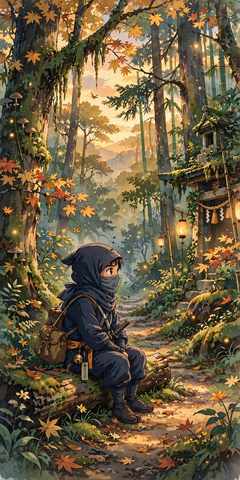
Of all the worlds Studio Ghibli has painted, the ancient forest at night may be the most spellbinding: towering cedars fading into mist, moonlight pooling in silver patches on the moss, and tiny lights drifting between the trunks like earthbound stars. It is the forest of Princess Mononoke, where the Forest Spirit walks, and the hushed woods of My Neighbor Totoro, where something ancient is always just out of sight. This prompt places you inside that mystery as a ninja, crouched silent on a mossy branch, fireflies glowing around you, utterly still and utterly alert.
The ninja forest portrait has carved out its own corner of the Ghibli AI photo trend because it offers something the sunny meadow scenes do not: cool, cinematic mystery. It is the portrait people choose for dramatic avatars, moody wallpapers, and that effortlessly cool profile picture that suggests hidden depths. The contrast is irresistible, a stealthy warrior rendered in the gentlest animation style on earth, and the moonlit palette makes it stand out dramatically in any feed.
Your real face stays at the center of it all, framed by the wrapped headband and lit by moonlight and firefly glow. The dark cloth outfit and the ancient forest do the storytelling while your identity anchors the image in reality. Below you will find the exact copy-paste prompt, an explanation of why it captures Ghibli’s forest magic so convincingly, simple usage steps, pro tips for the perfect generation, and answers to frequently asked questions.
The Prompt
Copy the exact prompt below and paste it into your AI image generator together with your photo:
Transform this photo into a Studio Ghibli-style anime illustration of a stealthy ninja crouched on a mossy branch in an ancient moonlit forest, wearing a dark cloth outfit with a wrapped headband, fireflies glowing among towering cedar trees and drifting mist. Keep the person's face and identity exactly the same as the uploaded photo. Painterly hand-drawn Ghibli look with cool blue moonlight, dappled shadows, lush ferns, and quiet cinematic mystery; vertical portrait orientation, 3:4 aspect ratio.
Why This Prompt Works
This prompt works because Ghibli’s forests are characters, not scenery. In Princess Mononoke the forest breathes, watches, and judges; in Totoro it hides wonders in plain sight. The prompt honors that tradition by building a full forest ecosystem around you: towering cedars, lush ferns, drifting mist, glowing fireflies. That density of living detail is what makes the AI paint a Ghibli forest instead of a generic dark woods backdrop.
It also masters Ghibli’s night palette. The studio’s night scenes are famously luminous rather than black: moonlight in cool blues and silvers, warm pinpricks of firefly light, dappled shadows that feel soft instead of threatening. Think of the glowing forest spirit’s night walk or the fireflies drifting over the countryside in Grave of the Fireflies. The prompt’s cool blue moonlight plus firefly glow recreates exactly this balance of mystery and beauty.
Finally, the stillness is pure Ghibli. The ninja is crouched, waiting, watching, not mid-leap or mid-fight. Ghibli’s most powerful moments are often its quietest: a held breath before something wonderful happens. By staging you in a moment of poised stillness rather than action, the prompt captures the studio’s signature tension, the feeling that the forest is about to reveal something, and you are ready for it. Your preserved face, calm and focused in the moonlight, completes the spell.
How to Use This Prompt
Step 1: choose a focused source photo. Select a clear, front-facing, well-lit photo. A calm, composed expression works best for the stealthy ninja mood; intensity in the eyes is welcome, but avoid big smiles, which clash with the quiet mystery of the scene. No sunglasses or face coverings, since the AI needs your features.
Step 2: upload to your image generator. Use a modern AI image tool that accepts reference photos, such as ChatGPT image generation, Google Gemini, Midjourney, or Leonardo AI. Upload your photo first, then paste the full prompt text exactly as written in the prompt box above.
Step 3: set the vertical format. The prompt asks for a 3:4 portrait orientation, which suits the towering vertical composition of cedar trunks, rising mist, and your crouched figure. Select a portrait aspect ratio in your tool for the intended framing.
Step 4: generate and fine-tune. Create the image and review it in detail: the headband, the branch, the fireflies, your likeness in moonlight. Regenerate if the pose looks awkward, or use follow-ups like softer mist or more fireflies to adjust the atmosphere while keeping your face identical.
Pro Tips for Best Results
Protect the mood in follow-ups. This portrait lives on quiet mystery, so keep variations in the same register: deeper mist, a fuller moon, denser fireflies. Asking for explosions or daylight would break the spell; if you want action, the samurai duel portrait in article 146 offers drama in a different key.
Try the firefly density slider trick. Fireflies are the soul of this image, and small changes matter enormously. A follow-up asking for twice as many fireflies transforms the scene from mysterious to magical; asking for just a few keeps it stealthy and minimal. Experiment to find your favorite balance.
Check the branch and pose closely. Crouched poses on branches are anatomically tricky for AI models, so zoom in on your figure at full resolution. If a limb looks odd, regenerate rather than trying to fix it with edits; a fresh generation usually resolves pose issues cleanly.
Use it as a dramatic wallpaper. The deep blues and glowing accents of this portrait look spectacular on phone lock screens, especially with dark mode. The vertical 3:4 composition fills the screen beautifully and the glowing fireflies draw the eye exactly where you want it.
Share the exact prompt text. The precise combination of moonlit cedar forest, firefly glow, and face preservation is what produces the reliable Ghibli night-forest look. When friends ask how you made yours, send them the verbatim prompt from this page.
Frequently Asked Questions
Will my face be visible in the dark forest scene?
Yes. The prompt preserves your face and identity exactly, and Ghibli night scenes are luminous rather than pitch black, so moonlight and firefly glow will light your features clearly. A well-lit source photo helps the AI render your likeness accurately in the night palette.
Can I make the ninja outfit a different color?
You can. After generating the base image, ask for a variation such as a deep indigo or forest-green outfit instead of the dark cloth. Keep the change minimal and specific so the forest, lighting, and your face stay consistent.
Which AI tool is best for night scenes?
Any leading image generator with reference-photo support handles this well, including ChatGPT image generation, Google Gemini, Midjourney, and Leonardo AI. Night scenes benefit from higher quality or detail settings, so enable the best rendering options your tool offers.
Can I add a weapon like a katana?
Yes, in a follow-up prompt. Ask for a sheathed katana at your side or across your back, described simply. One small addition at a time keeps the composition clean and avoids the cluttered look that too many props can create.
Some portraits shout; this one whispers, and in its whisper is the oldest Ghibli magic of all: the hush of an ancient forest at night, the glow of a thousand tiny lights, and you, perfectly still at the center of the mystery.
Related Viral Prompts
Ghibli Style Samurai Duel AI Photo Prompt | Ghibli Style Archaeologist Ruins AI Photo Prompt | Ghibli Style Inventor Workshop AI Photo Prompt
#GhibliAI #StudioGhibli #AIPhotoPrompt #GhibliStyle #NinjaForest




Leave a Reply