
Introduction
Few images in animation history are as universally loved as a Studio Ghibli kitchen. Think of the sizzling bacon and eggs that Calcifer cooks in Howl’s Moving Castle, the steaming bowls of ramen in Ponyo, or the humble herring pie that carries so much emotion in Kiki’s Delivery Service. Ghibli kitchens are never just backgrounds. They are warm, glowing sanctuaries where food becomes love, and every chopped vegetable feels like a small celebration of ordinary life.
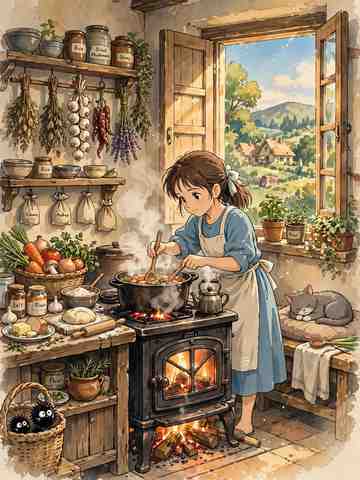
That is exactly why the Ghibli style kitchen cooking AI photo prompt has become one of the most shared trends of the year. It takes your own photograph and reimagines you as the star of your own hand-painted anime scene: sleeves rolled up, hands dusted with flour, golden afternoon light pouring through a cottage window while copper pots hang overhead and something delicious bubbles away on the stove.
Unlike generic anime filters that flatten your features into an unrecognizable cartoon, this prompt is written to preserve your face identity. The result still looks like you, just living inside the coziest animated film ever made. Friends will recognize you instantly, and the comments section will take care of the rest.
Whether you are an actual home cook, a foodie who lives for aesthetic kitchen content, or someone who simply grew up dreaming of stepping into a Ghibli film, this prompt delivers a portrait that feels personal, nostalgic, and endlessly shareable. Let us break down exactly how to use it for the best possible result.
The Prompt
Copy the prompt below exactly as written, then paste it into your favorite AI image generator along with your photo:
Transform this photo into a Studio Ghibli anime style portrait, keeping the person's face identity exactly the same. Place them in a cozy, sunlit rustic kitchen, hands kneading dough on a wooden counter, surrounded by hanging copper pots, steaming pots, and baskets of fresh vegetables. Warm hand-painted watercolor look, golden afternoon light streaming through a window, rich cozy details, portrait orientation, 4:5.
Why This Prompt Works
The first reason this prompt works so well is light. Studio Ghibli’s background artists are masters of warm, golden-hour illumination, and the prompt specifically asks for that hand-painted glow. Afternoon sun streaming through a kitchen window, steam catching the light, the soft gleam of copper cookware: these cues push the AI away from flat digital anime and toward the rich, painterly warmth that defines the true Ghibli look.
Second, the prompt is packed with specific, tangible details: hanging copper pots, baskets of fresh vegetables, flour-dusted hands, a worn wooden counter. AI image models perform dramatically better when you give them concrete objects instead of vague vibes. Each named detail gives the model something real to render, which is why results look dense and lived-in rather than empty and generic.
Third, the face identity instruction matters enormously. By explicitly telling the model to keep your face exactly the same, you anchor the generation to your uploaded photo. The kitchen, the lighting, and the art style all transform around you while your recognizable features stay put. That is the difference between a fun throwaway filter and a portrait that actually feels like yours.
Finally, there is pure emotional psychology at work. Ghibli food scenes trigger some of the strongest nostalgia in all of animation, and cooking itself reads as care, comfort, and home. When people see you inside that world, the image earns an instant emotional reaction, which is exactly why these portraits collect saves, shares, and profile-picture upgrades.
How to Use This Prompt
Using the prompt takes less than two minutes. Here is the exact workflow that produces the best results:
- Choose a clear, front-facing photo of yourself with good lighting. A simple head-and-shoulders selfie works perfectly, because the AI will generate the kitchen setting and body pose around your face.
- Open your AI image tool of choice, such as ChatGPT image generation, Google Gemini, Midjourney, or any photo-to-image anime model, and upload your photo as the reference image.
- Paste the full prompt exactly as written above. Do not paraphrase it, because the specific phrases about hand-painted style and face identity are doing real work behind the scenes.
- Set portrait orientation, ideally a 4:5 ratio that fills phone screens beautifully on Instagram, and generate. If your tool allows it, create two or three variations and pick the strongest one.
- Review the result carefully. Check that your face still looks like you and that the kitchen details rendered cleanly. If something looks off, regenerate once more, since small variations often fix stray artifacts on the second try.
That is the entire process. Most people get a share-worthy result on the first or second attempt, because the prompt already contains the lighting, style, and composition instructions the model needs to succeed.
Pro Tips for Best Results
Start with a high-resolution source photo. The AI can only preserve facial details it can actually see, so a sharp, well-lit original is the difference between ‘that looks just like you’ and ‘close, but something feels off.’
Match the mood with your expression. A soft, genuine smile or a calm, content look blends seamlessly into a cozy cooking scene, while an intense or dramatic expression can clash with the warm, peaceful kitchen atmosphere.
Customize the dish to make it yours. Want to knead pizza dough instead of bread, or stir a pot of curry? Add one short sentence to the prompt describing it. The base prompt handles the Ghibli style; your tweak makes the portrait personal.
Keep the portrait orientation. Ghibli kitchen scenes are naturally vertical compositions with tall windows, hanging pots, and stacked shelves, and a 4:5 frame shows them at their best. Landscape crops tend to waste the composition.
If hands look strange, regenerate rather than repair. AI models still occasionally fumble fingers, especially around dough and utensils. One more generation almost always resolves it, and it is far faster than manual editing.
Frequently Asked Questions
Will the AI really keep my face looking like me?
Yes, and that is the most important line in the prompt. By instructing the model to keep your face identity exactly the same, the generation anchors to your uploaded photo for facial structure while restyling everything else around you. For the best results, use a clear, front-facing photo, because the sharper your features are in the source image, the more recognizable the final portrait will be.
Which AI tools work best with this prompt?
Any modern image model that accepts a reference photo works well, including ChatGPT image generation, Google Gemini, and Midjourney with character reference features. The prompt is written in plain descriptive language with no tool-specific syntax, so it transfers cleanly between platforms without modification.
Can I change the kitchen to match my own cooking style?
Absolutely. The prompt is a starting template, not a locked recipe. Swap in your favorite dish, change the time of day, or add personal details like a stack of well-worn cookbooks. As long as you keep the Ghibli style descriptors and the face identity line intact, the results stay consistently beautiful.
Why do the hands or the food sometimes look weird?
Hands and complex food textures are among the hardest things for AI image models to render. If you spot odd fingers or mushy-looking dishes, simply generate again. Each run is a fresh attempt, and most people get clean results within two or three tries. Starting from a high-quality source photo also reduces artifacts noticeably.
The Ghibli style kitchen cooking prompt is more than a filter. It is a ticket into the warmest animated world ever drawn. Paste the prompt, upload your photo, and give yourself the cozy anime kitchen portrait you have always deserved, then share it, because this is one trend your friends will genuinely want to try for themselves.
Related Viral Prompts
Cozy Kotatsu Winter AI Photo Prompt
Hot Pot Winter AI Photo Prompt
Pancake Stack Honey AI Photo Prompt
#GhibliAI #StudioGhibli #AIPhotoPrompt #GhibliStyle #AnimeArt




Leave a Reply