
Introduction
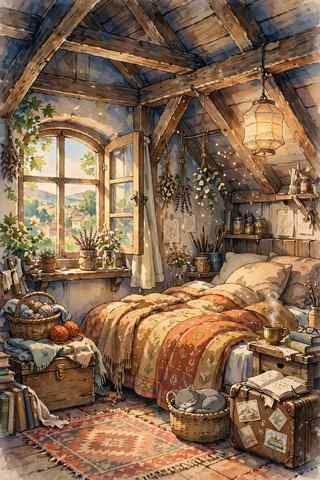
Kiki’s tiny attic room above the bakery. Marnie’s sunlit attic in When Marnie Was There. The cluttered, slanted-ceiling hideaways where Ghibli’s heroines dream, draw, and become themselves, the attic bedroom is one of the studio’s most beloved spaces, a room that feels like the inside of a daydream. This trend gives you one of your own: your selfie transformed into a hand-painted portrait of you in a cozy attic bedroom, patchwork quilt pulled up, string lights glowing, a round window framing the starry night.
Attics are the architecture of imagination. Slanted beams, hidden corners, and a window placed exactly where the sky performs, they are rooms that ask you to dream bigger. Ghibli understands this better than any studio alive, which is why its attic scenes feel like sanctuaries for becoming. A portrait of you in such a room is not just decor; it is a manifesto about the life you are quietly dreaming up.
You stay recognizably you through the whole transformation. The prompt instructs the AI to keep your exact face, hairstyle, and features from your uploaded photo, repainting only the room, the beams, the books, the sketches, the moonbeams, in nostalgic watercolor. It is the bedroom of your inner world, and you are already home in it.
Below: the exact copy-paste prompt, the reasons it works so well, step-by-step usage for every major AI image tool, pro tips for the dreamiest results, and answers to frequently asked questions. Climb the stairs, your attic is ready.
The Prompt
Copy the exact prompt below and paste it into your favorite AI image generator along with your photo. For best results, upload a clear front-facing photo first, then paste the entire prompt exactly as written.
Transform my photo into a Studio Ghibli anime-style portrait of me in a cozy attic bedroom under slanted wooden beams, keeping my exact face, hairstyle, and features from the uploaded photo. I sit on a patchwork-quilt bed beside a round window showing a starry night sky, surrounded by hand-painted books, sketches, a desk lamp, and string lights. Soft watercolor shading, warm lamplight, moonbeams through the window, and a dreamy nostalgic hideaway atmosphere. Portrait orientation, vertical 2:3 composition.
Why This Prompt Works
The round window is the prompt’s hero. A circular frame of starry night sky inside a room of warm lamplight creates the signature Ghibli contrast: the vast universe made intimate, the infinite sky turned into a picture on your wall. Kiki’s attic window works the same way; it promises that the wider world is always within dreaming distance.
Slanted wooden beams do quiet compositional work. They angle the eye upward and inward, making the room feel like a held breath, small, safe, and full of vertical possibility. Ghibli’s attic scenes use those beams to make small rooms feel expansive with imagination rather than cramped, and the AI follows the same geometry when you name it.
Personal clutter tells the story: books, sketches, a desk lamp, string lights, and a patchwork quilt. These are the artifacts of a creative inner life, the exact kind of detail Ghibli packs into heroines’ rooms to show who they are without a word of dialogue. Naming them turns a generic bedroom into your bedroom, specific, storied, and impossible to scroll past.
How to Use This Prompt
Using this prompt takes less than two minutes once you know the flow. Follow these steps in order for the most reliable results.
- Choose a clear, front-facing photo. Pick a well-lit selfie with a neutral expression and minimal background clutter. The AI preserves your facial identity, so a sharp, evenly lit source photo is the single biggest factor in a convincing attic bedroom portrait.
- Copy the entire prompt text. Select everything inside the
block above, including the face-preservation instruction at the start, which is what keeps the result looking like you instead of a stranger.
- Open your AI image generator. This prompt works in ChatGPT, Google Gemini, Midjourney, Leonardo AI, and most modern image tools. Use whichever platform you already have access to; all of them accept an uploaded reference photo plus a text prompt.
- Upload your photo first, then paste the prompt. Attach your chosen photo to the chat or canvas, paste the full prompt text, and send. Uploading the photo before the prompt helps the model lock onto your face before it starts painting the scene.
- Request portrait orientation if needed. Some tools default to square or landscape images. If yours does, add vertical 2:3 portrait to your follow-up message or select the portrait aspect ratio in the tool's settings before generating.
- Regenerate and refine. Your first result is a starting point, not a verdict. If the attic looks right but your face drifted, regenerate with the same prompt, or add keep the face exactly like the reference photo and try once more.
Pro Tips for Best Results
The prompt does most of the work, but these small refinements separate a good result from a jaw-dropping one.
- Lead with good light in your source photo. Soft daylight facing a window beats any overhead bulb. The AI borrows your photo's lighting logic, so clean, even illumination on your face translates into a clean, believable attic bedroom portrait.
- Make the clutter yours. Mention a guitar in the corner or polaroids pinned to the beams to fill the attic with your real hobbies. Ghibli rooms always tell you who lives in them.
- Do not delete the face-preservation sentence. It is the most important line in the prompt. If a tool shortens or improves your prompt automatically, check that the identity instruction survived; without it, you get a pretty stranger instead of you.
- Generate at the highest resolution your tool allows, then upscale. Fine watercolor texture and tiny background details, the string lights and sketchbook pages, only shine when the image has enough pixels. Upscale before posting or printing.
- Try one variation at a time. Change a single element per regeneration, the night sky or the desk items, so you learn what each tweak does. Changing five things at once makes it impossible to tell which edit improved the image.
Frequently Asked Questions
Will this prompt really keep my face looking like me?
Yes, that is what the opening sentence is engineered to do. By explicitly instructing the AI to keep your exact face, hairstyle, and features from the uploaded photo, the prompt prioritizes identity preservation over stylization. For the strongest likeness, use a clear, front-facing, well-lit photo; extreme angles, heavy filters, or sunglasses in the source photo make the AI guess, and guessing is where likeness drifts.
Which AI tools work best with this prompt?
Any modern image generator that accepts a reference photo plus a text prompt: ChatGPT, Google Gemini, Midjourney, Leonardo AI, Firefly, and similar tools all handle it well. Paste the full prompt exactly as written and upload your photo in the same message. If a tool rewrites or shortens prompts automatically, double-check that the face-preservation sentence survived the edit.
Can I add my pet or change the sky?
Both work. Add my cat asleep on the patchwork quilt for instant Ghibli authenticity, or swap the starry sky for a full moon or distant fireworks to change the mood. The slanted beams, string lights, and warm lamplight hold the cozy structure together no matter what you put outside the window.
Can I post or print the image?
For personal sharing, profile pictures, prints for your wall, and gifts, absolutely, and these portraits make wonderful versions of all three. For commercial use, check your AI tool's terms of service, since rights vary by platform and plan. One note: the style is inspired by Studio Ghibli rather than an official Ghibli product, so avoid presenting it as licensed artwork.
Everyone needs an attic of the mind: a slanted-ceilinged, starlit place where dreams get drafted. Copy the prompt, upload your photo, and climb up to yours. The quilt is patchwork, the lights are strung, and the round window is showing the universe tonight. Dream big up there; the beams can hold it.
Related Viral Prompts
Ghibli Style Fireplace Reading Nook AI Photo Prompt
Ghibli Style Treehouse Interior AI Photo Prompt
Ghibli Style Library Ladder Books AI Photo Prompt
#GhibliAI #StudioGhibli #AIPhotoPrompt #GhibliStyle #CozyAnime




Leave a Reply