
Introduction
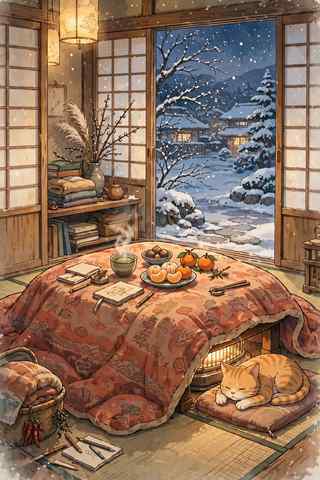
If you have ever seen a Ghibli film set in winter Japan, you have seen the kotatsu, that low table with a quilt draped over it, hiding a heater underneath, where entire families gather with their legs tucked into shared warmth. It appears in the quiet domestic scenes of films like Only Yesterday and Whisper of the Heart, and it might be the single coziest object in all of anime. This trend wraps you in one: your photo reimagined as a hand-painted winter afternoon, legs under the quilt, tea steaming, snow drifting past the window.
The kotatsu is more than furniture; it is a philosophy. It says warmth is something you share, that winter is for slowing down, and that happiness can be as simple as mandarins and a dozing cat. That philosophy is pure Ghibli, and it is why these portraits resonate so deeply. They do not show off; they invite in. Looking at one feels like being handed a warm cup with both hands.
Your face stays yours throughout the transformation. The prompt instructs the AI to preserve your exact features from your uploaded photo while repainting the room around you, the quilted blanket, the tea set, the snow-blurred window, in soft, nostalgic watercolor. It is you on your laziest, happiest winter day, painted like a memory.
Below you will find the exact copy-paste prompt, why it produces such convincing coziness, how to use it in ChatGPT, Gemini, Midjourney, and other tools, pro tips for the warmest results, and answers to common questions. Slide your legs under, it is warm in here.
The Prompt
Copy the exact prompt below and paste it into your favorite AI image generator along with your photo. For best results, upload a clear front-facing photo first, then paste the entire prompt exactly as written.
Transform my photo into a Studio Ghibli anime-style portrait of me relaxing under a cozy kotatsu on a snowy winter day, keeping my exact face, hairstyle, and features from the uploaded photo. I sit on a cushion with my legs tucked under the warm quilted kotatsu blanket, a hand-painted tea set and mandarin oranges on the table, snow drifting past the window. Soft watercolor shading, warm lamplight glow, a dozing cat curled on the blanket, and a snug nostalgic living room around me. Portrait orientation, vertical 2:3 composition.
Why This Prompt Works
This prompt weaponizes contrast. Snow drifting past the window in cold blue-white against the amber lamplight and quilted warmth of the kotatsu creates the inside-versus-outside tension that defines every great Ghibli winter scene. Our brains read that contrast as safety, and safety reads as beauty, which is why viewers find these portraits almost physically comforting.
Texture does the heavy lifting. A quilted kotatsu blanket, a steaming tea set, mandarin oranges, and a cat’s fur, the prompt names touchable surfaces, and AI models render named textures with far more richness than vague cozy-room requests. Ghibli’s backgrounds are famous for their tactile detail; naming textures is how you borrow that craft.
The composition is intimate by design. A low table, a cushion, and a close room, the prompt keeps the world small and near, the visual equivalent of a hug. Ghibli’s quietest scenes work the same way, pulling the camera close when characters feel safe. That closeness is what makes the portrait feel personal rather than postcard-like.
How to Use This Prompt
Using this prompt takes less than two minutes once you know the flow. Follow these steps in order for the most reliable results.
- Choose a clear, front-facing photo. Pick a well-lit selfie with a neutral expression and minimal background clutter. The AI preserves your facial identity, so a sharp, evenly lit source photo is the single biggest factor in a convincing kotatsu portrait.
- Copy the entire prompt text. Select everything inside the
block above, including the face-preservation instruction at the start, which is what keeps the result looking like you instead of a stranger.
- Open your AI image generator. This prompt works in ChatGPT, Google Gemini, Midjourney, Leonardo AI, and most modern image tools. Use whichever platform you already have access to; all of them accept an uploaded reference photo plus a text prompt.
- Upload your photo first, then paste the prompt. Attach your chosen photo to the chat or canvas, paste the full prompt text, and send. Uploading the photo before the prompt helps the model lock onto your face before it starts painting the scene.
- Request portrait orientation if needed. Some tools default to square or landscape images. If yours does, add vertical 2:3 portrait to your follow-up message or select the portrait aspect ratio in the tool's settings before generating.
- Regenerate and refine. Your first result is a starting point, not a verdict. If the kotatsu looks right but your face drifted, regenerate with the same prompt, or add keep the face exactly like the reference photo and try once more.
Pro Tips for Best Results
The prompt does most of the work, but these small refinements separate a good result from a jaw-dropping one.
- Lead with good light in your source photo. Soft daylight facing a window beats any overhead bulb. The AI borrows your photo's lighting logic, so clean, even illumination on your face translates into a clean, believable kotatsu portrait.
- Change what falls outside the window. Cherry blossom petals or gentle spring rain instead of snow gives you a year-round kotatsu portrait series with the same cozy core.
- Do not delete the face-preservation sentence. It is the most important line in the prompt. If a tool shortens or improves your prompt automatically, check that the identity instruction survived; without it, you get a pretty stranger instead of you.
- Generate at the highest resolution your tool allows, then upscale. Fine watercolor texture and tiny background details, the quilt folds and tea steam, only shine when the image has enough pixels. Upscale before posting or printing.
- Try one variation at a time. Change a single element per regeneration, the view outside the window, so you learn what each tweak does. Changing five things at once makes it impossible to tell which edit improved the image.
Frequently Asked Questions
Will this prompt really keep my face looking like me?
Yes, that is what the opening sentence is engineered to do. By explicitly instructing the AI to keep your exact face, hairstyle, and features from the uploaded photo, the prompt prioritizes identity preservation over stylization. For the strongest likeness, use a clear, front-facing, well-lit photo; extreme angles, heavy filters, or sunglasses in the source photo make the AI guess, and guessing is where likeness drifts.
Which AI tools work best with this prompt?
Any modern image generator that accepts a reference photo plus a text prompt: ChatGPT, Google Gemini, Midjourney, Leonardo AI, Firefly, and similar tools all handle it well. Paste the full prompt exactly as written and upload your photo in the same message. If a tool rewrites or shortens prompts automatically, double-check that the face-preservation sentence survived the edit.
What if I have never seen a kotatsu? Will it still look right?
It will. The prompt describes the kotatsu in visual detail, a low table, a quilted blanket, cushions, and a tea set, so the AI has everything it needs to paint one accurately whether or not you have sat at a real one. Think of it as a heated blanket fort with a table inside; the portrait will teach you the rest.
Can I post or print the image?
For personal sharing, profile pictures, prints for your wall, and gifts, absolutely, and these portraits make wonderful versions of all three. For commercial use, check your AI tool's terms of service, since rights vary by platform and plan. One note: the style is inspired by Studio Ghibli rather than an official Ghibli product, so avoid presenting it as licensed artwork.
The kotatsu teaches one lesson: warmth is better shared, even if only with a cat, a cup of tea, and a good long afternoon. Copy the prompt, upload your photo, and slide into the coziest corner of the anime universe. Snow can fall all it wants outside; in here, it is always tea time under the quilt.
Related Viral Prompts
Ghibli Style Hot Pot Winter AI Photo Prompt
Ghibli Style Fireplace Reading Nook AI Photo Prompt
Ghibli Style Attic Bedroom AI Photo Prompt
#GhibliAI #StudioGhibli #AIPhotoPrompt #GhibliStyle #CozyAnime




Leave a Reply