
Introduction
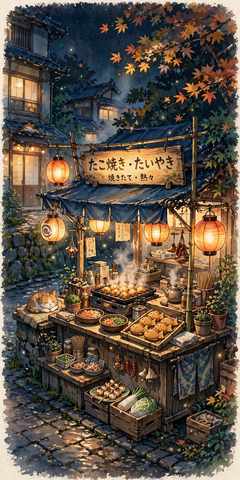
Remember the very first scenes of Spirited Away? Before the spirits, before the bathhouse, there is a quiet night-market street lined with food stalls, with steam rising, lanterns glowing, and food so beautifully painted it made an entire generation hungry. That sequence might be the most influential food animation ever made, and this trend is its direct descendant: your photo transformed into a Ghibli-style night market portrait, lantern light on your face, sizzling grills all around.
Night markets are electric in the Ghibli palette. Paper lanterns, string lights, festival banners, and the orange glow of charcoal grills against deep blue night, it is the studio’s love letter to the everyday magic of a busy street after dark. This prompt drops you into that world, skewer in hand, as the most interesting person on the most delicious street in the anime universe.
Identity preservation is what separates this from a costume filter. The prompt commands the AI to keep your exact face and features from your uploaded photo while repainting the entire street around you in warm watercolor. Friends will recognize you instantly; they will just also want to know which incredible night market you visited.
You will find the exact copy-paste prompt below, plus why it works, how to use it across ChatGPT, Gemini, Midjourney, and more, pro tips for mouth-watering results, and answers to common questions. Come hungry, the lanterns are already lit.
The Prompt
Copy the exact prompt below and paste it into your favorite AI image generator along with your photo. For best results, upload a clear front-facing photo first, then paste the entire prompt exactly as written.
Transform my photo into a Studio Ghibli anime-style portrait of me at a glowing street food stall on a lively night market street, keeping my exact face, hairstyle, and features from the uploaded photo. I stand before a lantern-lit wooden stall with hand-painted skewers, takoyaki, noodles, and sizzling grills, steam curling into the night air. Warm watercolor shading, paper lantern glow, string lights and festival banners, with a bustling nostalgic alley stretching behind me. Portrait orientation, vertical 2:3 composition.
Why This Prompt Works
This prompt works because it thinks like a cinematographer. A lantern-lit wooden stall in the foreground, you in the midground, and a bustling nostalgic alley stretching behind creates three planes of depth, the exact layering Ghibli background artists use to make streets feel endless and alive. Depth is what makes viewers feel they could step into the image.
Light does the emotional work. Paper lantern glow and string lights against night blue is the Spirited Away palette, and it flatters human faces the way candlelight does, with warm highlights, soft shadows, and a gentle glow on skin. The AI, guided by these cues, produces the luminous night look that flat night-mode filters never achieve.
Specificity sells the food. Takoyaki, skewers, sizzling grills, and curling steam, each named item becomes a paintable detail, from the char on a skewer to the gloss of sauce. Ghibli’s market street is unforgettable because every stall looks real enough to order from; naming the dishes is how you get the AI to paint a street you can almost taste.
How to Use This Prompt
Using this prompt takes less than two minutes once you know the flow. Follow these steps in order for the most reliable results.
- Choose a clear, front-facing photo. Pick a well-lit selfie with a neutral expression and minimal background clutter. The AI preserves your facial identity, so a sharp, evenly lit source photo is the single biggest factor in a convincing night market portrait.
- Copy the entire prompt text. Select everything inside the
block above, including the face-preservation instruction at the start, which is what keeps the result looking like you instead of a stranger.
- Open your AI image generator. This prompt works in ChatGPT, Google Gemini, Midjourney, Leonardo AI, and most modern image tools. Use whichever platform you already have access to; all of them accept an uploaded reference photo plus a text prompt.
- Upload your photo first, then paste the prompt. Attach your chosen photo to the chat or canvas, paste the full prompt text, and send. Uploading the photo before the prompt helps the model lock onto your face before it starts painting the scene.
- Request portrait orientation if needed. Some tools default to square or landscape images. If yours does, add vertical 2:3 portrait to your follow-up message or select the portrait aspect ratio in the tool's settings before generating.
- Regenerate and refine. Your first result is a starting point, not a verdict. If the food stall looks right but your face drifted, regenerate with the same prompt, or add keep the face exactly like the reference photo and try once more.
Pro Tips for Best Results
The prompt does most of the work, but these small refinements separate a good result from a jaw-dropping one.
- Lead with good light in your source photo. Soft daylight facing a window beats any overhead bulb. The AI borrows your photo's lighting logic, so clean, even illumination on your face translates into a clean, believable night market portrait.
- Direct the food like a menu. Swap takoyaki for grilled corn or roasted sweet potato to feature your favorite street food. The lantern-lit alley and night atmosphere stay exactly as magical.
- Do not delete the face-preservation sentence. It is the most important line in the prompt. If a tool shortens or improves your prompt automatically, check that the identity instruction survived; without it, you get a pretty stranger instead of you.
- Generate at the highest resolution your tool allows, then upscale. Fine watercolor texture and tiny background details, the lantern reflections and grill smoke, only shine when the image has enough pixels. Upscale before posting or printing.
- Try one variation at a time. Change a single element per regeneration, the dishes on the grill, so you learn what each tweak does. Changing five things at once makes it impossible to tell which edit improved the image.
Frequently Asked Questions
Will this prompt really keep my face looking like me?
Yes, that is what the opening sentence is engineered to do. By explicitly instructing the AI to keep your exact face, hairstyle, and features from the uploaded photo, the prompt prioritizes identity preservation over stylization. For the strongest likeness, use a clear, front-facing, well-lit photo; extreme angles, heavy filters, or sunglasses in the source photo make the AI guess, and guessing is where likeness drifts.
Which AI tools work best with this prompt?
Any modern image generator that accepts a reference photo plus a text prompt: ChatGPT, Google Gemini, Midjourney, Leonardo AI, Firefly, and similar tools all handle it well. Paste the full prompt exactly as written and upload your photo in the same message. If a tool rewrites or shortens prompts automatically, double-check that the face-preservation sentence survived the edit.
Can I make it a daytime market instead of night?
Yes, and it works wonderfully. Swap the night-market lighting for a bright morning market with striped awnings and unlit paper lanterns, and keep the stall, steam, and food details. You will get the same bustling Ghibli street energy in full daylight, a completely different and equally shareable portrait.
Can I post or print the image?
For personal sharing, profile pictures, prints for your wall, and gifts, absolutely, and these portraits make wonderful versions of all three. For commercial use, check your AI tool's terms of service, since rights vary by platform and plan. One note: the style is inspired by Studio Ghibli rather than an official Ghibli product, so avoid presenting it as licensed artwork.
Every great night market is a little bit of magic you can eat, and now you have a portrait standing in the middle of yours. Copy the prompt, upload your photo, and let the lanterns do the rest: steam, sizzle, glow, and you, right where the delicious smells are strongest. Just try not to get hungry looking at it.
Related Viral Prompts
Ghibli Style Pirate Ship AI Photo Prompt
Ghibli Style Train Conductor AI Photo Prompt
Ghibli Style Kitchen Cooking AI Photo Prompt
#GhibliAI #StudioGhibli #AIPhotoPrompt #GhibliStyle #AnimeFood




Leave a Reply