
Introduction
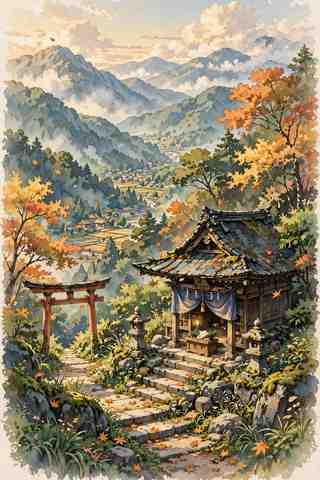
Every Studio Ghibli fan remembers the first time they saw a sacred forest on screen — the moss-thick woods of Princess Mononoke where the Forest Spirit walks, the camphor tree in My Neighbor Totoro that feels older than time itself. Ghibli treats nature as something holy, and nowhere is that clearer than in its shrines: stone steps soft with moss, vermilion gates glowing against deep green, light falling through the canopy like a blessing. The Ghibli style mountain shrine AI photo prompt brings that sacred stillness to your own portrait, preserving your face while the ancient forest rises around you.
This trend resonates because it offers something rare in the age of endless scrolling: genuine tranquility. The image is quiet — mist moving slowly between cedar trunks, maple leaves drifting down one by one, sunbeams cutting through the green dark. People are using these portraits as meditation-adjacent profile pictures, as travel-dream posts about Japan, and as a visual deep breath on stressful days. The comments tend to say the same thing: this image calmed me down.
There is also a spiritual dimension that makes this prompt unusually meaningful. A shrine is a threshold between the everyday world and something larger — and placing yourself on those mossy steps, in Ghibli’s reverent hand-painted style, feels like a small pilgrimage. It is no accident that many people generate this one before a big life decision or a fresh start. The vermilion torii gates practically glow with symbolism: you are walking through, toward something new.
The Prompt
Copy the prompt below word for word, upload your photo to your AI image generator, and paste it in. You will be standing on mossy shrine steps beneath towering cedars, mist drifting past vermilion torii gates.
Transform this photo into a Studio Ghibli anime illustration, keeping the person's exact face, identity and likeness unchanged. Set the scene at an ancient mountain shrine — moss-covered stone steps winding past vermilion torii gates, towering cedar trees, drifting mist, floating maple leaves and soft sunbeams breaking through the forest canopy. Portrait orientation (9:16), soft cel shading, warm hand-painted Ghibli backgrounds, lush green and vermilion palette, subtle film-grain texture, mystical and serene atmosphere.
Why This Prompt Works
This prompt works because the color story is unmistakable and powerful: deep forest greens against vermilion red. That pairing is one of the most striking in Japanese visual culture — the red of shrine gates was literally designed to stand out against green woods — and Ghibli’s artists use it to signal the sacred. When the AI follows this palette, the torii gates become natural focal points that frame your preserved face, giving the portrait a composition that feels designed rather than generated.
The prompt also works because mist and sunbeams are atmosphere machines. Drifting mist adds layers of depth that make a flat image feel three-dimensional, while sunbeams breaking through the canopy create natural light shafts that illuminate your face like a spotlight. These are the exact techniques Ghibli’s background painters use to make forests feel alive and holy, and the prompt hands them to the AI as explicit instructions.
Finally, the scene’s verticality suits the 9:16 format perfectly. Towering cedars, winding steps, and stacked torii gates all draw the eye upward — the natural reading direction of a phone screen. Your face sits at the composition’s heart while the forest rises above and the steps fall below, creating a portrait that feels both grounded and transcendent.
- The vermilion-against-green palette is Japan’s most iconic sacred color story, giving the portrait instant visual power.
- Drifting mist and canopy sunbeams create Ghibli-style atmosphere and naturally spotlight your preserved face.
- Towering cedars and winding steps suit the vertical 9:16 format, drawing the eye upward like a real shrine visit.
- The serene, mystical mood stands out in busy feeds and invites calm, thoughtful engagement.
- Face-identity preservation keeps you recognizable as the pilgrim at the center of the sacred forest.
- Moss, maple leaves, and stone textures give the AI rich hand-painted detail to render in true Ghibli fashion.
How to Use This Prompt
- Pick a clear, well-lit photo of yourself — a head-and-shoulders selfie or a half-body shot works best. The prompt preserves your face identity while the AI rebuilds everything around you as a mystical mountain shrine in the forest, so a sharp, front-facing source photo gives the cleanest and most recognizable result.
- Open your favorite AI image generator — ChatGPT’s image mode, Gemini, Midjourney, Leonardo AI, or any tool that accepts a text prompt together with an uploaded photo — and upload your picture first.
- Copy the exact prompt from the
block above and paste it into the prompt box. Keep the wording untouched: the face-preservation clause, the portrait 9:16 instruction, and the soft cel-shading directions are tuned to work together as one package.
- Generate the image and review the result carefully. If a detail feels slightly off — the lighting, the background density, the mood — regenerate once or twice. AI image tools very often nail the composition on the second attempt.
- Download your new Ghibli-style portrait in full resolution and share it anywhere. It is sized 9:16, which is perfect for Instagram Stories, TikTok, WhatsApp status, Facebook posts, and phone wallpapers.
Pro Tips for Best Results
- Use a well-lit, front-facing photo with a simple background. Busy original backgrounds can confuse the AI, while a clean source photo lets the Ghibli scene take over completely.
- Do not edit the prompt's technical instructions — the face-preservation line, the 9:16 portrait note, and the cel-shading directions are the load-bearing parts of the prompt.
- A calm, gentle expression suits the sacred mood — think peaceful rather than posed.
- If you want falling maple leaves emphasized, add 'more drifting red maple leaves' after the prompt for an autumn version.
- Photos taken in soft natural light blend most seamlessly into the forest's dappled sunbeams.
- This portrait makes a beautiful printed keepsake — the vertical composition suits posters and phone wallpapers alike.
Frequently Asked Questions
Will this prompt really keep my face looking like me?
Yes — that is the entire point of the face-preservation clause in the prompt. It explicitly instructs the AI to keep your exact face, identity, and likeness unchanged while only the scene around you is rebuilt in Studio Ghibli anime style. For the most faithful likeness, start with a front-facing, well-lit photo where your face fills a good portion of the frame, and avoid heavy filters or sunglasses in the source picture.
Which AI image generator works best with this prompt?
This prompt works with any modern generator that accepts image input plus a text prompt — including ChatGPT's image mode, Gemini, Midjourney, and Leonardo AI. Free options like ChatGPT's image mode or Gemini handle a mystical mountain shrine in the forest scenes very well. If you want the most painterly, hand-drawn-looking backgrounds, Midjourney tends to produce the richest Ghibli-style textures, while ChatGPT is usually the most faithful at preserving your face.
Is this Ghibli AI photo prompt free to use?
Yes, the prompt itself is completely free to copy and use as many times as you like. You only need access to an AI image generator — many of which offer free daily generations. There are no watermarks added by the prompt, and you can regenerate the scene endlessly until you love the result.
Can I make this an autumn or winter version of the shrine?
Yes, easily. The prompt defaults to a lush green shrine with drifting maple leaves, which already leans autumnal. For full autumn, add 'brilliant red and gold autumn foliage everywhere' after pasting the prompt. For winter, add 'light snow dusting the stone steps and torii gates, bare branches with falling snowflakes.' Keep the core prompt unchanged so the face preservation and Ghibli styling remain intact.
Mossy steps, vermilion gates, and mist between ancient cedars — this is Ghibli's sacred stillness with your face at its center. Copy the prompt and begin the climb.
Related Viral Prompts
Ghibli Style Ancient Tree Village AI Photo Prompt
Ghibli Style Misty Bamboo Forest AI Photo Prompt
Ghibli Style Hilltop Chapel AI Photo Prompt
#GhibliAI #AIPhotoPrompt #StudioGhibliStyle #AnimePhoto #GhibliTrend




Leave a Reply