
Introduction
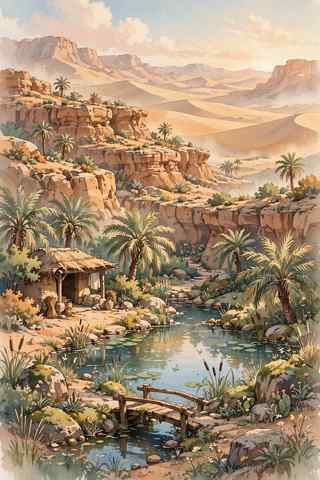
Endless dunes, then suddenly — water, green, life. The desert oasis is nature’s best plot twist, and the Ghibli style desert oasis trend turns that wonder into a portrait. Your photo becomes an adventurer’s rest stop: turquoise spring, leaning palms, golden sand rolling to a painted horizon. These images are going viral because they promise the thing every scroller secretly wants: discovery.
Ghibli knows deserts. Nausicaä of the Valley of the Wind opens onto vast wastelands where every pocket of green feels like a miracle, and the film treats those sanctuaries with genuine reverence. This prompt borrows that emotional logic: the oasis is precious because the desert is immense. Placing you at its edge makes the portrait feel like a frame from an epic journey — you are not posing, you have arrived.
Picture the render: you stand at the water’s edge where a turquoise spring mirrors a sky full of towering painted clouds. Palms lean overhead, their fronds stirring in a warm breeze, while rippled dunes climb toward the horizon in waves of gold and rose. A dragonfly skims the water; distant birds cross the enormous sky. Soft cel shading and hand-painted detail give the sand real texture — you can almost feel its warmth.
Oasis portraits stand out in feeds crowded with city selfies and beach shots because almost nobody has one. The prompt’s vast-sky composition and turquoise-and-gold palette are visually rare, which means these portraits stop thumbs — and the Ghibli styling keeps them feeling like art rather than a travel brochure.
The Prompt
Copy the prompt below exactly as written and paste it into your AI image tool with your photo. Every phrase targets the oasis look — turquoise spring, palms, endless dunes — so do not drop any detail.
Transform my photo into a Studio Ghibli anime illustration while preserving my exact face, features, hairstyle and expression. Place me at a hidden desert oasis, with a turquoise spring ringed by palm trees, golden dunes rolling to the horizon beneath a vast painted sky, and a light warm breeze stirring the air. Use soft cel shading, hand-painted background detail, and an adventurous serene mood, in portrait 9:16 orientation.
Why This Prompt Works
Scale contrast is this prompt’s engine: tiny human, immense desert, jewel-like oasis. That contrast is inherently dramatic, and the prompt reinforces it with “golden dunes rolling to the horizon” and a “vast painted sky.” AI generators respond strongly to explicit scale language, so the scene gains the epic depth that makes Ghibli landscapes feel so transporting.
The turquoise spring is the color anchor. Against warm gold sand, that cool blue-green water creates the complementary-color pop that professional color scripts are built on — the same reason Nausicaä’s green sanctuaries glow against the wasteland. The prompt’s hand-painted instruction keeps the water luminous instead of flat.
Your identity is locked in by direct instruction — exact face, features, hairstyle, expression — so the adventure setting never turns you into a stranger. Portrait 9:16 lets the sky tower above and the spring pool below, stacking the scene’s three zones (water, you, sky) into one sweeping vertical composition.
- Scale contrast (tiny traveler, vast desert) creates instant epic drama
- Turquoise water against gold dunes gives a professional color-script pop
- Explicit horizon and sky language produces real depth, not flat sand
- Preserves your exact face, hairstyle, and expression
- Breeze and birds add the living motion Ghibli scenes always include
- Portrait 9:16 stacks water, figure, and towering sky perfectly
How to Use This Prompt
Turning your photo into this Ghibli scene takes less than two minutes. Follow these steps:
- Choose a clear photo of yourself — front-facing, good lighting, and your whole face visible. Sunlit outdoor photos match the prompt’s bright desert lighting with the least friction.
- Open an AI image generator that accepts photo uploads. ChatGPT, Google Gemini, and Microsoft Copilot all work for free — just start a new chat and upload your photo.
- Paste the complete prompt from the
box above into the chat, exactly as written, and send it together with your photo.
- Wait for the generation to finish, then review the result carefully: check your likeness, the turquoise spring and rolling dunes, and the overall Ghibli look.
- Download the portrait in the highest resolution available, then share it as a post, a Story, or your new wallpaper.
Pro Tips for Best Results
A few small choices separate a good Ghibli portrait from a breathtaking one:
- Use a sharp, front-facing photo with even lighting — the clearer your input, the stronger the face likeness in the final portrait.
- If the first result drifts slightly off your likeness, regenerate with the same prompt; the second attempt usually locks your face in.
- Keep glasses, jewelry, or distinctive hairstyles visible in your input photo if you want them preserved in the Ghibli portrait.
- If the desert looks empty rather than epic, follow up with “more dramatic dune ridges and a bigger sky” to restore the scale.
- Earthy or white clothing in your input photo blends into the oasis palette; neon colors will fight the Ghibli color script.
- Add “camel footprints trailing across a distant dune” in a follow-up for a storytelling detail that suggests your journey.
Frequently Asked Questions
Will this prompt keep my face looking like me?
Yes — face preservation is written directly into the prompt. It instructs the AI to keep your exact face, features, hairstyle, and expression while transforming everything else into a hand-painted desert adventure. For the best likeness, upload a sharp, front-facing photo with even lighting and skip heavy beauty filters. If the first result drifts a little, generate once more with the same prompt; likeness usually locks in on the second pass.
Which free AI tools can I use this Ghibli prompt with?
The prompt works in any image-capable AI tool that accepts a photo plus text instructions: ChatGPT, Google Gemini, and Microsoft Copilot all handle it for free. Dedicated art generators like Leonardo AI, Adobe Firefly, and Playground AI also produce beautiful results. Paste the prompt exactly as written — its Ghibli-specific wording (soft cel shading, hand-painted backgrounds) is phrased to work consistently across different models.
Why does the prompt specify portrait 9:16 orientation?
The 9:16 vertical format is chosen deliberately for this scene: the scene stacks vertically — spring below, you at the center, an enormous sky above. It is also the native size for phone wallpapers, Instagram Stories, TikTok, and Reels covers — exactly where Ghibli portraits go viral. If you need a square profile picture, generate the full portrait first and crop the center afterward so you keep the complete composition.
Can I change the setting or add my own details to the scene?
Absolutely. Keep the face-preservation line and the Ghibli style phrases untouched, then adjust the scenery to taste: try “desert oasis at sunset” for rose-gold dunes, or add “an ancient stone well” or “palm shadows striping the sand”. Small, specific additions work best — AI image models handle concrete details far better than vague requests, so name exactly what you want to see.
Every desert hides an oasis, and every feed hides a portrait worth stopping for. Yours is the traveler who found the water — turquoise, palm-shaded, and painted in the warm, wondering style only Ghibli does this well.
Related Viral Prompts
Ghibli Style Sand Dunes AI Photo Prompt
Ghibli Style Cloud Sea Sunset AI Photo Prompt
Ghibli Style Lavender Field AI Photo Prompt
#GhibliAI #AIPhotoPrompt #StudioGhibliStyle #GhibliAdventure #AnimePortrait




Leave a Reply