
Introduction
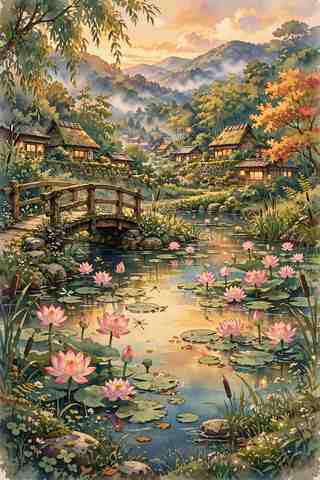
Still water, giant blossoms, and light turning to honey — the lotus pond is one of the most dreamlike settings in all of anime, and the Ghibli style lotus pond trend is bringing it to profile pictures everywhere. This prompt transforms your photo into a portrait beside tranquil waters covered in pink lotus flowers, fireflies rising as the sun goes down. It is going viral because it feels like the exact midpoint between a garden and a dream.
Ghibli has always painted water as something alive and emotional. Ponyo treats the sea as a joyful character, The Tale of the Princess Kaguya renders nature in flowing watercolor washes, and the quiet garden ponds of Arrietty’s world are full of tiny wonders. This prompt channels that tradition: the pond is not a backdrop but a presence, and you are its calm, human counterpoint — a portrait about stillness in a noisy feed.
See the finished image: you stand or sit at the pond’s mossy edge while enormous pink lotus blossoms open around you, their petals catching the last gold of dusk. Lily pads dot the mirror-still water, willow branches trail overhead, and the first fireflies blink awake among the reeds. The sky melts from amber to violet, doubled in the water below — all of it rendered in soft cel shading and hand-painted detail that makes the scene glow from within.
Lotus pond portraits earn their saves through color harmony: pink blossoms, green pads, gold light, violet dusk. Ghibli’s color scripts are legendary for exactly this kind of orchestration, and the prompt’s dusk setting plus explicit hand-painted instruction push the generator toward that same painterly cohesion instead of random pretty colors.
The Prompt
Copy the prompt below exactly as written and paste it into your AI image tool with your photo. It is tuned for the lotus pond look — giant blossoms, still water, golden dusk — so keep every phrase.
Transform my photo into a Studio Ghibli anime illustration while preserving my exact face, features, hairstyle and expression. Set the scene beside a tranquil lotus pond at golden dusk, with giant pink blossoms and lily pads floating on still water, dragonflies and fireflies in the air, and willow branches framing the view. Use soft cel shading, hand-painted background detail, and a dreamy serene mood, in portrait 9:16 orientation.
Why This Prompt Works
Still water is one of the hardest things for AI to render convincingly, which is why this prompt describes it so carefully: “still water,” “floating” blossoms and pads, blossoms “catching the last gold of dusk.” These concrete visual facts give the model reflection behavior it can actually follow, producing that doubled sky-and-blossom mirror effect instead of a murky green smear.
The dusk timing is doing heavy lifting too. Golden dusk gives the scene a unified warm-to-cool gradient — amber sky melting into violet — which is far more flattering and cohesive than flat midday light. It is also when fireflies appear, and those tiny points of light are pure Ghibli: small, specific, magical details that make viewers lean in.
Identity stays protected throughout. Your exact face, features, hairstyle, and expression are preserved by explicit instruction, so the dreamlike setting never costs you recognizability. In portrait 9:16, the willow branches frame you from above while the pond stretches below — a natural, flattering composition.
- Concrete water descriptions produce real mirror reflections, not muddy smears
- Golden dusk palette: amber sky melting into violet, doubled in the water
- Fireflies and dragonflies add signature Ghibli micro-magic
- Preserves your exact face, hairstyle, and expression
- Willow framing plus pond below creates a naturally flattering composition
- Portrait 9:16 suits the vertical fall of branches and rising fireflies
How to Use This Prompt
Turning your photo into this Ghibli scene takes less than two minutes. Follow these steps:
- Choose a clear photo of yourself — front-facing, good lighting, and your whole face visible. Soft, warm-lit photos harmonize instantly with the prompt’s golden dusk atmosphere.
- Open an AI image generator that accepts photo uploads. ChatGPT, Google Gemini, and Microsoft Copilot all work for free — just start a new chat and upload your photo.
- Paste the complete prompt from the
box above into the chat, exactly as written, and send it together with your photo.
- Wait for the generation to finish, then review the result carefully: check your likeness, the lotus blossoms and still reflective water, and the overall Ghibli look.
- Download the portrait in the highest resolution available, then share it as a post, a Story, or your new wallpaper.
Pro Tips for Best Results
A few small choices separate a good Ghibli portrait from a breathtaking one:
- Start with a photo that has a simple, uncluttered background so the AI focuses on preserving your face.
- After generating, use a short follow-up message (“more …”) to fine-tune details instead of starting over.
- Generate first, then crop: the full 9:16 portrait gives you the most flexibility for wallpapers, Stories, and profile pictures.
- If blossoms look small or sparse, follow up with “larger, more abundant lotus flowers” to get that lush pond density.
- A gentle smile or serene expression in your input photo matches the tranquil mood far better than a wide grin.
- Add “koi fish gliding beneath the lily pads” in a follow-up for a hidden detail viewers will love discovering.
Frequently Asked Questions
Will this prompt keep my face looking like me?
Yes — face preservation is written directly into the prompt. It instructs the AI to keep your exact face, features, hairstyle, and expression while transforming everything else into a hand-painted garden dream. For the best likeness, upload a sharp, front-facing photo with even lighting and skip heavy beauty filters. If the first result drifts a little, generate once more with the same prompt; likeness usually locks in on the second pass.
Which free AI tools can I use this Ghibli prompt with?
The prompt works in any image-capable AI tool that accepts a photo plus text instructions: ChatGPT, Google Gemini, and Microsoft Copilot all handle it for free. Dedicated art generators like Leonardo AI, Adobe Firefly, and Playground AI also produce beautiful results. Paste the prompt exactly as written — its Ghibli-specific wording (soft cel shading, hand-painted backgrounds) is phrased to work consistently across different models.
Why does the prompt specify portrait 9:16 orientation?
The 9:16 vertical format is chosen deliberately for this scene: the composition runs vertically — willow branches above, blossoms around you, reflections below. It is also the native size for phone wallpapers, Instagram Stories, TikTok, and Reels covers — exactly where Ghibli portraits go viral. If you need a square profile picture, generate the full portrait first and crop the center afterward so you keep the complete composition.
Can I change the setting or add my own details to the scene?
Absolutely. Keep the face-preservation line and the Ghibli style phrases untouched, then adjust the scenery to taste: change “golden dusk” to “soft morning mist” for a quieter mood, or add “a small wooden bridge” or “moonrise over the pond”. Small, specific additions work best — AI image models handle concrete details far better than vague requests, so name exactly what you want to see.
Stillness is a superpower, and the lotus pond proves it. Let the blossoms open, the fireflies rise, and the water hold the sky — your portrait, hand-painted in the quietest, dreamiest corner of the Ghibli world.
Related Viral Prompts
Ghibli Style Moonlit Lake AI Photo Prompt
Ghibli Style Firefly Night Forest AI Photo Prompt
Ghibli Style Cherry Blossom Path AI Photo Prompt
#GhibliAI #AIPhotoPrompt #StudioGhibliStyle #GhibliGarden #AnimePortrait




Leave a Reply