
Introduction
There is a special kind of quiet that only exists in falling snow, and Studio Ghibli films have always known how to paint it. The Ghibli style snowy village winter trend takes your everyday photo and wraps it in that hush: a lantern-lit village lane, rooftops heavy with fresh snow, warm windows glowing against a lavender-blue dusk. These portraits are exploding across feeds every winter because they bottle the exact feeling of coming home on a cold evening — comfort, calm, and a little bit of magic.
Ghibli’s winter scenes are some of the most beloved frames in animation. Remember the snow-dusted rooftops around the bathhouse in Spirited Away, or the vast silent snowscapes of the Waste in Howl’s Moving Castle, where even the howling wind feels gentle? This prompt borrows that visual poetry and places you inside it. The result does not look like a filter slapped over a selfie; it looks like a quiet moment from a winter film where you happen to be the main character.
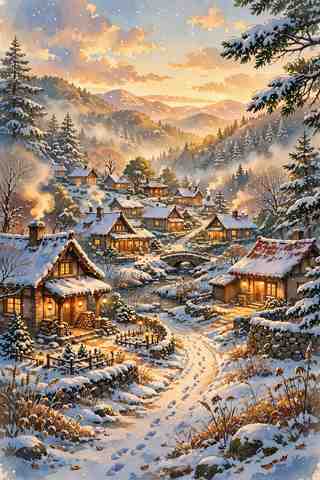
Imagine the finished portrait: you stand on a snow-softened lane between old wooden houses, each window spilling golden light onto the blue-white drifts. Snowflakes hang in the air, caught mid-fall, and thin ribbons of chimney smoke rise into an evening sky painted in lavender and rose. Your breath fogs faintly in the cold air. Every rooftop, fence post, and footprint is rendered with the soft, hand-painted texture that makes Ghibli backgrounds feel like places you could actually visit.
What keeps viewers stopping their scroll on these images is contrast — the cold blue of snow against the warm amber of lamplight, stillness against gentle motion. That tension is pure Ghibli, and this prompt is written to reproduce it faithfully: cool shadows, warm highlights, and you, calm at the center of a world holding its breath.
The Prompt
Copy the prompt below exactly as written and paste it into your AI image tool along with your photo. The wording is tuned for the snowy village look — glowing windows, drifting flakes, lavender dusk — so keep every detail intact.
Transform my photo into a Studio Ghibli anime illustration while preserving my exact face, features, hairstyle and expression. Set the scene in a quiet snow-covered village at dusk, with wooden houses glowing warm from their windows, soft snowflakes drifting down, and smoke curling from chimneys under a lavender-blue evening sky. Use soft cel shading, hand-painted background detail, and a cozy winter mood, in portrait 9:16 orientation.
Why This Prompt Works
Winter portraits often fail in AI generators because “snowy” gets interpreted as a flat white background with no atmosphere. This prompt avoids that trap by describing a full scene with depth: foreground lane, midground houses, background sky, and atmospheric layers of falling snow and chimney smoke. The model has real spatial information to work with, so the village feels like a place rather than a backdrop.
Naming Studio Ghibli’s soft cel shading and hand-painted backgrounds matters enormously here. Ghibli snow is never pure white — it carries blue shadows, lavender reflections, and warm bounce-light from windows. Those specific color behaviors are what separate a breathtaking winter portrait from a washed-out one, and the prompt’s style language steers the generator toward them.
As always with a personal portrait, identity comes first. The prompt explicitly preserves your face, features, hairstyle, and expression, then builds the winter fantasy around you. Combined with portrait 9:16 framing — which lets falling snow travel the full height of the image — the composition feels cinematic and tailor-made for phone screens.
- Describes a full layered village scene so the snow has depth, not flat whiteness
- Uses Ghibli’s signature blue-shadowed snow with warm window glow contrast
- Preserves your exact face, hairstyle, and expression
- Lavender-blue dusk sky adds the dreamy Ghibli color storytelling
- Portrait 9:16 framing lets snowfall travel the full height of the image
- Hand-painted textures make rooftops, smoke, and flakes feel tangible
How to Use This Prompt
Turning your photo into this Ghibli scene takes less than two minutes. Follow these steps:
- Choose a clear photo of yourself — front-facing, good lighting, and your whole face visible. Photos taken in soft, even light work best; the prompt will add its own warm-and-cool winter lighting.
- Open an AI image generator that accepts photo uploads. ChatGPT, Google Gemini, and Microsoft Copilot all work for free — just start a new chat and upload your photo.
- Paste the complete prompt from the
box above into the chat, exactly as written, and send it together with your photo.
- Wait for the generation to finish, then review the result carefully: check your likeness, the snow-covered village and glowing windows, and the overall Ghibli look.
- Download the portrait in the highest resolution available, then share it as a post, a Story, or your new wallpaper.
Pro Tips for Best Results
A few small choices separate a good Ghibli portrait from a breathtaking one:
- Start with a photo that has a simple, uncluttered background so the AI focuses on preserving your face.
- After generating, use a short follow-up message (“more …”) to fine-tune details instead of starting over.
- Generate first, then crop: the full 9:16 portrait gives you the most flexibility for wallpapers, Stories, and profile pictures.
- If the snow looks too bright or blown out, follow up with “softer blue shadows in the snow” to recover that Ghibli winter palette.
- Winter clothing in your input photo sells the scene — a scarf or coat blends seamlessly into the snowy village mood.
- Add “warm breath fog in the cold air” in a follow-up message for an extra touch of realism Ghibli artists love.
Frequently Asked Questions
Will this prompt keep my face looking like me?
Yes — face preservation is written directly into the prompt. It instructs the AI to keep your exact face, features, hairstyle, and expression while transforming everything else into a hand-painted winter evening. For the best likeness, upload a sharp, front-facing photo with even lighting and skip heavy beauty filters. If the first result drifts a little, generate once more with the same prompt; likeness usually locks in on the second pass.
Which free AI tools can I use this Ghibli prompt with?
The prompt works in any image-capable AI tool that accepts a photo plus text instructions: ChatGPT, Google Gemini, and Microsoft Copilot all handle it for free. Dedicated art generators like Leonardo AI, Adobe Firefly, and Playground AI also produce beautiful results. Paste the prompt exactly as written — its Ghibli-specific wording (soft cel shading, hand-painted backgrounds) is phrased to work consistently across different models.
Why does the prompt specify portrait 9:16 orientation?
The 9:16 vertical format is chosen deliberately for this scene: falling snow reads best when it has the full vertical height of the frame to drift through. It is also the native size for phone wallpapers, Instagram Stories, TikTok, and Reels covers — exactly where Ghibli portraits go viral. If you need a square profile picture, generate the full portrait first and crop the center afterward so you keep the complete composition.
Can I change the setting or add my own details to the scene?
Absolutely. Keep the face-preservation line and the Ghibli style phrases untouched, then adjust the scenery to taste: change “at dusk” to “on a bright snowy morning” for a different mood, or add “a small shrine with stone lanterns” or “children building a snowman nearby”. Small, specific additions work best — AI image models handle concrete details far better than vague requests, so name exactly what you want to see.
Winter is quiet, but it is never empty — not in a Ghibli film, and not in your portrait. Let the snow fall, the windows glow, and the village hush settle around you in a hand-painted moment you will want to revisit all season.
Related Viral Prompts
Ghibli Style Lighthouse Storm AI Photo Prompt
Ghibli Style Moonlit Lake AI Photo Prompt
Ghibli Style Aurora Night Sky AI Photo Prompt
#GhibliAI #AIPhotoPrompt #StudioGhibliStyle #GhibliWinter #AnimePortrait




Leave a Reply