
Introduction
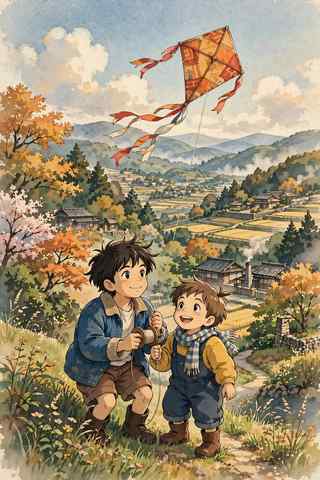
Every childhood has a hilltop moment — running as fast as your legs can carry you, string tugging at your fingers, eyes locked on a splash of color climbing into the sky. Studio Ghibli built entire films out of that feeling: the wind in the grass in My Neighbor Totoro, the soaring freedom of Kiki’s Delivery Service, the wide-open skies of Castle in the Sky. The Ghibli style brothers kite flying prompt captures that exact rush of joy and turns your photo into the memory.
This version of the trend is going viral because it radiates pure happiness. Scroll through any feed and a bright, windy hilltop scene with a soaring kite stops thumbs instantly — it is the visual opposite of doomscrolling. The composition practically glows with optimism: blue sky, green grass, wildflowers, and two brothers caught mid-laugh. It is nostalgia you can feel in your chest.
For brothers, cousins, or childhood best friends, this prompt hits especially hard. It does not just restyle a photo; it rewrites it as an adventure you wish you had lived — or one you actually did, on some half-remembered summer afternoon. The kite becomes a symbol of freedom, and the hilltop becomes the whole wide world as seen through a child’s eyes.
Below you will find the exact copy-paste prompt, an explanation of why it produces such joyful results, simple step-by-step instructions, pro tips for the perfect hilltop scene, and answers to frequently asked questions.
The Prompt
Copy the full prompt inside the box and paste it into your AI image generator along with your photo. Moments later, you will be flying a kite on a Ghibli hilltop.
Transform this photo into a Studio Ghibli anime-style illustration of two brothers flying a colorful kite on a windy green hilltop, keeping the person's face and likeness exactly the same. Show them running with joy as the kite soars high in a bright blue sky filled with fluffy hand-painted clouds, wildflowers swaying in the grass around them. Portrait orientation (9:16), soft cel shading, vibrant hand-painted background details, and a carefree adventurous mood like My Neighbor Totoro.
Why This Prompt Works
The prompt succeeds because motion is baked into every line. ‘Running with joy’ and ‘kite soars high’ give the AI dynamic action to render instead of a static pose, and Ghibli-style art shines brightest in motion — wind, swaying wildflowers, and billowing clouds are the studio’s visual signature. Dynamic scenes also hide minor AI imperfections better than stiff portraits do.
The color story is deliberately uplifting: bright blue sky, fluffy white clouds, green grass, wildflowers, and a colorful kite. This is the classic Ghibli nature palette, the same one that makes Totoro’s meadows feel so alive. High-saturation natural colors photograph well on phone screens and trigger positive emotional responses, which is a big reason these images get shared so widely.
Like the rest of the batch, face preservation keeps the image personal while the portrait 9:16 format frames the scene perfectly — the kite gets the sky in the upper third, the brothers get the hill in the lower two-thirds. That vertical composition mirrors how Ghibli frames its sweeping landscape shots, and it fits Stories, Reels covers, and wallpapers without cropping.
- Action-packed scene (running, soaring kite) creates energy and hides AI flaws.
- Classic Ghibli nature palette — blue sky, green hills, wildflowers — maximizes shareability.
- Face preservation keeps the adventure personal and recognizable.
- Wind and cloud details showcase Ghibli’s signature sense of motion.
- Vertical 9:16 composition frames kite and hilltop like a film still.
- Carefree mood makes it ideal for brothers, friends, and childhood nostalgia posts.
How to Use This Prompt
You can go from selfie to hilltop adventure in under a minute with these simple steps.
- Select a bright, clear photo where your face is visible — outdoor shots blend in most naturally, but any sharp selfie works.
- Upload the photo to an AI image tool that supports image-to-image generation, like ChatGPT, Gemini, or Midjourney.
- Copy the prompt from the box above and paste it in, keeping your photo attached as the reference image.
- Generate the scene and check the kite, faces, and sky — regenerate once if the kite string or faces look tangled or off.
- Download and share your hilltop adventure, or set it as a wallpaper for an instant mood boost.
Pro Tips for Best Results
A few refinements will make your kite-flying scene look straight out of a Ghibli film.
- Photos with you looking slightly upward work wonderfully — the gaze matches the kite in the sky.
- Specify the kite’s colors (‘a red-and-yellow diamond kite’) if you want a particular look instead of a random design.
- For a real sibling photo, change the prompt to ‘keeping each person’s face and likeness exactly the same.’
- Add ‘dandelion seeds floating in the wind’ for an extra layer of dreamy Ghibli atmosphere.
- If the hill looks too empty, ask for ‘a lone tree on the hilltop’ — a classic Totoro-style landmark.
- Try a sunset variation (‘warm orange sunset sky’) for a more emotional, golden-hour version of the scene.
Frequently Asked Questions
Can I use a photo of just one person for the brothers scene?
Yes — the AI will create the second brother figure to complete the scene. Position yourself slightly off-center in the source photo so the composition has room for the imagined sibling. For the most authentic result, though, a real photo of two brothers preserves both faces accurately.
My kite looks weird or tangled. How do I fix it?
Kite strings are tricky for AI. Regenerate once or twice — string physics usually resolves itself. You can also simplify by adding ‘a simple diamond kite with a short string’ to the prompt, which reduces the complexity the AI has to render.
Does this prompt work for sisters or friends too?
Absolutely. Just swap ‘two brothers’ for ‘two sisters’ or ‘two friends’ in the prompt. The hilltop, kite, and joyful mood work for any pair — the scene is about togetherness and freedom, not any specific relationship.
What is the best free tool for this prompt?
ChatGPT’s image generation and Google Gemini both handle this prompt excellently for free, including face preservation. Dedicated anime-filter apps are faster but give you less control over details like the kite design and composition.
Some prompts make a pretty picture; this one makes a feeling — wind in your hair, grass under your feet, and a kite pulling you toward the sky. Copy the prompt, take flight, and let a little Ghibli joy lift your feed.
Related Viral Prompts
Ghibli Style Windmill Hill AI Photo Prompt
Ghibli Style Cloud Sea Sunset AI Photo Prompt
Ghibli Style Sand Dunes AI Photo Prompt
#GhibliAI #AIPhotoPrompt #StudioGhibliStyle #KiteFlying #AnimeAdventure #TotoroVibes




Leave a Reply